17
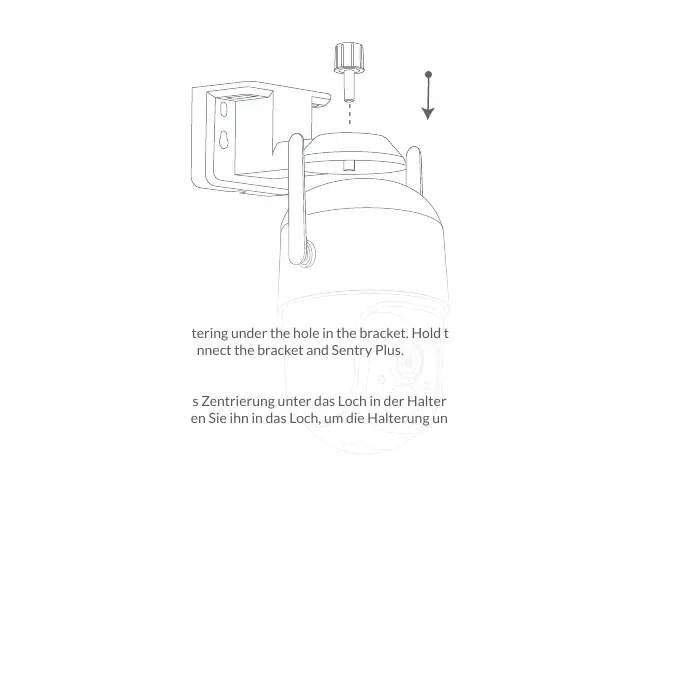
Step 2:
Hold the Sentry Plus centering under the hole in the bracket. Hold the Bracket Connector and
twist it into the hole to connect the bracket and Sentry Plus.
Schritt 2:
Halten Sie die Sentry Plus Zentrierung unter das Loch in der Halterung. Halten Sie den Halterung-
sanschluss fest und drehen Sie ihn in das Loch, um die Halterung und Sentry Plus zu verbinden.
Étape 2:
Tenez le centrage Sentry Plus sous le trou du support. Tenez le connecteur de support et
tournez-le dans le trou pour connecter le support et Sentry Plus.
Paso 2:
Sostenga el Sentry Plus centrado debajo del orificio en el soporte. Sostenga el conector del
soporte y gírelo en el orificio para conectar el soporte y Sentry Plus.
Passo 2:
Tenere il Sentry Plus centrato sotto il foro nella staffa. Tenere il connettore della staffa e
ruotarlo nel foro per collegare la staffa e Sentry Plus.



 To Next Page