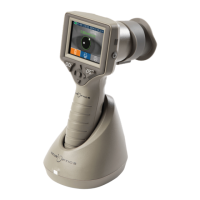
The NeurOptics VIP-400 Pupillometer is a handheld optical scanner designed for clinicians to objectively and accurately measure pupil size using quantitative infrared technology. It features an advanced, ergonomic design, making it comfortable to hold and operate. The device incorporates a barcode scanner for efficient patient ID association, wireless charging for convenience, and an easy-to-read touchscreen LCD with clear graphics for intuitive navigation.
Function Description
The primary function of the VIP-400 Pupillometer is to measure pupil size under different background illuminations. The device captures pupil data, which is then analyzed and displayed on the screen. It offers two main measurement protocols: "Light Off" mode and "Variable" mode.
In "Light Off" mode, the measurement takes approximately 2 seconds and involves no light background, providing a baseline pupil size.
In "Variable" mode, the eye is exposed to a sequence of three consecutive light backgrounds simulating Scotopic, Low Mesopic, and High Mesopic lighting conditions. This mode takes approximately 12 seconds.
- Scotopic: The background light is off.
- Low Mesopic: Simulates dimly lit conditions (approximately 0.3 lux), such as moon illumination or driving at night outside urban areas.
- High Mesopic: Simulates conditions with moderate streetlights or early twilight (approximately 3 lux).
For "Variable" mode measurements, patients should be dark-adapted prior to the scan. The results obtained from the VIP-400 scans are for informational purposes only and are not intended for clinical diagnostic use. The device should only be operated by properly trained clinical personnel under the direction of a qualified physician.
Usage Features
The VIP-400 is designed for ease of use, from initial setup to data management.
Initial Setup and Power Management:
- The system includes the pupillometer, a charging station, a power adapter, eye cups, and a data download cable.
- To power up, the pupillometer is placed in the charging station. The charging station's indicator light changes color to show its status: white for power established, blue for charging, green for fully charged, and amber/orange for a charging malfunction.
- The pupillometer goes to sleep after 2 minutes in the charging station to efficiently charge, with the screen going dark. It automatically wakes upon removal.
- When not in the charging station, the device enters sleep mode after 4 minutes and powers down after an additional 6 minutes to conserve battery life. It can be turned on by pressing the On/Off button or touching the screen.
Patient ID Entry:
- Patient IDs can be associated with measurements either by scanning a barcode using the integrated barcode scanner or by manually entering alpha or numeric characters via the touchscreen or keypad. The barcode scanner emits a white light and beeps upon successful scan.
Measurement Process:
- An eye cup must be correctly fitted to the pupillometer before any measurement. The eye cup has a tab that fits into an indentation in the lens shield, ensuring a snug fit to reduce stray light interference.
- Before scanning, the room should be darkened, and the patient instructed to focus on a distant target (at least 10 feet/3 meters away) with the non-tested eye. The operator should position the instrument at a right angle to the patient's axis of vision, minimizing tilting.
- The patient should keep their head straight and both eyes wide open. If needed, the operator may gently hold the patient's eye open.
- Measurements are initiated from the Main Menu screen, which displays the date, time, patient ID, and active protocol ("Variable" or "Light Off"). The screen should read "READY TO SCAN."
- The operator presses and holds either the OD (right eye) or OS (left eye) button until the pupil is centered on the touchscreen and a green circle appears around it, indicating proper targeting. A red frame indicates the need for re-centering. Once targeted, the button is released, and the VIP-400 is held in place for approximately two seconds until results are displayed.
- If a measurement is affected by tracking problems (e.g., excessive blinks), the results will be reported as "NA," indicating invalid data that requires a repeat measurement.
Data Management:
- Results Display: The results page in "Light Off" mode shows the mean pupil diameter and standard deviation, along with the subject's ID, date, time, and measured eye. In "Variable" mode, it displays mean diameter and standard deviation for Scotopic, Low Mesopic, and High Mesopic light levels.
- Video Replay: The device allows playback of the last measurement's video from the results screen. This feature is not accessible if the device powers off or if the OD/OS button is pressed during the scan.
- Browse Records: Users can browse stored records by Patient ID or view all pupil measurements in chronological order. The pupillometer stores at least 1,200 measurements and overwrites the oldest data when memory is full.
- Download Data: Data can be downloaded to a computer via a USB cable. The device displays instructions to connect the cable and copy an Excel file. After copying, pressing "Done" on the pupillometer screen erases the file from the device.
- Print Data: Measurement results can be printed wirelessly by connecting a power supply to a compatible printer and selecting the print icon on the pupillometer screen. The device will only print the currently displayed measurement result.
- Delete Records: Records can be deleted from the device memory, either for a specific Patient ID or all records.
Settings and Customization:
- Date and Time: The date and time can be adjusted from the Settings menu. For US customers, there's an option to enable Automatic Daylight Savings Time, which adjusts based on US DST regulations (not connected to internet/GPS).
- Protocol Selection: Users can toggle between "Light Off" and "Variable" measurement protocols from the Settings menu.
- LCD Screen Brightness: The LCD screen brightness can be adjusted from maximum to medium or low.
- Test LED: A Test LED function demonstrates the LED light pattern emitted during a pupil measurement, showing LEDs at 3, 6, 9, and 12 o'clock on the lens side. This is for demonstration only.
- Barcode Scanner Customization: The incorporated barcode scanner can be customized to truncate or expand alpha/numeric characters read from a barcode. Default settings are suitable for most 1D and 2D barcodes.
- System Information: The device displays its serial number, software application, and firmware versions.
Maintenance Features
The VIP-400 Pupillometer is designed for minimal maintenance, focusing on proper handling and cleaning to ensure longevity and accurate performance.
General Handling:
- The device contains sensitive metal, glass, plastic, and electronic components, so it should always be handled with care.
- Avoid dropping the device or exposing it to prolonged liquid or high humidity environments, as this can cause damage.
- Store and use the system in ambient environments with non-condensing humidity levels to prevent inaccurate readings due to condensation on optical surfaces.
- The internal components are not compatible with sterilization techniques such as ETO, Steam Sterilization, Heat Sterilization, or Gamma.
Cleaning:
- Isopropyl alcohol (IPA)-based cleaning solutions (up to 70% IPA concentration) are recommended for cleaning the pupillometer, charging station, and eye cup.
- Do not use chemicals that can damage plastic parts or the device surface.
- Always follow the cleaner's manufacturer instructions.
- Squeeze out excess liquid from cloths before wiping the device to prevent cleaner from collecting on or entering the instrument.
- Do not submerge the device or pour cleaning liquids over or into it.
- Do not use hard, abrasive, or pointed objects for cleaning.
- Do not use acetone on any surface of the VIP-400 or Charging Station.
- For the LCD and lens cover glass, use a clean, soft, lint-free cloth with up to 70% IPA. Ensure the LCD, barcode scanning window, and cover glass are free of debris or water spots after cleaning.
- If hospital protocols require bleach for highly resistant bacteria, follow with a second cleaning using IPA and a lint-free cloth to remove all bleach residue.
Drying and Inspection:
- After cleaning, ensure the pupillometer and charging station are thoroughly dry before placing the pupillometer back into the charging station.
Troubleshooting and Service:
- The VIP-400 and Charging Station do not require regularly scheduled maintenance or calibration.
- If the device is not working properly or is believed to be damaged, contact NeurOptics Customer Service immediately.
- The battery is only replaceable by a qualified NeurOptics service technician.
- Only the NeurOptics VIP-400 Charging Station and provided power adapter should be used for charging.
- The device should not be opened, as there are no user-serviceable parts, and doing so presents an electric shock hazard.
- Avoid use if damage to the housing or internal optical components is apparent, as this may lead to inaccurate readings.
- The device and its components present a risk of fire or chemical burn if mistreated; do not disassemble, expose to heat above 100°C, incinerate, or dispose of in fire.
- Do not operate the device in an MRI environment or near high-frequency surgical diathermy equipment, defibrillators, or short-wave therapy equipment, as electromagnetic interference could disrupt its operation.


 To Next Page

 General