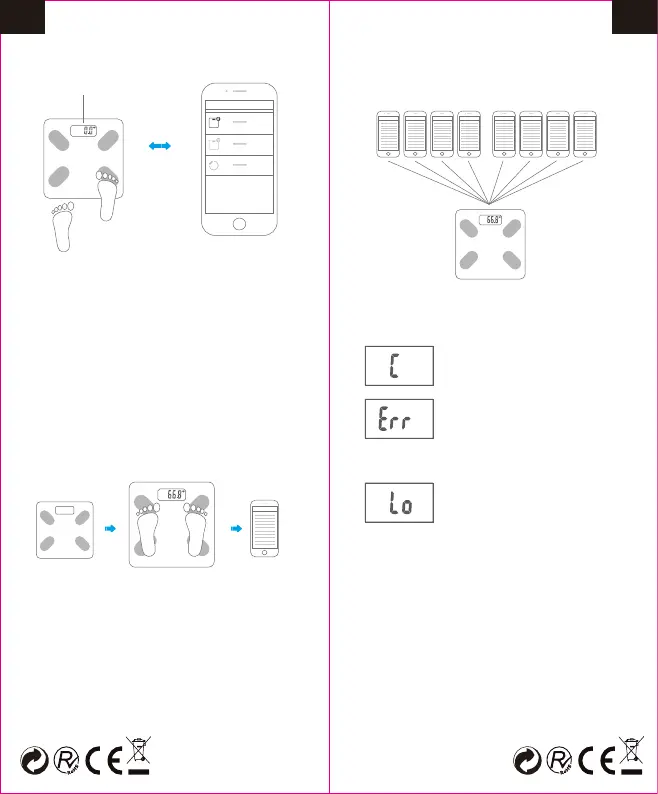
4. START WEIGHING
The LCD is lighted up
Step gently to
turn on the scale
Connect the
scale with App
Place the scale on hard and flat floor.
Stand on the scale with bare feet. The
weight reading is stable and flashes,
then begins to be transmitted. The scale
shuts off after several seconds. App will
show and save all indexs and history record.
Place the scale
on hard and
flat floor.
Keep your bare feet
on the electrodes of
scale.
Check the
measurement
data on App.
Note:
To make a proper measurement of body fat,
please keep your bare feet on the electrodes
of scale.
5. MULTIPLE USERS SUPPORTED
The scale can be connected with multiple
users.
Note: Final user amount depends on the product.
Over-load Indication
The weighing subject on the
platform exceeds the maximum
capability of scale. Please step
off to avoid damage.
Calibration
Error exists, please re-test to get
the correct result.
Low Battery Indication
The battery power is running low.
6. WARNING INDICATIONS ON LCD
7. THE DISPLAY OF AMBIENT
TEMPERATURE
This product can detect and display ambient
temperature automatically if starting up . And
It would constantly refresh the latest ambient
temperature until power off.
If you change service environment of the
product, it is recommend to check the
temperature display in 30 minutes later to
ensure its accuracy.
(Some products don't have temperature
display, please refer to the actual one.)
11 12
EN EN


 To Next Page
 Loading...