17
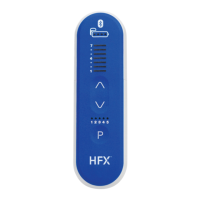
These changing group instructions are for
PTRC2500/PTRC3000 5 Program remote control
users only.
How to change groups
1. To enter Group Change Mode, press and hold the
Program Selection Button for at least 3 seconds.
You will hear 1 long beep which conrms you
successfully entered Group Change Mode.
2. You will see 1 blinking light above the Stimulation
Start/Increase Button that indicates what group
number you’re currently on.
3. Use the
or
to move to your desired
group number.
4. To conrm the change to your new group, press
and hold Program Selection Button (1) again for
at least 3 seconds.
5. You will hear 1 long beep which conrms the
change has been made. Your remote control will
then automatically exit Change Group Mode.
• If you don’t conrm the group number change
within 60 seconds, your changes won’t be saved.
• Your remote control will show what group number
you’re currently on any time you change programs.
• To activate a program change, press Program
Selection Button (1) once. You will then see one
number level illuminated indicating your current group
number. Press the Program Selection Button (1) a
second time to move to the next program.
12345
2
Please contact your Nevro
HFX Care Team before
accessing these settings
in your remote control.
For Implanted Patients
(For PTRC2500/PTRC3000 - 5 Program Remote Control Users Only)
How to Use Your Remote Control
Example: remote control
showing Group 1 - Program 1
3
1
PROGRAM (1-5)
GROUP (1-7)
Note


 To Next Page
 Loading...