Need help?
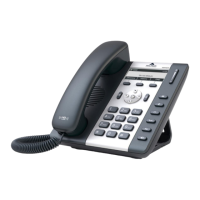
Do you have a question about the New Rock Technologies NRP1012 and is the answer not in the manual?
Guides on connecting the phone to power and network sources for operation.
Covers the initial setup and basic configuration steps required for the phone.
Explains fundamental phone operations like making, answering, holding, and transferring calls.
Covers fundamental settings for the phone's operation, including keyboard, screen, and ring tone.
Configures Voice over IP (VoIP) settings, primarily SIP, IAX2, STUN, and Dial Peer.
Covers maintenance tasks like auto-provisioning, syslog, config, updates, access control, and reboot.
Manages security settings including web filter, firewall, NAT, VPN, and certificates.
 General
| Ethernet Ports | 2 x 10/100 Mbps |
|---|---|
| SIP Accounts | 2 |
| Operating Temperature | 0°C to 40°C |
| Protocols | SIP, RTP, RTCP |
| PoE | IEEE 802.3af |
| Audio Codecs | G.711, G.726, iLBC |
| Power Supply | PoE |
| Humidity | 10% to 90% (non-condensing) |
| Network Interface | 2 x RJ-45 |


 To Next Page