EasyManua.ls Logo

Newage Bold 3.0 - Weight Capacity for Display Shelves; Display Shelf Installation Guide

Default Icon
23 pages
Print Icon
To Next Page IconTo Next Page
To Previous Page IconTo Previous Page
Loading...
4
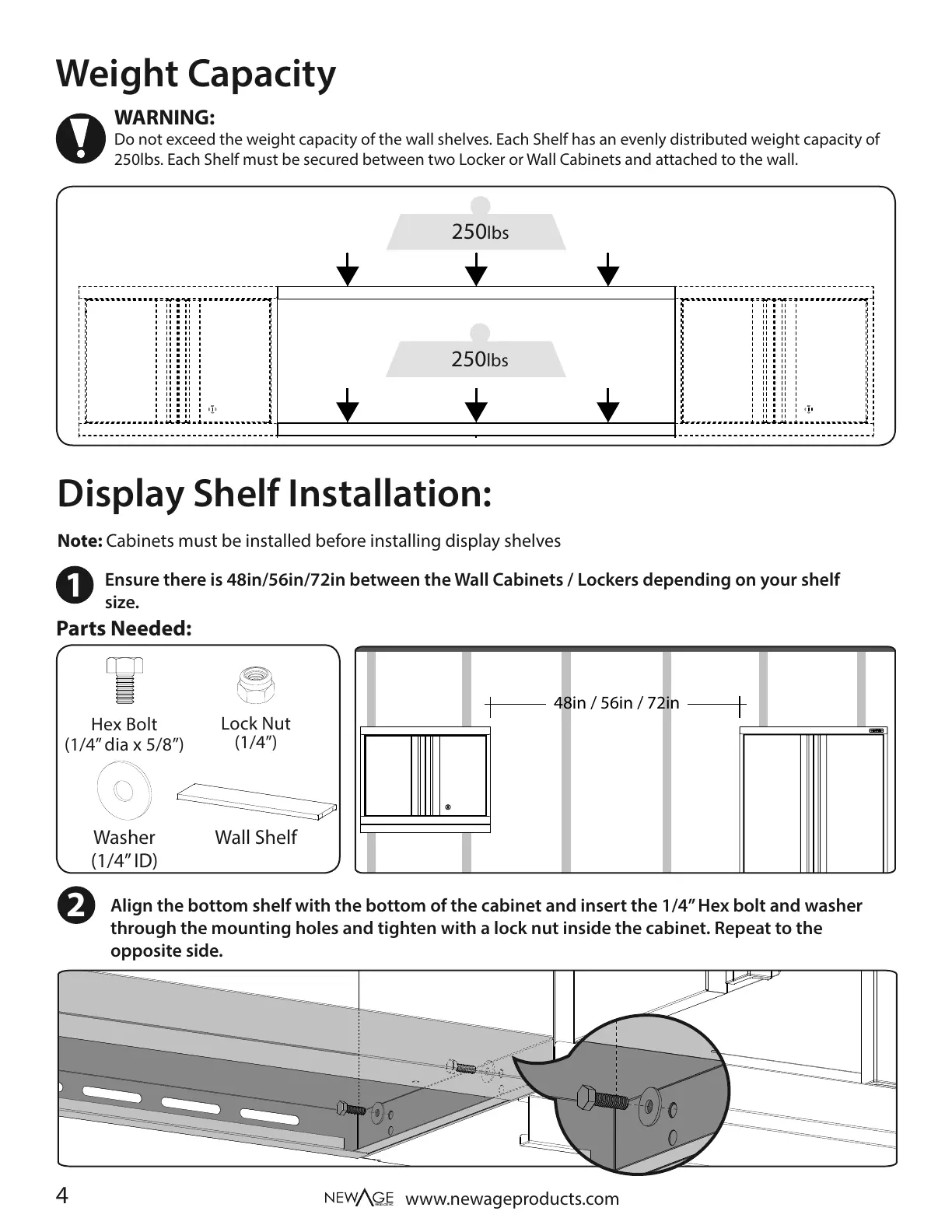
Align the bottom shelf with the bottom of the cabinet and insert the 1/4” Hex bolt and washer
through the mounting holes and tighten with a lock nut inside the cabinet. Repeat to the
opposite side.
Ensure there is 48in/56in/72in between the Wall Cabinets / Lockers depending on your shelf
size.
Weight Capacity
Display Shelf Installation:
48in / 56in / 72in
Parts Needed:
www.newageproducts.com
Lock Nut
(1/4”)
Washer
(1/4” ID)
2
1
250lbs
250lbs
WARNING:
Do not exceed the weight capacity of the wall shelves. Each Shelf has an evenly distributed weight capacity of
250lbs. Each Shelf must be secured between two Locker or Wall Cabinets and attached to the wall.
Hex Bolt
(1/4” dia x 5/8”)
Note: Cabinets must be installed before installing display shelves
Wall Shelf