
 Need help?
Do you have a question about the newell DYMO LetraTag 100H and is the answer not in the manual?
Familiarize yourself with the features and functions of your new label maker.
Learn how to power your label maker using batteries.
Instructions on properly inserting AA alkaline batteries into the device.
Guide on how to load the DYMO LetraTag label cassette into the maker.
Step-by-step guide to create and print your very first label.
Adjusting the text size from Extra Small to Extra Large.
Applying different styles like Bold, Italic, Outline, Shadow.
Highlighting text with borders or underlines.
Important safety guidelines for operating the label maker device.
Safety precautions related to the use of label cassettes.
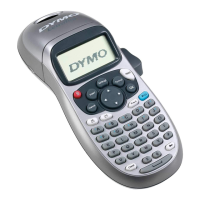
The DYMO LetraTag® 100H is a portable label maker designed for creating a wide variety of high-quality, self-adhesive labels for personal and professional use. It utilizes DYMO LetraTag (LT) 12 mm label cassettes, which are available in multiple colors of plastic tape and white iron-on tape.
The LetraTag 100H allows users to input text, format it with various font sizes and styles, add symbols, special characters, and even create two-line labels. It features a graphical LCD display that shows formatting instantly, including italics and borders, as they are applied to the text. The device is powered by standard batteries and includes an auto-off feature to conserve power after two minutes of inactivity. The last created label and previously selected style settings are remembered when the power is turned back on.
Getting Started:
Keyboard and Navigation:
Formatting Labels:
Symbols and Special Characters:
Printing Options:
Labelmaker Memory:
The manual provides solutions for common issues:
The product requires natural resources for production and may contain hazardous substances. Users are encouraged to use appropriate take-back systems for reuse or recycling of end-of-life equipment to minimize environmental impact. The crossed-bin symbol indicates the use of these systems. Contact local waste administration or DYMO for more information on recycling.

 To Next Page
 General