Instructions
Newlec Helpline: 0800 783 6909
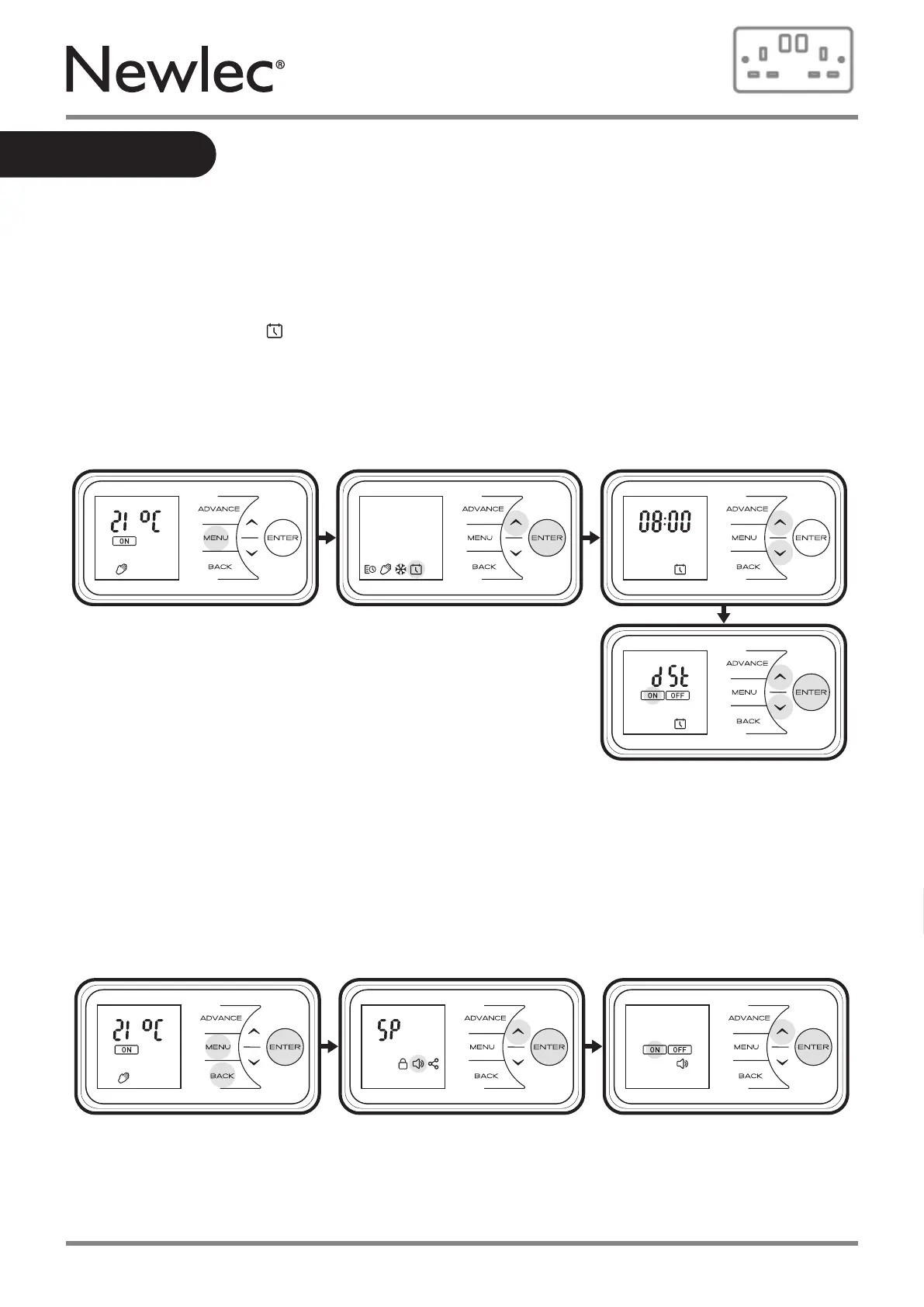
DST Rule - Select your daylight saving setting. The heater clock will automatically adjust for
daylight saving time. If no adjustment is required then select o.
• Press the Menu button
• Press Up button 3 times
• Press Enter when the Date & time Icon is highlighted
• Press Down or Up to Enter DST screen
• Press Enter to adjust DST
• Press Down or Up to toggle DST on/o
• Press Enter to confirm
Sound - Audio feedback can be enabled or disabled.
• Press the Menu, Back and Enter buttons and hold for 10 seconds
• Press Up button 2 times
• Press Enter when the Sound Icon is highlighted
• Press Down or Up to toggle audio feedback on/o
• Press Enter to confirm
Options
Comms - Choose to enable or disable Bluetooth pairing function.
Bluetooth is disabled by default.
20



 To Next Page