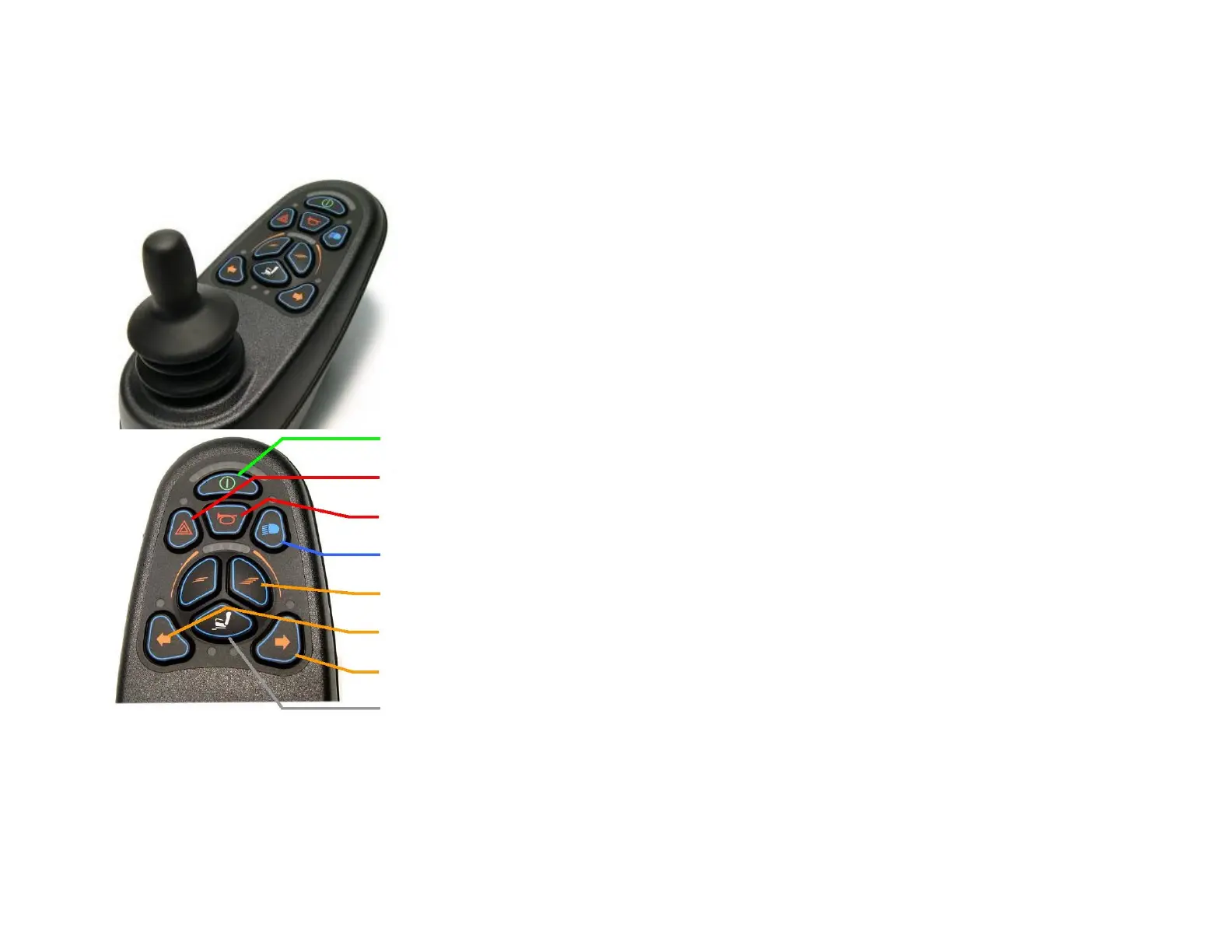
8.0 Control VR2
The control VR2 is provided with a standard joystick. If it’s turned ON you can drive the wheelchair in
all directions. The wheelchair always follows the direction which is given by the joystick. If you move
the joystick toward the front, the wheelchair will go forward. If it moves to the left, the wheelchair
will turn to the left. The same thing to the right and backward.
The user has a choice of speed profiles. Each driving of profile can be set individually by the reseller. In
case of change, it is necessary to contact the reseller (see first page for coordinates).
In case of failure it appears an error code on the display. It informed of where the error is located.
This error information should be communicate immediately to your dealer in order to initiate the
necessary measures. Errors codes are listed in section 20.
On/off key
Warning
Horn Button
Lights
Speed keys - / +
Left/Right turn signal
Seat key (electrical functions of the wheelchair)
By pressing the keys, lights, turn signal or warning, the desired required functions will be ON/OFF



 To Next Page