The Newskill Anuki Wireless ANC Earbuds are a pair of wireless earbuds designed for audio playback and communication, featuring Active Noise Cancellation (ANC) and Transparency modes. This quick guide outlines their operation, charging, pairing, and maintenance.
Function Description
The Anuki earbuds offer a range of functions controlled by touch gestures on the earphone's touch part. These include:
- Power On/Off: A 5-second light touch on either earphone will power the device on or off.
- Music Control:
- Double-touch the right earphone for the next song.
- Double-touch the left earphone for the previous song.
- Volume Control:
- Triple-touch the right earphone to increase volume.
- Triple-touch the left earphone to decrease volume.
- Call Management:
- Light touch any side to answer a call.
- Light touch any side for 2 seconds to reject a call.
- Noise Control Modes: The earbuds feature three noise control modes:
- Transparent Mode: Allows external sounds to pass through, enhancing awareness of surroundings. To activate, long-press either the left or right earphone for approximately 2 seconds while the headset is on or playing music. A beep sound will confirm entry into transparent mode, followed by a "transparency" prompt tone.
- Noise Reduction Mode (ANC): Blocks out external sounds for an immersive audio experience. To activate, long-press either the left or right earphone for approximately 2 seconds while in transparent mode. A beep sound will confirm entry into noise reduction mode, followed by an "ANC on" prompt tone.
- Off Mode: Disables both noise reduction and transparency. To activate, long-press either the left or right earphone for approximately 2 seconds while in noise reduction mode. A beep sound will confirm, followed by an "ANC off" prompt tone.
Usage Features
The Anuki earbuds are designed for ease of use with various pairing and charging options.
Charging:
- Earphone Charging: When the earphone's indicator light flashes green, it signifies low battery. Placing the earphones into the charge case will automatically turn them off and begin charging.
- Charge Case Charging: A flashing green light on the charge case indicates low battery. Use the provided charging cable to charge the case. The red indicator light will remain on during charging and turn green for 10 seconds after a full charge before turning off.
- Power Display: Once connected to a phone, the battery level of the earphones can be seen next to the Bluetooth or earphone symbol on the device.
Pairing Modes:
- Dual Earphone Mode (Method One): After a full charge, simply open the charging case. The earphones will automatically power on within approximately 5 seconds. The red and green lights will flash. Turn on Bluetooth on your phone, search for "ANUKI" in the pairing list, and connect.
- Dual Earphone Mode (Method Two): After a full charge, remove both earphones from the case and touch them for approximately 5 seconds. The red and green lights will flash. Turn on Bluetooth on your phone, search for "ANUKI" in the pairing list, and connect.
- Single Earphone Mode: After a full charge, take out one earphone and touch it for approximately 5 seconds. The red and green lights will flash. Turn on Bluetooth on your phone, search for "XG-5.0" in the pairing list, and connect.
Resetting Bluetooth Earphone:
To reset the Bluetooth connection, place the earphone back into the charging case to close it. After 3-5 seconds, take it out, and it will automatically re-pair.
iPhone Support for Manual ANC Mode Setting:
For iPhone users, the noise control modes (Noise Cancellation, Transparency, Off) can also be manually set through the phone's Bluetooth settings under the "ANUKI" device options. This allows for direct selection of the desired mode.
About Signal:
- To prevent signal interruption, ensure the wearing method does not cover the earphone by your ear.
- Avoid covering any earbuds with your hand in dual earbuds mode, as this can interrupt the signal.
- For optimal performance, use the earphones within their working range of 10 meters and minimize obstacles between the connected devices.
- In dual earbuds mode, occasional interruptions to the "R" (right) earbud connection may occur. Check the usage conditions and working range if this happens.
Maintenance Features
Proper care and adherence to safety guidelines are crucial for the longevity and safe operation of the Anuki Wireless ANC Earbuds.
Warnings:
- Disassembly and Remodeling: Do not attempt to disassemble or remodel the earbuds. Doing so can lead to electrical breakdown, fire, or complete damage to the product.
- Temperature Exposure: Avoid exposing the product to extreme temperatures, specifically below 0°C or above 45°C.
- Indicator Light Safety: Do not use the device's indicator light near the eyes of children or animals.
- Thunderstorms: Do not use the device during thunderstorms, as this may cause malfunction and increase the risk of electric shock.
- Cleaning: Do not wipe the product with oil or other volatile liquids.
- Liquid Exposure: Do not allow the device to get wet with liquids.
Note on Hearing Damage:
Prolonged use at high volumes may cause hearing damage. It is recommended to arrange your use time reasonably to protect your hearing.

 Need help?
 General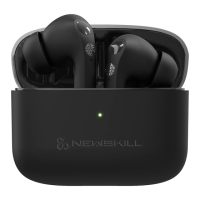

 To Next Page