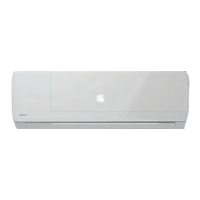
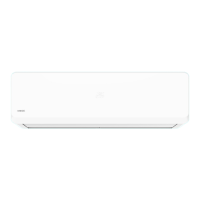
The NEWTEK split-type air conditioner is designed to maintain a comfortable indoor temperature. It comes in various models (NT-65M07, NT-65M09, NT-65M12, NT-65M18, NT-65M24), each with specific technical specifications.
Function Description
The air conditioner operates in several modes:
- Cooling Mode: Maintains the set temperature with an accuracy of ±1 °C. If the set temperature is more than 1 °C higher than the ambient temperature, the unit operates in ventilation mode.
- Heating Mode: Maintains the set temperature with an accuracy of ±1 °C. If the set temperature is more than 1 °C lower than the ambient temperature, the unit operates in ventilation mode.
- AUTO Mode: Automatically adjusts to heating or cooling based on the difference between room and set temperatures. The night mode function is not available in AUTO mode. The temperature is not manually adjusted, and the unit maintains a comfortable temperature of 25±2 °C.
- DRY Mode: Maintains the set temperature with an accuracy of ±2 °C. The unit automatically starts or stops cooling and fan operation to reduce humidity. Fan speed is not always controlled in this mode.
- SLEEP Mode: In cooling mode, the set temperature automatically increases by 1 °C after the first hour and by another 1 °C after the second hour. The temperature then remains unchanged.
The remote control unit (RC unit) allows users to select the operating mode (COOL, HEAT, AUTO, DRY, SWEEP), adjust temperature (16-32 °C), and set fan speed (AUTO, Medium, High, Low). Additional functions include:
- TURBO: Activates high-performance cooling or heating.
- ECO: Activates energy-saving mode.
- CHILD-SAFE: Activates a mode suitable for children.
- TIMER: Activates a timer for turning the unit on or off.
- DISPLAY: Controls the backlight of the indoor unit's display.
- SWING (ЖАЛЮЗИ): Controls the direction of the airflow by adjusting the blinds.
- IFeel, Self Cleaning, Quiet, Sleep: Activated via the "FUNCTION" button.
The unit also features an automatic defrost function. When the outdoor temperature is very low and humidity is high, the outdoor unit's radiator may freeze, affecting heating efficiency. In such cases, the unit automatically defrosts, interrupting heating for 5-15 minutes. During defrosting, the indoor and outdoor fans stop, and the outdoor unit may release some steam, which is normal.
Important Technical Specifications
The air conditioner models (NT-65M07, NT-65M09, NT-65M12, NT-65M18, NT-65M24) have varying capacities and dimensions:
- Cooling Output: Ranges from 2200 W (7000 BTU/h) for NT-65M07 to 7030 W (24000 BTU/h) for NT-65M24.
- Heating Output: Ranges from 2400 W (8190 BTU/h) for NT-65M07 to 7090 W (24200 BTU/h) for NT-65M24.
- Power Supply: Recommended range 220-240 V/~50 Hz, allowable range 198-252 V/~50 Hz.
- Refrigerant: R410A, with charge amounts varying from 510 g to 1350 g depending on the model.
- Noise Level (Indoor Unit): Ranges from 24 dB(A) to 33 dB(A).
- Noise Level (Outdoor Unit): Ranges from 45 dB(A) to 47 dB(A).
- Indoor Unit Dimensions (WxHxD): From 700x198x270 mm to 908x220x295 mm.
- Outdoor Unit Dimensions (WxHxD): From 635x458x240 mm to 820x635x310 mm.
- Working Temperature Range (Cooling/Heating): +18...+43 °C / -7...+24 °C.
- Electrical Protection Class: I/I (indoor/outdoor unit).
- Energy Efficiency Class: A.
The electrical cable length is 1.5 m with 3 cores and a 1.0-1.5 mm² section. The interconnect cable length is 3.5 m with 4 cores and a 1.0-1.5 mm² section. Both cables use rubber as the outer braid material.
Usage Features
- Installation: Must be performed by qualified specialists. Incorrect installation can lead to malfunctions or failure. The manufacturer is not responsible for issues arising from self-installation or unqualified repairs.
- Power Supply: Use a proper earthed power supply. Ensure the power plug is clean and firmly inserted into the socket to prevent fire or electric shock.
- Remote Control: Uses two AAA alkaline batteries. The effective range is about 8 meters. Point the signal emitter at the indoor unit's receiver. Avoid obstacles between the RC unit and the indoor unit.
- Emergency Operation: If the RC unit is lost or faulty, the air conditioner can be operated using the emergency start/stop button on the indoor unit (located behind the front panel).
- Safety Precautions:
- Do not block air intakes/outlets.
- Avoid prolonged exposure to cold air stream.
- Air the room after use.
- Close doors and windows during operation for optimal efficiency.
- Do not install in high humidity areas or where aggressive vapors are discharged.
- Do not touch moving louver blades or buttons on the indoor unit with wet hands.
- Do not insert foreign objects into the appliance.
- Do not place objects (especially liquids) on the units.
- Do not wash the appliance with water.
- Ensure proper ventilation if operating with open flame appliances.
- Never allow children to play with the appliance.
Maintenance Features
Regular maintenance and cleaning extend the appliance's service life and reduce power consumption. Always disconnect the unit from the power supply before maintenance.
- Indoor Unit Front Panel: Clean with a dry cloth. For stubborn dirt, use a damp cloth. Do not use alcohol-containing liquids, gasoline, oils, polishers, abrasive cleaners, or metallic sponges. Water temperature should not exceed 45 °C to prevent deformation or discoloration.
- Air Filter:
- Raise the front panel to its stop.
- Lift the protruding part of the filter and remove it.
- Clean the filter with a vacuum cleaner or rinse with water. For heavy contamination, wash with warm water and mild detergent.
- Dry the filter completely in a shaded place.
- Reinstall the filter and close the front panel.
- End of Season Maintenance:
- Run the AC in VENTILATION mode for an extended period.
- Disconnect from power supply.
- Clean the air filter.
- Wipe indoor and outdoor units with a soft dry cloth.
- Remove batteries from the RC unit.
- Beginning of Season Maintenance:
- Ensure air intake/exhaust openings are not blocked.
- Check for corrosion or rust on the outdoor unit.
- Ensure the air filter is clean.
- Connect to power supply.
- Install batteries into the RC unit.
Troubleshooting: A table of fault codes is provided on page 75 to help diagnose and resolve common issues. For example, F1 indicates an ambient temperature sensor error (indoor unit), F2 an indoor unit evaporator temperature sensor error, F3 an outdoor unit condenser temperature sensor error, and F4 an indoor unit motor error.

 Need help?
 General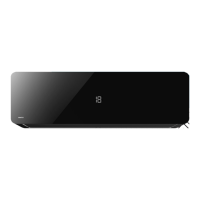

 To Next Page