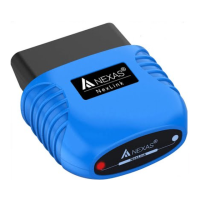
The NexDiag ND602 is a professional and powerful multi-system diagnostic scanner designed for LAND ROVER and JAGUAR vehicles, as well as general OBD/EOBD diagnostics for engines of all car, SUV, mini-van, and light-duty vehicles manufactured after 1996. It caters to car enthusiasts, small garages, repair workshops, and mechanics by providing OE-level diagnostics across various electronic systems.
Function Description:
The ND602 offers comprehensive diagnostic capabilities for LAND ROVER and JAGUAR models, supporting most RANGE ROVER vehicles from 1999 to 2016, LAND ROVER vehicles from 1999 to 2018, and JAGUAR vehicles from 1994 to 2018. It connects via a standard OBD 16PIN DLC and can diagnose systems such as Diesel, Gasoline, Airbag, ABS, Gearbox, and other Electronic Control Units (ECUs).
Beyond general diagnostics, the device includes several special functions:
- Oil Light Service Reset: Resets oil service counters, performs service interval resets, oil dilution resets, and oil change resets.
- DPF Regeneration: Supports Diesel Particulate Filter (DPF) functions, including dynamic regeneration.
- Battery Management Service (BMS) Reset: Checks battery health and registers new battery replacements. This is a crucial step to prevent overcharging and extend battery life.
- EPB Electronic Park Pad Brake Reset: Facilitates opening and closing brake pads, driving the parking brake to the latching position, and performing parking brake unjam procedures.
- Steering Angle Sensor (SAS) Reset: Allows for steering angle sensor adjustment after replacing the sensor, control unit, or steering column, or to clear certain trouble codes.
For OBD/EOBD diagnostics, the ND602 supports all 10 modes of operation:
- Mode $01: Identifies Powertrain information and displays current data such as DTC status, engine RPM, temperatures, ignition advance, speed, air flow rates, and fuel system closed-loop status.
- Mode $02: Displays Freeze Frame data, which captures vehicle conditions at the moment a malfunction occurred and a DTC was set.
- Mode $03: Displays powertrain or emission-related DTCs using a five-digit alphanumeric code.
- Mode $04: Clears DTCs and Freeze Frame data, including readiness monitors.
- Mode $05: Displays oxygen sensor test results.
- Mode $06: Shows non-continuously monitored systems test results, including minimum, maximum, and current values.
- Mode $07: Requests pending DTCs from continuously monitored systems to verify repair effectiveness after a single driving cycle.
- Mode $08: Manufacturer-specific control mode for bi-directional control of on-board systems, tests, or components.
- Mode $09: Reports vehicle information, including VIN, Calibration ID (CID), and Calibration Verification Number (CVN).
- Mode $0A: Requests emission-related DTCs with permanent status.
Important Technical Specifications:
- Screen: 2.8" TFT 262K true color, 320x240 QVGA LCD display.
- Input Voltage Range: 8~36V.
- Operating Current: <100mA@12V (Typical).
- Power Consumption: <1.2W (Typical).
- Operating Temperature: 32°F~122°F / 0°C~50°C.
- Storage Temperature: -4°F~158°F / -20°C ~70°C @ RH60%.
Usage Features:
The ND602 features a user-friendly interface with dedicated buttons for navigation and functions:
- ESC button: Returns to the previous menu.
- Up/Down buttons: Move the cursor for selection.
- Left/Right buttons: Move the cursor or turn pages.
- OK button: Confirms a selection or action.
- Help button: Provides assistance for live data and DTCs.
- USB port: Used for connecting to a computer for online software updates.
The device supports multiple languages (English as default, with French, Spanish, Deutsche, Italian, and Russian available via software update) and allows configuration of units (Metric/English) and beeper sound.
Maintenance Features:
- Software Updates: The ND602 supports lifetime free software updates. Users can download the latest software from www.nexastech.com or contact customer service for assistance. The update process involves connecting the device to a computer (Win XP or Win 7) via a USB cable, using the provided update tool, selecting the desired language, and clicking "UPGRADE."
- Cleaning: The device should be kept dry, clean, and free from oil, water, or grease. A mild detergent on a clean cloth can be used for external cleaning when necessary.
- Troubleshooting: The manual provides guidance for common issues such as system halts during data stream reading (check connector), screen flashes at ignition start (normal electromagnetic disturbance), no response during communication (confirm power, throttle position, transmission neutral, water temperature), and numerous fault codes (check connections or circuit grounding).
- Safety Precautions: Emphasizes performing tests in a safe environment, avoiding tool operation while driving, wearing safety eye protection, keeping clear of moving/hot engine parts, working in well-ventilated areas, using wheel blocks, exercising caution around ignition components, engaging the parking brake, having a fire extinguisher nearby, and avoiding connecting/disconnecting equipment while the ignition is on or the engine is running.

 Need help?
 General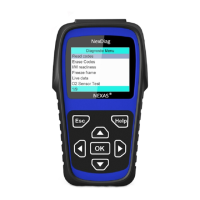

 To Next Page