1
2
3
4
8
9
5 6 7
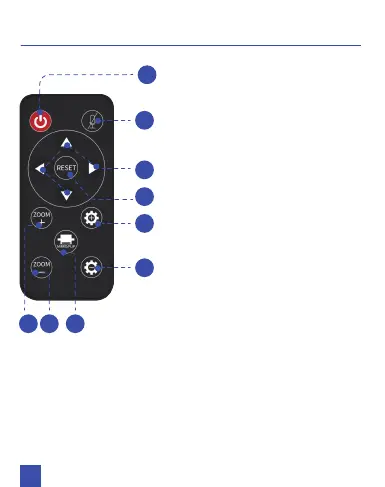
1. Power Button: Press to turn
on/off the camera.
2. Mute Button: Press to mute/
unmute the camera’s
microphone. The indicator light
will show red while muted.
3. Arrow Buttons: While the
video capture is zoomed in,
this moves the camera’s view.
4. Reset Button: Press once
to go back to the home view.
5. Zoom +: Zoom in the
video capture.
6. Zoom -: Zoom out the
video capture.
7. Mirror/Flip: Mirror or flip
the video.
8. Brightness +: Increase the
brightness.
9. Brightness -: Decrease the
brightness.
REMOTE INSTRUCTIONS
05



 To Next Page