Note: Please ensure that you have disabled the auto framing
function and closed the OSD menu before using the zoom function.
REMOTE CONTROL INSTRUCTION
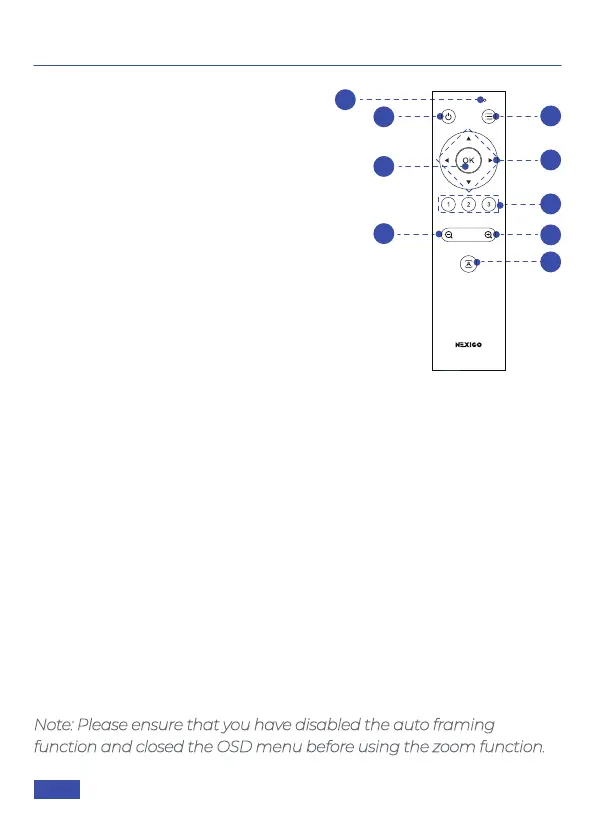
KEYS INTRODUCTION
1. Power Button
Press to turn the webcam on/off.
2. Menu Button
Press to open or close the On Screen
Display (OSD) menu, or return to the
previous menu.
Press and hold for three seconds to
mirror / unmirror the OSD menu.
3. Electronic Pan / Tilt Control
Press the arrow buttons to pan / tilt the
camera’s view when it is zoomed in. Hold
to increase the speed of the pan / tilt.
4. OK Button
Resets the video capture view to the default position. In the OSD
menu, press to select options and enter the next menu.
5. Numbered Buttons (See details on page 18)
Assign, recall, or delete presets for the numbered buttons (1, 2, 3).
Recall Preset: Press one of the numbered buttons once to recall
the preset on that button.
Set Preset: Press and hold for three seconds to save the current
settings to a numbered button and will override any previously
saved preset.
6. Zoom +
Press to zoom in on the video. Hold to adjust faster.
7. Zoom -
Press to zoom out the video. Hold to adjust faster.
1
2
3
4
5
8
7
6
9
US 01EN 07


 To Next Page