2
Setting the Video Standard
The IP camera can run in one of two video standards (NTSC or PAL).
► To set the video standard:
1. On the back on the IP camera, move the DIP switch to NTSC or PAL.
Installing the Nextiva IP camera
This section explains how to mount and connect a lens onto the Nextiva IP camera.
CAUTION: Verint will not be held liable for damages to persons or property due to the improper installation of
the Nextiva S5120BX or the Nextiva S5250BX IP cameras.
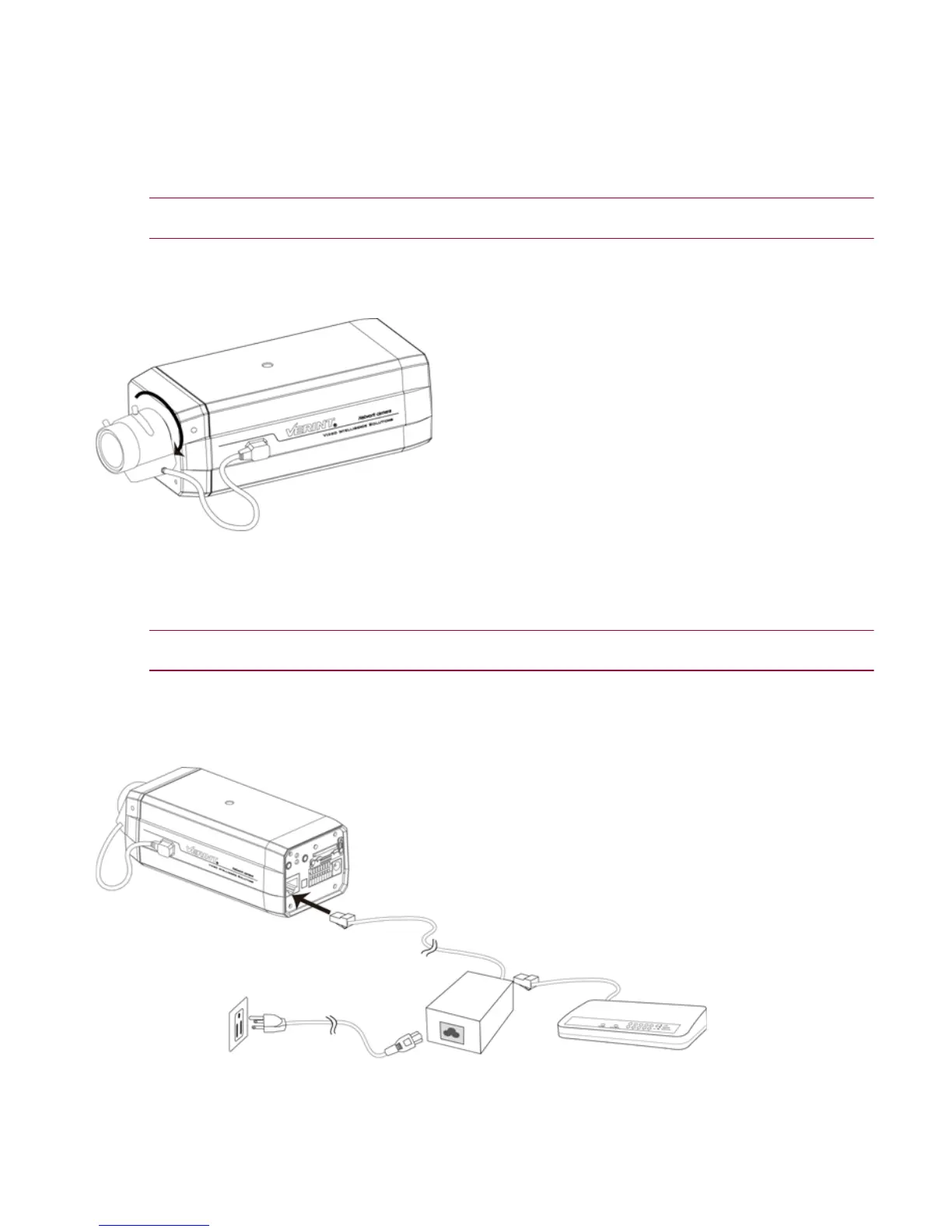
► To mount and connect the lens:
1. Mount the lens by turning it clockwise onto the camera mount until it stops.
2. Connect the lens cable plug to the camera DC-Iris control connector.
Connecting the Nextiva IP camera
This section explains how to connect the power and network cables to the Nextiva IP camera. A power
supply is not included with the Nextiva IP camera and must be purchased separately.
CAUTION: Never use a Power over Ethernet (PoE) connection and a 12V DC connection at the same time.
This can damage the device.
► To use a 802.3af compliant PoE kit:
1. Plug a straight-through Ethernet cable into the RJ-45 connector on the back of the IP camera.
2. Plug the other end of the cable into a POE switch or to the Data&PWR port of a PoE injector. If you use a
PoE injector, make sure the Data port of the injector is properly connected to the Ethernet switch.



 To Next Page
 Loading...