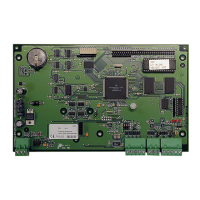
The PW-5000 Intelligent Controller is the central processing unit for a security system, designed to manage I/O interfaces, store database information for subsystem configuration and cardholders, and maintain an event log buffer in battery-backed memory. It is designed for rack-mounting to achieve maximum density or tile-mounting for cost savings when remotely located near controlled devices.
Function Description:
The controller provides real-time processing for connected I/O interfaces. It stores the database for subsystem configuration and cardholders, and an event log buffer in battery-backed memory. An on-board real-time clock maintains date and time, accounting for leap years, global time zones, and daylight savings. The program is stored in FLASH memory, allowing for software updates via a serial port without physical board changes.
Important Technical Specifications:
- Primary Power: DC input 12VDC ±10%, 400mA (550mA with PW5KxEN, 401mA with PW5KxM4). Polarity is critical: +12VDC to the +12V terminal and return to the GND terminal.
- Memory and Clock Backup: 3-volt Lithium battery, type BR2325.
- Data Memory: 1Mb standard (4Mb with optional memory module, J3).
- Ports:
- Port 1: RS-232 or RS-485 (9,600 to 38,400 BPS, asynchronous). Optional Ethernet BD (PW5KxEN) converts RS-232 to Ethernet TCP/IP. Default is RS-485 at 38.4Kbps.
- Port 2: RS-232 or RS-485 (9,600 to 38,400 BPS, asynchronous). Default is RS-232 at 38.4Kbps.
- Ports 3-6: RS-485 interfaces (9,600 to 38,400 BPS, asynchronous). Default is 38.4Kbps. Up to 32 I/O boards can be connected across these ports, with a recommendation of not exceeding 8 boards per port for maximum performance.
- Inputs: 2 non-supervised, dedicated function inputs for Tamper and Power Fail Detect.
- Wire Requirements:
- Power: 1 twisted pair, 18 AWG.
- RS-485: 24 AWG, 4,000ft (1,200m) max, 2 twisted pair(s) with shield (120Ω, 23pF, Belden 9842 or equivalent).
- RS-232: 24 AWG, 25ft (7.6m) max.
- Alarm Input: 1 twisted pair, 30 ohms max.
- Environmental:
- Temperature: 0 to 49 °C operating, -55 to +85 °C storage.
- Humidity: 0 to 85% RHNC.
- Mechanical:
- Dimension: 5.5 in. (140mm) W x 9.0 in. (229mm) L x 1.0 in. (25mm) H.
- Weight: 12 oz. (340 gm) nominal.
- Compliance: Tested and found to comply with Class A digital device limits, pursuant to part 15 of FCC Rules.
Usage Features:
- Communication Flexibility: Port 1 can be configured as RS-232 for direct point-to-point connection to a host computer or as RS-485 for multi-drop communication with up to 8 controller boards sharing one host port. With the optional Ethernet board (PW5KxEN), Port 1 can support TCP/IP. Port 2 offers redundant host connection via RS-232 (e.g., modem backup) or RS-485. Ports 3-6 are dedicated RS-485 interfaces for connecting I/O boards.
- Scalability: Supports up to 32 I/O boards in total, with a recommended maximum of 8 boards per port for optimal performance.
- Configuration: Hardware configuration is done via jumpers and an 8-position DIP switch, setting memory chip size, port interface type, end-of-line termination, controller address, and baud rate.
- LED Status Indicators: Three on-board LEDs (A, B, C) provide status information during power-up sequence and normal operation:
- Power-up Sequence:
- LED A ON, B OFF, C OFF: Start Power-up, hardware setup.
- LED A OFF, B ON, C ON: Testing RAM and Clearing Database (approx. 5 sec./MB).
- LED A OFF, B ON, C OFF: Testing RAM and NOT Clearing Database (approx. 5 sec./MB), database is O.K.
- LED A ON, B ON, C ON: Power-up complete, held for 1 second.
- Normal Operation:
- LED A FLASH: Faint flicker, flashes once every second when the system is active.
- LED B FLASH: Flashes when there is activity on either Host Port 1 or 2.
- LED C FLASH: Flashes when there is activity on I/O Port (Ports 3, 4, 5, 6).
- Memory Expansion: An optional memory expansion board (PW5KxM4) allows the card database to hold up to 100,000 cards and a buffer for 50,000 transactions when off-line.
- Alarm Inputs: Dedicated inputs for cabinet tamper and power fault monitoring. If not used, a shorting wire should be installed between the signal terminal and GND to simulate a non-alarm state.
Maintenance Features:
- Battery Replacement: The 3V Lithium memory backup battery should be replaced annually, or sooner if the cabinet is exposed to unusually high temperatures.
- Installation Procedure: A suggested installation sequence includes setting jumpers and DIP switches, installing optional boards, mounting the board, connecting communications and power, wiring alarm inputs and I/O boards, rechecking all wiring, running communication wiring to host devices, and finally setting up panel controls via host software.
- Troubleshooting: The LED indicators assist in diagnosing power-up and operational status.
- Shipping Instructions: Detailed instructions for returning equipment, including obtaining a Return Authorization Number (RMA) and proper packaging, are provided.
- Warranty: NexWatch provides a two-year warranty on products from the date of shipment, covering defects in materials and workmanship. Warranty on Terminals, Printers, Communications Products, and Upgrade kits is 90 days.
- Safety Precautions: Warnings include turning off external circuit breakers before installation, verifying power supply output voltage, not applying power until installation is complete, and earth grounding all enclosures. Fire safety and liability notices emphasize the importance of alternative exits for critical access points and obtaining local fire official approvals. Suppressors (S-4) are recommended for all door strikes, with NexWatch recommending only DC strikes.
- ESD Protection: Caution against electro-static discharge damage to CMOS integrated circuits and modules, recommending static shield packaging and handling at approved static-controlled workstations.

 Need help?
 General

 To Next Page