Need help?
Do you have a question about the Nexxt Solutions Nyx300 and is the answer not in the manual?
Guidance on working with the Nyx300 stand-alone, recommending disabling Wi-Fi when using Ethernet.
Lists essential components for setting up the Nyx300, including PC, Nyx300, Ethernet cable, and power adapter.
Connect the power adapter to the Nyx300 and press the RESET/RST button for 20 seconds to reset the device.
Connect one end of the Ethernet cable to LAN Port #1 on the Nyx300 and the other to the PC or Laptop.
Open a browser and navigate to IP address 192.168.0.1 to access the configuration website after connecting.
Enter 'admin' for both Username and Password when prompted to sign in to the configuration website.
Choose the 'Repeater' option within the configuration interface to set the device's operating mode.
Change Network Name (SSID) and Passphrase if desired, then press 'Site Survey' to scan for signals.
Select a wireless signal from the survey, input Security Mode, Encryption Type, and Passphrase for the remote network.
Press 'Save/Apply' to confirm the settings, allowing the Nyx300 to start repeating the internet connection.
 General
| Model | Nyx300 |
|---|---|
| Device Type | Wireless Router |
| Frequency Band | 2.4 GHz |
| Maximum Data Rate | 300 Mbps |
| Security Features | WEP, WPA, WPA2 |
| Wireless Standard | IEEE 802.11n |
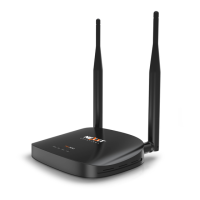
| Antennas | 2 external |
| Ethernet Ports | 4 x 10/100 Mbps LAN, 1 x 10/100 Mbps WAN |
| Button Features | WPS, Reset |

 To Next Page