This document is the user's manual for the Nexxtech Slim Personal MP3/CD Player, model 4219545.
Function Description:
The Nexxtech Slim Personal MP3/CD Player is a portable audio device designed for playing various disc formats. It supports CD, CD-R, MP3, and CD-RW discs, offering versatility in audio playback. The player incorporates an electronic digital anti-shock circuit to prevent sound interruption during movement or vibration. It features a programmable function, allowing users to create custom playback sequences. The device also includes a repeat play function for single songs or entire discs, and a HOLD function to prevent accidental button presses. An in-line controller with an LCD display provides convenient control and information at a glance. The player has a rechargeable function and comes with a detachable external battery box for extended use.
Important Technical Specifications:
- Dimensions (approx.): 135mm x 132mm x 17mm
- Weight (approx.): 148.6 g (excluding battery)
- Operation Temperature: +5 °C to +35 °C
- Operation Humidity: 5% to 90%
- Supported Disc Types: CD, MP3, CD-R, CD-RW
- Audio Frequency Response: 20Hz to 20KHz
- Signal-to-Noise Ratio: ≥70dB
- Output: 20mW + 20mW / 32 Ω
- Power:
- Two rechargeable 1100mAh Ni-Mh batteries (included)
- AC/DC adapter (Output: 4.5V 650mA)
- Anti-Shock (ESP) Times:
- MP3: 120 seconds
- CD: 40 seconds
- Long ESP: MP3/120S', CD/40S'
Usage Features:
- Power Supply: The player can be operated using two special rechargeable batteries (1100mAh Ni-Mh) or via the included AC/DC adapter. An external battery box is provided for two AA batteries, offering an alternative power source, though it does not offer a charge function.
- Charging: To charge the rechargeable batteries, connect the AC adapter. It is advised to recharge for 10 to 12 hours. The unit will enter charge mode and turn off when recharging is complete.
- Disc Loading: Open the main unit cover, insert the disc label side up, and close the cover. If the LCD displays "NO DISC," it indicates no disc is present or the disc is damaged.
- Playback Controls (Main Unit & In-line Controller):
- PLAY/PAUSE (►II): Starts playback, pauses, and resumes playback.
- STOP (■): Ends operation and turns off the player.
- PREV (I◄◄) / NEXT (►►I): Skips to the previous/next track. Holding these buttons enables fast reverse/forward.
- EQ (Equalizer): In play mode, cycles through 7 music styles (Concert, Theatre, Stadium, Church, 3D Round, Live, Standard). For MP3 discs, holding EQ for 2 seconds skips to the first song of the next file. For CD discs, holding EQ for 2 seconds toggles the anti-shock function (ESP ON/OFF). Note: Anti-shock for MP3 CDs cannot be disabled.
- MODE: In play mode, cycles through repeat one, repeat entire disc, and cancels repeat play. When stopped, pressing MODE enters program mode.
- HOLD: Prevents accidental button presses.
- In-line Controller: Provides remote control with an LCD display showing MP3/CD disc type, charge status, program play, anti-shock status, repeat modes (single song/entire disk), disc playing indicator, PLAY/PAUSE status, current song number, and play time (minute:second).
- Program Mode: When stopped, press MODE to enter program mode. Use NEXT/PREV to select tracks/songs, then PLAY/PAUSE to add them to the program. Press STOP when finished.
- Connection with Hi-Fi: Connect an audio output cable from the player's LINE OUT port to a Hi-Fi system.
- Volume: Controlled via the in-line controller.
Maintenance Features:
- Disc Handling: Handle discs with care to avoid scratches. Clean discs with a soft cloth, wiping from the center outwards, not around the playing surface. Clean fingerprints and dust from the disc surface before use. Do not use scratched or damaged discs.
- Battery Care:
- Ensure rechargeable batteries are inserted with correct polarity to avoid damage.
- Remove batteries if the player will not be used for a long period.
- When carrying the external battery box independently, prevent its plug from contacting metal.
- If the battery life is reduced, it may be due to prolonged disuse, high volume, or extended anti-shock system usage.
- If the player stops working, charge the battery or use the AC adapter. Disconnect the adapter before changing batteries.
- General Care:
- Do not use in moist or damp locations; protect from rain.
- Do not drop or jar the player.
- Do not attempt to open the player cabinet; there are no user-serviceable parts inside.
- Keep the unit out of direct sunlight and away from high heat locations.
- Do not look directly into the laser lens or attempt to disable the lid's safety mechanism.
- Use only the AC-DC adapter that comes with this player.
- Do not mix old and new batteries.
- Do not attempt to recharge non-rechargeable batteries.
Troubleshooting:
The manual includes a troubleshooting section for common issues such as:
- CD door not closing (check disc placement, lock state)
- Unable to playback disc (check lock state, disc placement, disc condition, disc type, battery installation)
- Unable to begin playback from 1st song (check if paused, program mode)
- Unable to listen to music (check plug, disc condition)
- Unable to control main button (check lock mode)
- Battery not charging (check if rechargeable, polarity)
- Player shuts down unexpectedly (charge battery, insert adapter, replace battery)
- Cannot read discs / "NO DISC" (disc bad or dirty)
- Earphone silent (check earphone cord, plug, volume)

 Need help?
 General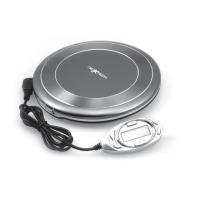

 To Next Page