Need help?
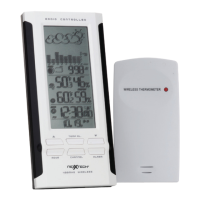
Do you have a question about the NexxTech 8001230 and is the answer not in the manual?
Details the 4-line LCD display and essential navigation/setting buttons.
Explains alarm, snooze, alert, and reset functions.
Covers battery compartment, table stand, and wall mount hole.
Describes the LED, LCD display, and TX button for data transmission.
Covers channel selection, temperature unit switch, and battery compartment.
Details wall mounting hole and table stand options.
Instructions for installing batteries in the remote sensor.
Instructions for installing batteries in the main unit.
How to identify and address low battery warnings on both units.
How to position the main unit and remote sensor.
Details signal range, potential interference, and transmission process.
How outdoor temperature is shown and handled if transmission is lost.
Location and display of indoor temperature readings.
Steps to resolve radio signal transmission problems.
Explains how signal reception is shown on the LCD.
How to access and reset stored max/min temperature data.
Interpretation of icons showing temperature change direction.
Step-by-step guide to programming upper and lower temperature alerts.
How the alarm is indicated and sounds when activated.
Details how the alarm is triggered, stops, and how to disable it.
Explains the symbols used for 12-24 hour weather predictions.
Explains how the atomic clock receives and displays time signals.
Information on the WWVB radio signal source and its reception range.
How to switch between calendar and time displays, and select time zones.
Guide to manually adjusting year, date, time format, hour, minutes, DST, and temperature units.
Steps to set alarm time and turn the alarm on/off.
How to use the snooze feature and deactivate the alarm.
Warnings regarding product maintenance, repair, and handling.
Details on weather forecast accuracy, temperature ranges, and transmission.
Features related to the atomic clock and display functions.
Details transmission frequency and power supply requirements.
Provides size, weight, and mounting options for both units.
Details FCC rules and guidelines for digital devices.
Canadian regulatory compliance statement for the device.
Outlines the one-year warranty, coverage, and exclusions.
 General
| Brand | NexxTech |
|---|---|
| Model | 8001230 |
| Category | Weather Station |
| Humidity Range | 20% to 95% |
| Display Type | LCD |
| Backlight | Yes |
| Forecast Icons | Yes |
| Alarm Function | Yes |
| Memory Function | Yes |
| Type | Wireless Weather Station |
| Indoor Temperature Range | 0°C to 50°C (32°F to 122°F) |
| Outdoor Temperature Range | -20°C to +60°C (-4°F to +140°F) |
| Transmission Range | 30 meters |
| Features | Weather forecast |


 To Next Page