Need help?
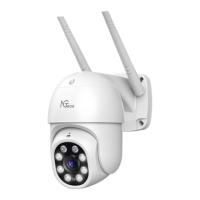
Do you have a question about the NGTeco NG-C5700 and is the answer not in the manual?
Details on how to contact customer support for queries or issues.
Specifies the need for 2.4GHz Wi-Fi and dual-band router connection.
Essential checks for password, device proximity, and connection confirmation.
Notes that product updates may differ from manual information.
Steps to download the O-KAM app and create a user account.
Guide on connecting the device using the app's QR code feature.
Explains image quality, sound mute, and two-way talk functionalities.
Details how to control the camera's pan, tilt, and zoom movements.
Configuration for night vision modes and white light behavior.
Overview of device settings like name, volume, indicator lights, and video management.
How to select and adjust device power modes for efficiency.
Setting up motion detection frequency and scheduling.
Information on using AI services like Alexa voice control and cloud storage.
How to generate and share QR codes for viewing access.
Procedures for contacting support and understanding device boot status.
Step-by-step guide to restore the device to factory settings.
Solutions for common issues when adding the camera to the app.
Guidance on resolving problems with TF card detection and compatibility.
 General
| Brand | NGTeco |
|---|---|
| Model | NG-C5700 |
| Category | Security Camera |
| Language | English |

 To Next Page