Latest Training Information can be found on:
https://portal.e-lfh.org.uk/Component/Details/606835
This quick start guide has been developed by the NHS and Cabinet Office and should be used in conjunction with the manufacturers Instructions for Use
How do I select the mode?
4
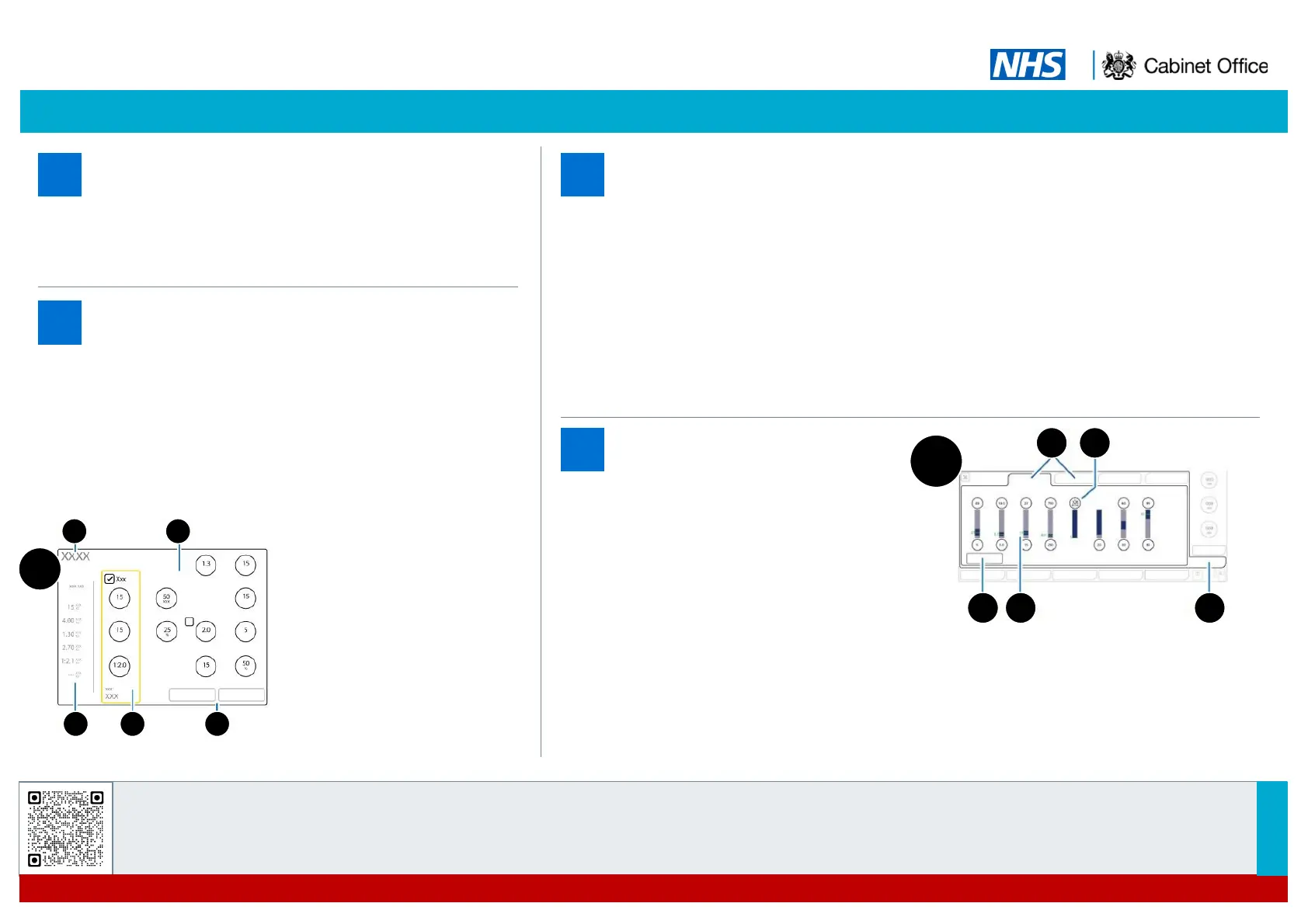
How do I set the parameters?
(Image D)
5
• After selecting and confirming ventilation mode from ‘Modes’
window, the ‘Controls’ window opens.
• In ‘Controls’ window adjust ventilatory settings as needed.
• Click Confirm.
• Standby window opens. Ensure correct patient data entered.
• On Standby screen touch ‘Start’ to start ventilation.
How do I check the
device?
6
• Turn machine on. Auto power test will run.
• On standby menu menu, click ‘pre-use check’ on touchscreen. For each of the four pre-use
checks (flow sensor, tightness, 02 cell, CO
2
module) follow instructions found top left of
screen. A green tick will appear once each test is complete.
• Flow sensor check: When prompted to “turn flow sensor” remove flow sensor from patient
circuit and re-attach in reverse position. Auto calibration will follow. Once complete, turn
flow sensor back to original position. Second auto calibration will occur.
• Tightness check: Cap or block off circuit and auto leak check will commence.
O
2
cell and CO
2
module check: Auto calibration of fuel cell/ CO
2
module.
What do the alarms mean?
(Image E)
7
• When alarm triggered reason will
appear on screen. Alarm lamp
illuminates.
• To review and adjust alarm touch the
‘Alarms’ button (bottom left of screen)
• Alarm limits can be adjusted
individually or all set automatically by
selecting ‘Auto’. Standard alarms are
found in ‘Limits 1’ window. Additional
alarms are found in ‘Limits 2’ window.
• Close the window to return to home
screen.
Turn machine on. Standby menu appears. Select ”Modes” tab
(top right of screen). “Modes” window opens. Select ventilation
mode and touch Continue.
OPERATE THE G5
HAMILTON-G5 VENTILATOR: QUICK START GUIDE
TYPE A ICU
V1.0
VP009
‘Controls’ window
Selected ventilation mode
Ventilatory parameters as per
mode selected
Calculated values as mode
selected
Apnea back up on/off.
Cancel/confirm
E
Alarms window tab
Limits 1 and 2 tab
Alarm Off symbol when alarm is set to Off
Auto
Current alarm setting
154
2 3
D
1 2
3 4 5


 To Previous Page
 Loading...