12
PACKAGE CONTENTS
• Toothbrushhandle
• 3xbrushhead(soft,medium,hard)
• Magneticdockingstation
• USB-Cchargingcable
• RechargeabletravelcasewithUVfunction
• Instructionsforuse
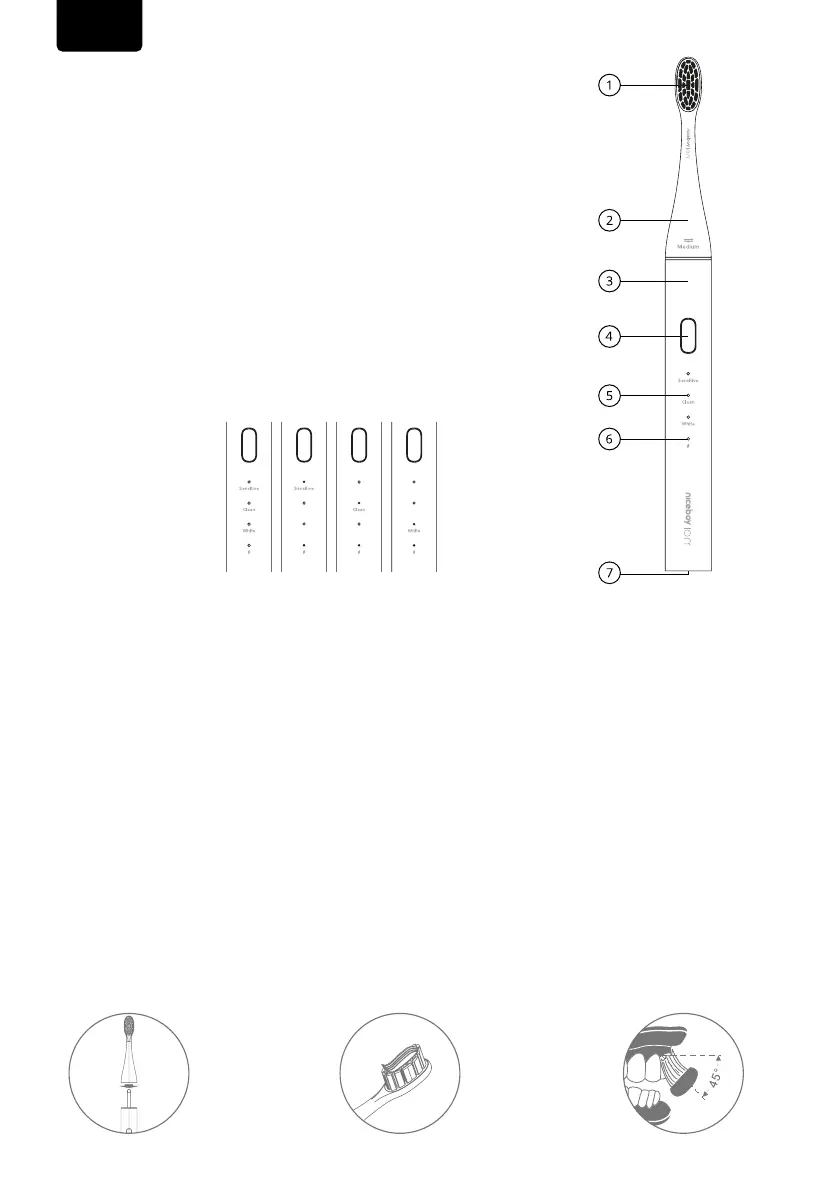
SCHEMATIC OF THE SONIC UV PRO PRODUCT
1. Bristle
2. Theheader
3. Body
4. On/o/modeswitchbutton
5. Indicatorofcleaningmodes
6. Poweron/chargeindicator
7. Chargingconnector
CLEANING MODES
INSTRUCTIONS FOR USE
1. Whenusingforthersttime,placethebrushinthemagneticdockingstation.
Chargingprocess:
•0%-10%,chargingindicatorshowssteadyredcolor
•10-100%,thechargingindicatorshowsasteadyorangecolor
•Chargingiscomplete,thechargingindicatorshowssteadygreen
Note: If the product has not been used for a long time, the charging indicator may not appear when
charging the electric toothbrush. Please wait patiently for 3-5 minutes to resume normal charging.
EN
2. Insertthenew
brushheadas
shown;ifyou
needtotakeit
out,justpullit
outasshownin
thepicture.
3. Wetthebristles
andsqueezeout
anappropria-
teamountof
toothpaste.Touch
thebristlescoa-
tedwithtoothpas-
tetothesurface
ofthetoothinany
partofthemouth.
4. Presstheswitch
andmovethejaw
slightlyupand
downtocleanyour
teethlaterallyfrom
theoutsideaswell
asfromtheinside.
Slowlymovethe
brushbristlesata
45°angle.



 To Next Page