14
DESCRIPTION AND FEATURES
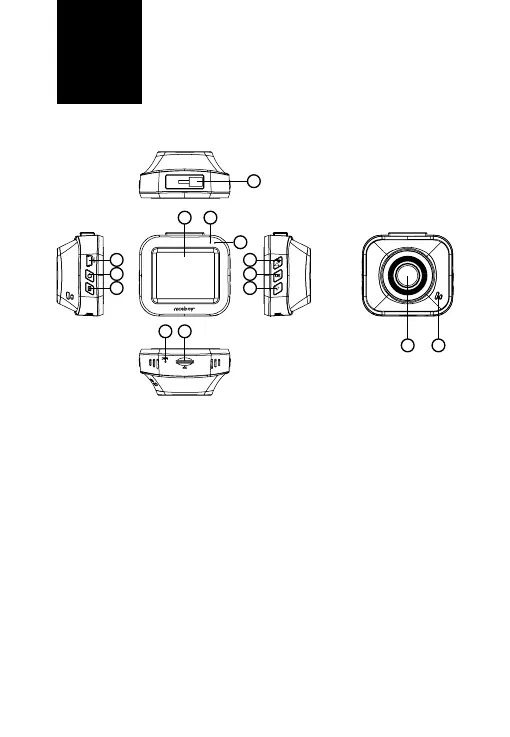
1. Lens – used for capturing video and taking photos.
2. Microphoneandspeaker – noise-cancelling microphone for captu-
ring audio, speaker for playback.
3. Screen – 2“ camera screen.
4. Operatingdiode – glows blue when the camera is on, ashes blue
when recording.
5. Chargingdiode – lights up red when the camera is connected to
power. Once the battery is fully charged, the diode turns o.
6. miniUSB – used for connecting to a power source or a PC.
7. On/obutton – a long press turns the camera on/o. A short press
when the camera is on turns o the screen (does not aect video
recording). The screen can be reactivated by pressing any button on
the camera.
8. Menu/ChangeMode/EmergencyRecordingbutton – long-
-pressing the button when in standby mode (camera is not recording
video and the camera menu is closed) opens the video/photo settings
menu (based on the selected mode); pressing the button again opens
camera settings. Short-pressing in standby mode toggles between
EN
13
3 4
5
12
1 2
6 9
7 10
8 11
14


 To Next Page