15
CONTACTLESS PAYMENTS (NICEBOY PAY)
Linking to the application
• InstalltheNiceboyPayapponyourmobilephone(theappisonlysupportedonAndroid10and
above,iOS8.2andaboveforsecurityreasons).
• TurnontheNFCfunctiononyourmobilephone.
• OpenthedownloadedNiceboyPayapplication.
• Ifyouhavealreadycreatedanaccount,loginusingyouremailaddressandpassword.
• Ifyoudonothaveanaccount,click“CreateAccount”.Thenenteryouremailandchoosea
password.Thenclickregister.Theapplicationwillthenallowyoutologintoyouraccount.
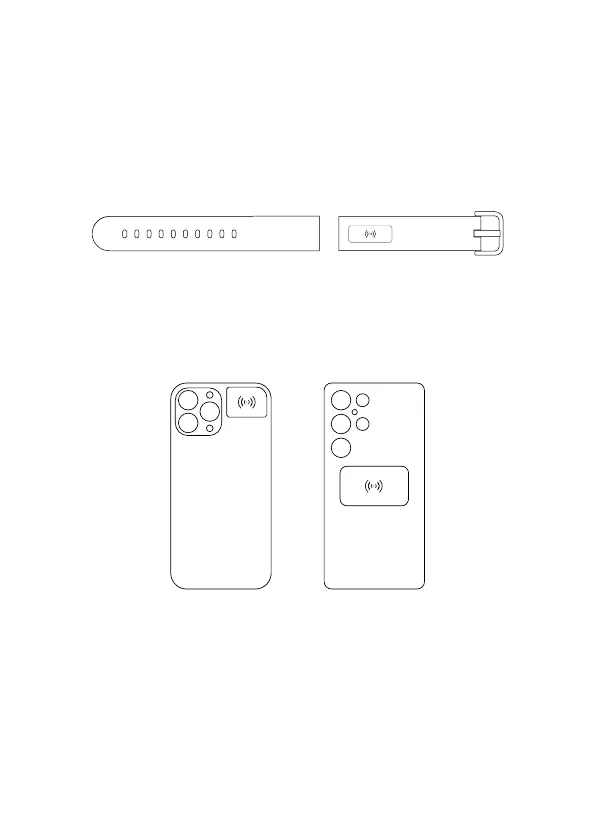
• Nowallyouhavetodoisaddyourwearable.Thechipislocatedontheshorterofthetwo
attachedpartsofthestrap.
• Click“AddDevice”.Next,placeyourdeviceneartheNFCchipofyourphone(foriPhonedevices,
theNFCchipisusuallyonthetopofthephone,seegure1.ForAndroiddevices,itismostof-
tenseeningure2.Theexactpositionofthephone’sNFCchipmaydierondierentdevices.
Tondouttheexactpositionofyourphone’sNFCchip,contactthephonemanufacturer).
Afteraddingthedevicetoyouraccount,youcaninsertyourcreditcard,oryoucancreateabusi-
nesscard.
• Toaddacard,rstenterthecardnumber,thenitsexpirationdateandCVVcode.Afterlling
in,itisnecessarytoconrmtheconditionsbyclicking“conrmandcontinue”.Thecardmust
thenbetokenizedintothedevice.Youcandothisbytouchingthedevicetoyourphone’sNFC
chipagain.Forasmoothprocessoftokenization,placethepaymentelementonthetable
andplacethephonenexttoit.Trynottomoveyourphone.Ifyouareunabletocompletethe
tokenization,itwillbenecessarytobringthedeviceclosertotheNFCchip.Subsequently,allyou
havetodoisauthorizethecardwithavericationcodeusinganSMSmessageandcomplete
theactivation.
Common approximate location
of the iPhone‘s NFC chip
Common approximate location
of Android devices



 To Next Page