14
DESCRIPTION
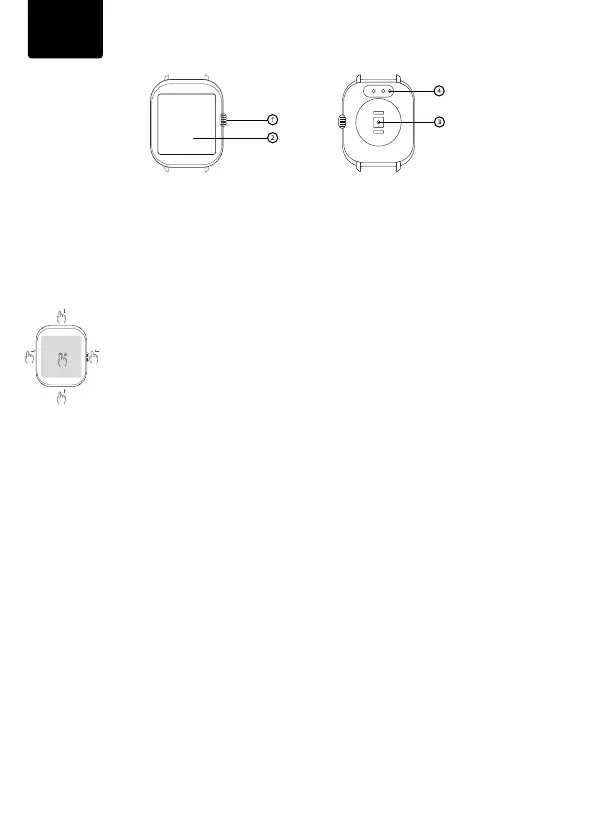
1. Controlbutton-longpressturnsthewatchon/o.Ashortpresswhenthedisplayisoacti-
vatesthedisplay.Ashortpressontheactivateddisplaystartsthemenu.Inthemenu,adouble
quickpresswillchangethestyleofthemenu.Ashortpressinthemenuservestoreturntothe
homescreen.
2. Touchscreenwatch.
3. Opticalsensorformeasuringheartrateandothervalues.
4. Chargingconnector
CONTROL
Thewatchiscontrolledusingafulltouchscreen.Whenthedisplayisactivated,scroll
uptothenoticationmenu,scrolldowntothequicksettingsmenu,scrollleftto
movebetweenthepulse,SPO2,sleep,weathermeasurementscreens.swiperightto
opentheContacts,MusicPlaybackandActivitiesmenu.Youcanchangethewatch
facesbylongpressingonthemainwatchface.
CONNECTING THE WATCH WITH THE APPLICATION
DownloadtheNiceboyWATCHapptoyourmobilephone(Android10andaboveandiOS8.2and
above).Todownloadtheapplication,youcanusetheQRcodethatappearsonthedisplayofthe
watchwhenitisturnedonforthersttime.Theapplicationisonlyavailableformobilephones.
Thenfollowtheinstructions:
1. TurnonBluetoothonyourmobilephone
2. Ifthewatchiso,turnitonbypressingthepowerbutton(1)
3. LaunchtheNiceboyWATCHappandfollowtheon-screeninstructions(selectWATCH4from
thedevicesoered).
4. Conrmtheconnectiononthewatchdisplay
Inorderfortheapplicationtoworkproperly,itisnecessarytoenableaccesstoapplication
noticationsinthemobilephonesettings.ItisalsonecessarytoenabletheapplicationintheRAM
managementofthemobilephonesothatthephonedoesnotterminatetheapplicationrunningin
thebackground.Moreinformationaboutmobilephonesettingscanbefoundinthemanualofyour
mobilephone.
CONNECT WATCH TO PHONE FOR BT CALLS
Ifyouwanttomakecallsusingthewatch,followtheinstructions:
1. TurnonBluetoothonyourmobilephone
2. Inthemobilephone’sBluetoothsettings,searchforadevicenamedWatch4andconnect
3. Enablecallandaudioaccessinyourphone’sBluetoothsettings
4. NowthewatchwillactasaBTspeakerorheadphonesandyoucanreceivecallsthroughitor
makeoutgoingcallsinthewatchmenu
Note: BT calls reduce battery life per charge. The ideal distance of the watch from the mouth for calls is up
to 15 cm.
EN



 To Next Page