11
CHARGING
Chargethewatchonlywiththeoriginalcharger,whichyouattach
usingmagnetstotheconnectorsonthebackofthewatch(3).Use
anadapterwithavoltageof5Vandacurrentof1Aforcharging.Fully
chargethebatterybeforeusingthewatchesforthersttime.Donot
exposethewatchtotemperaturedierences,andkeepthewatch
undercontrolwhencharging.
WATCH FUNCTIONS
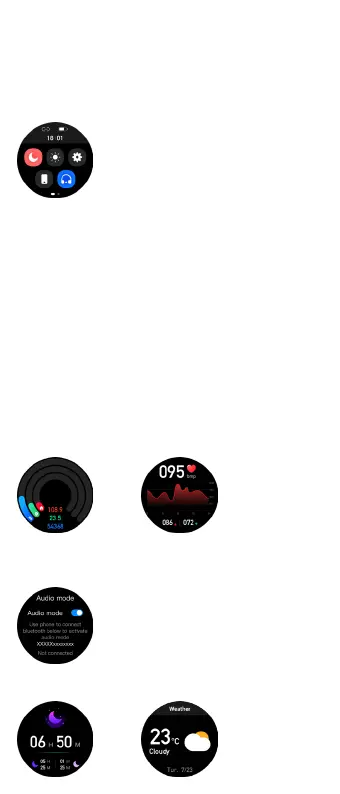
Swipedownonthescreen(onthehomescreen
withawatchface)tobringupthecontrolpanel,
whichaccessesthemenuoptionsDoNotDis-
turbMode,BrightnessSettings,EnterSettings,
FindPhone,BTCallMode
Watch settings
YoucanaccessthewatchsettingsviatheControlPanel.Thefollowing
itemsareavailable:
Menu Style:adjuststheappearanceofthewatchmenu
Dial:allowsyoutochangethedial,changethebrightness,setthe
backlighttime,setthedisplaytoactivatebyturningthewrist,AOD
(Alwayson)mode
Battery:showsthebatterystatusofthewatchandallowsyouto
turnontheSavingMode(thewatchturnstheBluetoothoand
disconnectsfromthemobilephone)
Vibration intensity:adjuststhestrengthofvibrationsorturns
themocompletely
Language:watchlanguagesettings
QR code:providesthewatchapplink
Password:PINcodesettingforenteringthewatchmenu
System:oersinformationaboutthewatch(BTname,MACaddress,
FWversion),enablesturningoandresettingofthewatch
1. Steps
Displaythestepcounter,
distancetravelled,and
caloriesburned.
2. Heartbeat
Swipethescreentostarttheheartrate
measurement.Youcansetup24/7
monitoringinthewatchapp
3. Audio mode
BTcallsettingsscreen.Toconnectthewatchtothemobilephone,
followthechapterCONNECTING THE WATCH TO THE MOBILE
PHONE FOR BT CALLS.
Afterconnectingthewatchtothemobilephone,
thescreenwilloerthefollowingitems:Call
recording,Favoritecontacts(mustbesetinthe
application),andDialnumber.
4. Sleep
Sleepdurationdisplay
5. Weather
Displaysweatherinformation(mustbe
setintheapp)
Control panel
Watch screens



 To Next Page