10
EN
1
2
3
4
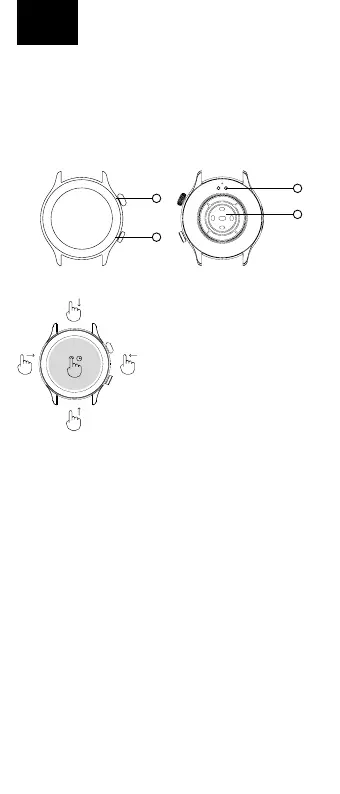
DESCRIPTION
1. ON/OFFbutton–pressandholdtoturnwatcheson/o.Press
brieywhenthedisplayisotoactivateit.Pressbrieywhen
thedisplayisactivatedtostartthemenu.Turnthemenubutton
tonavigatethemenu;turnitonthehomescreen(whenthe
watchfaceisdisplayed)toselectwatchfaces.Whileinthemenu,
abriefpressactsas“one-step-back”.
2. Functionalbutton-pressbrieywhilethedisplayisactivatedto
enterthesportsactivitiesselection
3. Chargingconnector
4. Opticalsensorformeasuringheartrateandothervalues
CONTROLS
Thewatchiscontrolledviaafull
touchscreen.Whenthedisplayis
activated,swipeuptogettothe
noticationmenu,swipedowntothe
settingsmenu,swipetotheleftto
movebetweenscreenswitharecord
ofactivities,sleepdata,weatherand
others,andswipetotherightto
openthemenuofrecentlylaunched
functions.Youcanchangethewatch
facesbypressingandholdingonto
themainwatchface.
CONNECTING THE WATCH WITH THE APPLICATION
DownloadtheFitCloudProapptoyourmobilephone(Android10and
aboveandiOS8.2andabove).Theapplicationisonlyavailablefor
mobilephones.Followtheinstructions:
1. TurnonBluetoothonyourmobilephone
2. Ifthewatchiso,turnitonbypressingthepowerbutton(1)
3. LaunchtheFitcloudproappandfollowtheon-screeninstruc-
tions(selectWATCHGTRfromthedeviceslisted)
Inorderfortheapptoworkproperly,youneedtoenableaccessto
appnoticationsinyourmobilephonesettings.Itisalsonecessaryto
enabletheapplicationintheRAMmanagementofthemobilephone
sothatthephonedoesnotterminatetheapplicationrunninginthe
background.Formoreinformationonmobilephonesettings,referto
yourmobilephonemanual.
CONNECTING WATCH TO MOBILE PHONE FOR BT CALLS
Ifyouwanttomakecallsusingthewatch,followtheinstructions:
1. TurnonBluetoothonyourmobilephone
2. TurnontheAudiomodeonthewatch(fromthemainscreen,
swipelefttotheAudiomodemenu,thenactivatetheswitchby
touchingthedisplay)
3. SearchforadevicenamedWATCHGTRAudioinyourmobile
phone’sBluetoothsettingsandconnect(remembertoenable
callandaudioaccessinyourphone’ssettings)
4. NowthewatchactsasaBTspeakerorheadphones,andyou
canreceivecallsthroughitormakeoutgoingcallsinthewatch
menu.
Attention: BT calls reduce battery life per charge. The ideal distance of the
watch from the mouth for calls is up to 20 cm.
WATERPROOFNESS
NiceboyWATCHGTRmeetstheIP67standard,whichmeansprotec-
tionagainstimmersioninwaterfor30minutesandtoamaximum
depthof1meter.Thewatchisnotintendedforswimming.



 To Next Page