
 Need help?
Do you have a question about the Nicolaudie Wolfmix W1 and is the answer not in the manual?
Guidance on environmentally friendly disposal of packaging and the product.
Specifies authorized usage and user requirements for the device.
Warning about small parts and keeping the product away from children.
States that there are no user-serviceable parts inside the unit.
Defines suitable environments and conditions for using the device.
Instructions for safe electrical connection and handling of power.
Explains the manual's approach to describing Wolfmix functions.
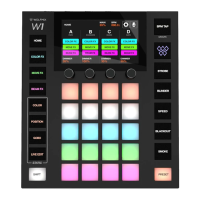
General description of the Wolfmix W1's physical and technical attributes.
Lists and describes the physical parts of the Wolfmix W1.
Information about the controller's screen and touch interface.
Details on the controller's rotary encoders and their functionality.
Specifications for the controller's buttons and backlighting.
Technical details about the controller's CPU, RAM, and Flash memory.
Information on the controller's microphone and audio input.
Specifications for the controller's DMX connectors and capabilities.
Details on the controller's USB port and communication.
Special key combinations for accessing different controller modes.
Overview of the list displaying added fixtures and their DMX assignments.
Guide to selecting and adding fixture profiles from the library.
Configuration screen for setting minimum and maximum Pan and Tilt values.
Tool for creating custom fixture profiles by defining channels and features.
Interface for editing individual fixture channel properties and values.
The main control screen for managing groups, dimmers, and flashes.
Controls and settings for the Color FX module.
Controls and settings for the Move FX module.
Controls and settings for the Beam FX module.
Screen for applying fixed colors to fixtures, overriding effects.
Screen for applying fixed positions to fixtures, overriding move effects.
Screen for selecting and applying gobos to fixtures.
Functionality for applying static values that override all other effects.
Screen for storing and recalling controller states and effect configurations.
Defines how flash effects are triggered and released.
Description of the Paparazzi-style white flash effect.
Details on setting the speed and release mode for strobe effects.
Configuration of blinder effects, including fade time and release mode.
Functionality for multiplying the speed of all active effects.
Description of the effect that turns off all beams and channels.
Controls for triggering and adjusting smoke machine effects.
Details on available global settings like XLR mapping and BPM mode.
Additional controller settings such as firmware updates and crash reports.
 General
| Brand | Nicolaudie |
|---|---|
| Model | Wolfmix W1 |
| Category | Controller |
| Language | English |

 To Next Page