14. SPEED SLIDER: move to adjust chasing speed.
15. FULL ON KEY: when activated, whole channel output will be maximum and disable
BLACK OUT.
16. AUDIO LEVEL SLIDER: move to adjust the sensitivity of audio.
17. BLACK OUT KEY: the key will force all DMX to “0”.
18. STEP KEY: press it once and the program go one step.
19. AUDIO KEY: press it to get into audio control.
20. HOLD KEY: press and hold it, whole output will be hold.
21. PARK: IN CHASE SCENES mode, press it to select SINGLE CHASE OR MIX CHASE. In
DOUBLE PRESET, pressing PARK B is same as MASTER B at the maximum. In SINGLE
PRESET, pressing PACK A is same as MASTER A at the maximum.
22. REC EXIT: exit record. When the LED is lighting, it is in KILL, press any one of all channel
FLASH and all output is zero except the one channel.
23. RECORD KEY: press it to record the step of program.
24. PAGE KEY: press it to select desired SCENE program in appropriate page.
25. MODE SELECT: by pressing the key you can select CHASE SCENES DOUBLE RESET or
SINGLE PRESET.
26. DARK KEY: press it to pause whole output, including FULL ON and FLASH.
27. ALL REV: the key, when activated will reverse chasing direction of all program.
28. 0 % OR 0-255 KEY: press it to select 0% or 0-255 on DISPLAY.
29. REV ONE: press and hold the key, then press any one of PRESET B .the SCENE program will
chase in reversed direction.
30. CHASE REV: the key will reversed the SCENE program chase direction controlled by slider of
speed.
31. BEAT REV: the key will reversed the SCENE program chase direction controlled by regular beat.
32. FOG MACHINE: the key will control fog machine.
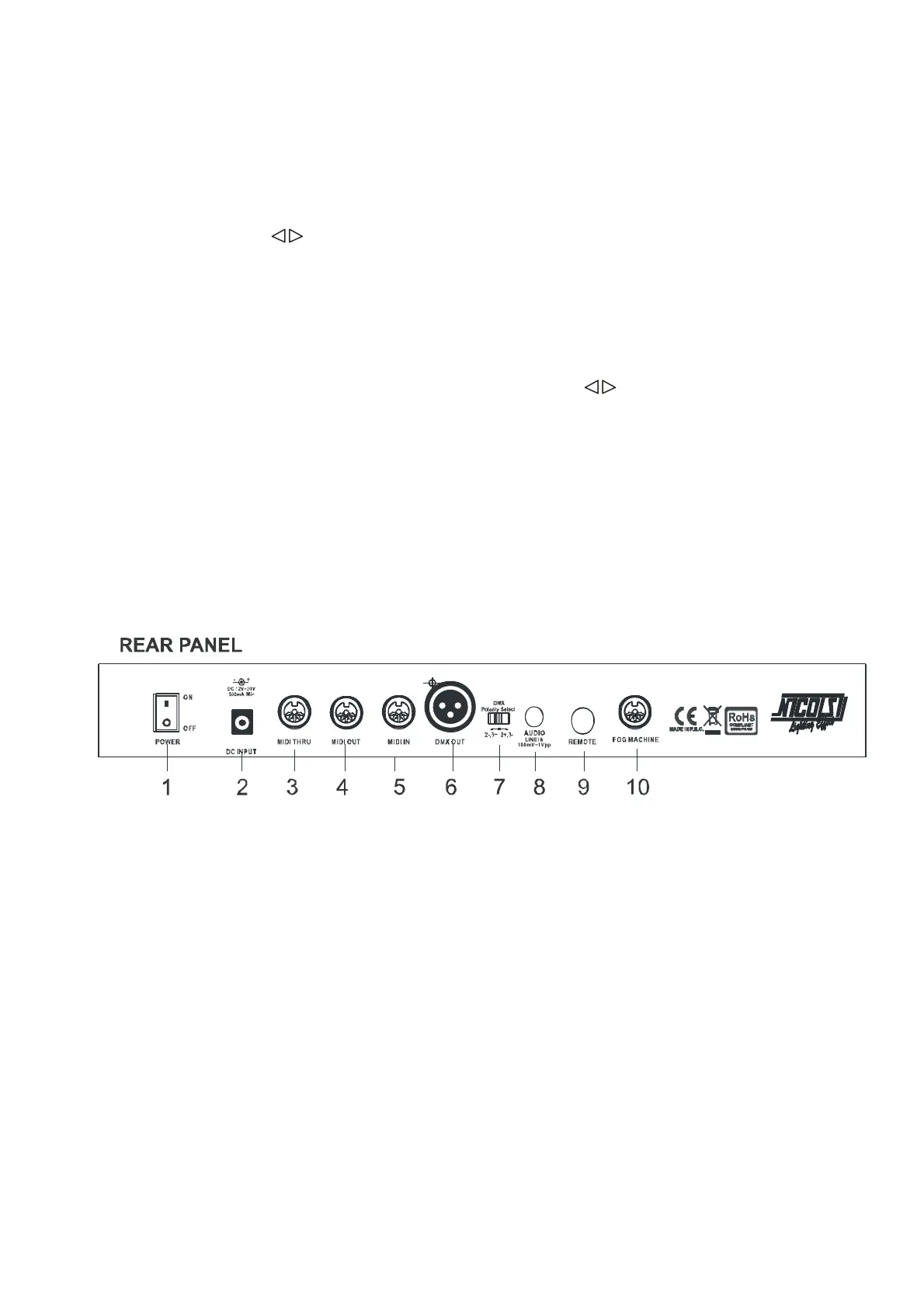
1. POWER SWITCH.
2. POWER INPUT : DC 12V-18V, 500mA MIN.
3. MIDI THRU: use to transmit MIDI data received on the MIDI IN connector.
4. MIDI OUT: transmit MIDI data originated by itself.
5. MIDI IN: received MIDI data.
6. DMX OUT : DMX output.
7. DMX POLARITY SELECT: select the polarity of DMX output.
8. AUDIO INPUT: line in music single.100mV-1Vpp.
9. REMOTE CONTROL: FULL ON and BLACK OUT are remote controlled using 1/4`` stereo
jack.
10. FOG MACHINE: connect fog machine.
3 – Operating instructions
1. RECORD ENABLE
1) Press and hold RECORD KEY.
2) Press FLASH 1 FLASH 6 FLASH 6 FLASH 8 keys in sequence.
3) Release RECORD, the led is lighting, recording is ready.
2. ERASE ALL PROGRAMS


 To Next Page
 Loading...