6
How to Operate the Flashlight
1. To turn the flashlight on or off, press the barrel switch for 0,5 seconds.
2. General function operation:
a. High - Med - Low (3-speed cycle)
b. The flashlight remembers the mode it was in when turned off and will resume
in that mode when turned on again.
3. Hide function operation:
a. Press the switch three times continuously in any mode to activate Strobe-SOS
mode, then press again to turn off.
4. Red light function operation:
a. Press and hold the switch for 1,2 seconds in any mode to switch between Red
light and Red Strobe modes.
5. Charging function operation:
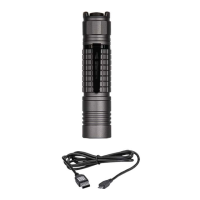
a. To charge the flashlight, remove the battery and connect the USB charger.
b. Insert the Micro-USB cable into the USB port of the battery.
c. The red indicator light will turn on during charging, and the green indicator
light will indicate a fully charged battery.
Usage and Maintenance
• Avoid opening the fixed head parts to prevent any damage to the flashlight. Opening
them may void the warranty.
• It is recommended to use high-quality batteries. If you plan to power off the
flashlight for an extended period, remove the battery to prevent potential damage
that may occur over time.
• Regularly clean the current contact pin and surface to ensure proper functioning of
the flashlight, especially if you notice any slight flickering of the light.
Common Issues and Solutions
Issue 1: Battery depletion
Solution: Replace the battery with a new one, ensuring correct orientation.
Issue 2: Dirty threads or PCB (Printed Circuit Board)
Solution: Clean the PCB or threads using Alcohol Swabs to remove any dirt or debris.



 To Next Page