7
Operating Instructions
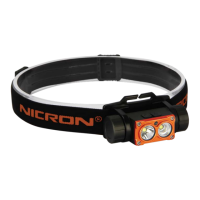
• Long press 1.2 seconds the switch button to turn on and turn off the headlamp;
• Switch A button to adjust the spotlight; Switch B button to adjust the floodlight, the
spotlight and floodlight can be turned on at the same time, the max brightness is
700 lumens.
• Spotlight modes: Turn on-High-Middle-Low-Turn off;
Floodlight modes: Turn on-High-Middle-Low-Turn off;
• Long press the switch for 10 seconds, the function will be reversed to “turn on-
Low-Middle-High-turn off”.
• Battery detection (only for 14500 Li-ion battery):
Press any switch LED blinks times to detect battery volume and battery voltage:
White blinking
beats (times)
• Low battery reminder function, (only for 14500 Li-ion battery)
During working, the lamp will flash when the voltage is down to 3.0V
• White light will flash 3 times then the light turns off in 2 minutes;
• Will flash 3 times again after 30 seconds;
• Will flash 3 times after 30 seconds, and the turns off.
• After turning off, it can be lighted again, and the repeat the above reminding
process. When it is lower than 2.9V, it will be turned off directly after lighting.
*Flash will happen on the working spotlight modes or flood light modes
• Memory function
Working a few seconds at any mode, press the switch to turn off, and then press
again will start from the last off mode.
• Charging:
Put out the 14500 Li-ion battery and use a charger with an output of 5V-1A for
charging the battery directly. The indicator light will be red when charging, and it
will turn green when fully charged.



 To Next Page