STOPPING THE TIMER
1212
1212
12
Once begun, the timer may be stopped at
any time. Press the top button to stop the
timer (a). The “STOP” indicator will appear
in lower right window.
* STOP mode will pause the timer and
distance log, however, the Pace/Speed and
Stroke Rate will continue to update.
When ready to begin again, press the top
button; the “STOP” indicator will no longer
be displayed. The timer and distance log
will now resume.
a
b
SpeedCoach
TM
RUN/STOP
OFF/RECALL/RESET
TIME/DIST/AVG
SPEED/PACE
SETUP
M
/S
T
I
ME
/MIN
NK
STOP
SpeedCoach
TM
RUN/STOP
OFF/RECALL/RESET
TIME/DIST/AVG
SPEED/PACE
SETUP
M/S
TIME
/MIN
1
/
2
NK
1111
1111
11
When the unit is displaying the ready
screen, press the top button to get out
of “STOP” mode. The “STOP” indicator
will now disappear (a).
Once you begin to row or paddle, the
unit will start displaying information (b).
READY TO RUN
a
b
SpeedCoach
TM
RUN/STOP
OFF/RECALL/RESET
TIME/DIST/AVG
SPEED/PACE
SETUP
M/S
TIME
NK
SpeedCoach
TM
RUN/STOP
OFF/RECALL/RESET
TIME/DIST/AVG
SPEED/PACE
SETUP
M/S
TIME
/MIN
1
/
2
NK
STROKE MODE SELECTION
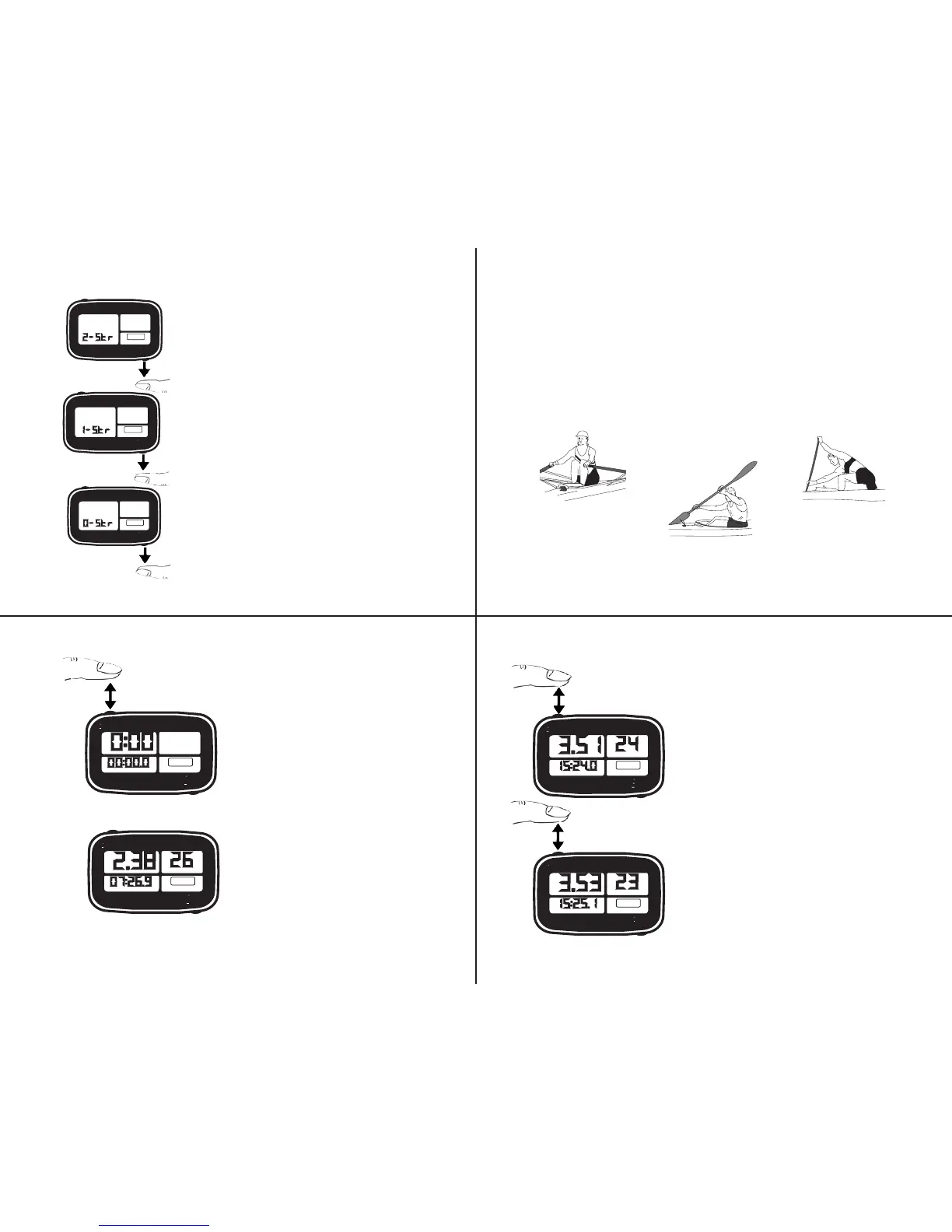
To select and change the Stroke Mode
which your unit will display, press and
hold the lower button. After 7 Seconds,
the unit will scroll through the unit
selection and begin scrolling through
each available Stroke Mode. When your
desired Stroke Mode appears in the
lower left window, release the button.
The scrolling order is as follows:
2-Str = 8 Second Hold / Release
1-Str = 9 Seconds / Release
0-Str = 10 Seconds / Release
SpeedCoach
TM
RUN/STOP
OFF/RECALL/RESET
TIME/DIST/AVG
SPEED/PACE
SETUP
/MIN
NK
SpeedCoach
TM
RUN/STOP
OFF/RECALL/RESET
TIME/DIST/AVG
SPEED/PACE
SETUP
/MIN
NK
SpeedCoach
TM
RUN/STOP
OFF/RECALL/RESET
TIME/DIST/AVG
SPEED/PACE
SETUP
/MIN
NK
99
99
9
1010
1010
10
Rowers using seat switch (a) should use the “2-Stroke” setting; Kayakers
using the paddle switch (b) should use the “1-Stroke” setting; Canoeists AND
Rowers and some Kayakers* not using the optional rate switch (c) should use
the “0-Stroke” setting. The SpeedCoach will calculate stroke rate from the
changes in speed through the water.
*Kayakers who maintain too consistent of a speed must use the paddle switch
to obtain stroke rate.
STROKE MODE SELECTION
ROWER
(using seat switch)
KAYAKER
(using paddle switch)
CANOEIST
or...
(Rower or Kayaker NOT
using rate switch)
a
b
c


 To Next Page