7.8 PVR FUNCTION
Base on USB PVR function you could record the preference program and playback.
Instant recording, EPG recording and timer recording were available.
8.8.1 Instant recording
Press REC. key to start instant recording during watch TV and the recording symbol
would be display on the left top of the screen. Press INFO. key to get fur ther more
information of instant recording. Press STOP key to stop instant recording.
12
11
1098
13
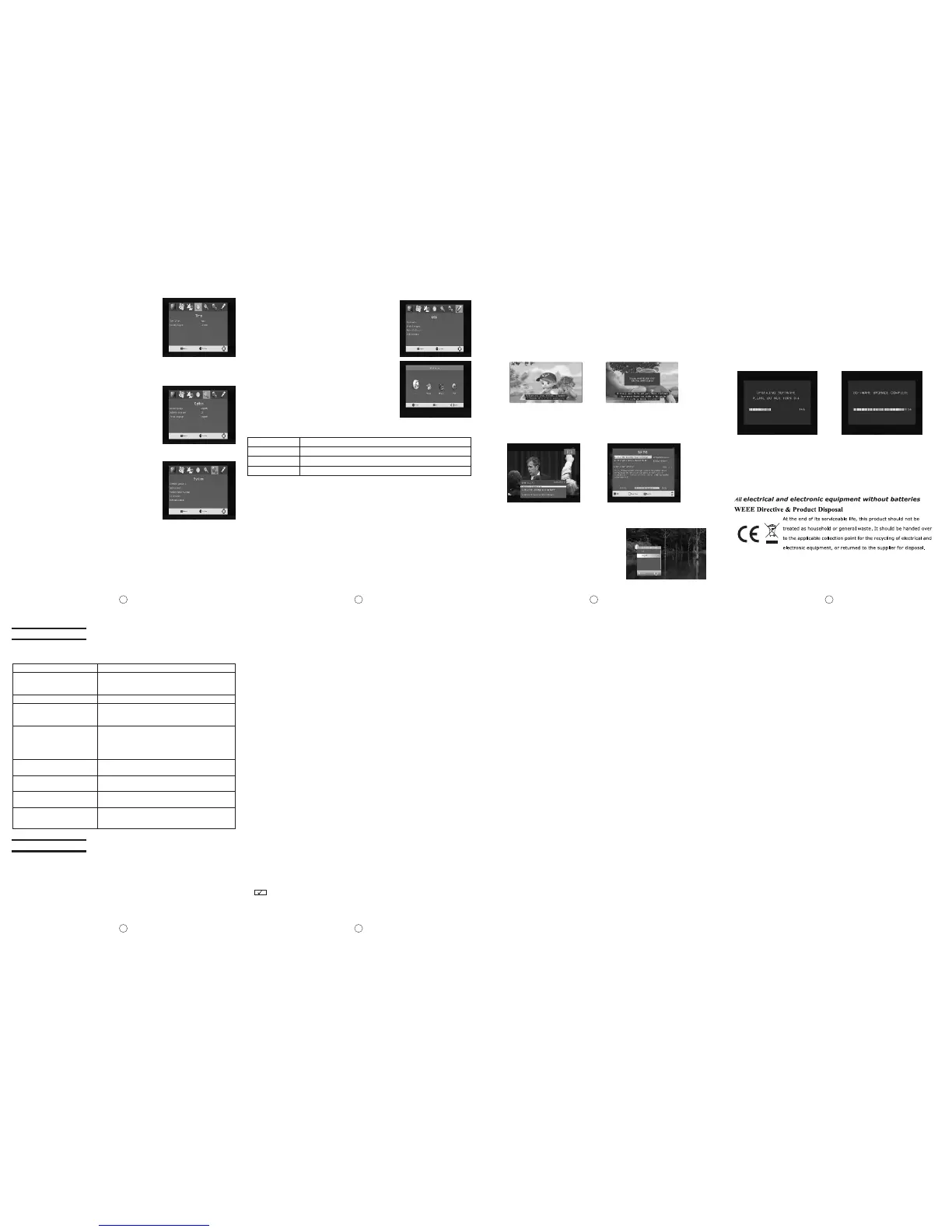
7.4 Time
Setup the following items under Time menu:
1)Time Offset: Adjust time zone to Auto or Manual.
2)Country Region: Setup your capital of the Country
under this item.
3)Time Zone: Setup your time zone according to
your location.
7.5 Option
OSD Language, Subtitle Language, Audio Language,
are available to setup in Option menu, press upward/
downward key to select the above items, press
leftward/rightward key to switch the selected item. Once
7.6 System
The following operations are available in System
interface:
1)Parental Guidance: Setup Lock function according
to audiences' ages.
2)Set Password: Change factory password in this
item. Input old password and new one orderly, and
then confirm. The default password is 888888.
Please remember the new password after
modifying.
3)Restore Factory Default: Press OK key to restore to
factory default setting.
4)Information: Press OK key to check system information.
5)Software Update: Upgrade is needed, select this item
for relative operation.
7.7 USB
Under USB interface, the following operations are available:
1)Multimedia: Press OK key to enter USB playing main interface.
Player
Photo
Music
Movie
Supported file
JPEG, BMP, PNG
*.wma, *.mp3, *.m4a
*.avi, *.mpg, *.dat, *.ts etc
2)Photo Configure: Press OK key to setup pictures
playing.
3)Movie Configure: Press OK key to setup movie
playing.
4)PVR Configure: Press OK key to setup program record.
7.7.1 Multimedia
Insert U disk, select Multimedia item, press leftward
/rightward key to select the followings(Music, Photo,
Movie, PVR)to play, then press OK key to play from
selected file.
Multimedia player feature also has been integrated
on the receiver. Press PVR key to display multimedia
player window. You could show your preference photo,
playing music and movie on multimedia player. Known supported file were
illustration below. NTFS, FAT32 file system could be supported at the moment.
Base information bar Further more information bar.
7.9 INFO. KEY
Press "INFO" key to displaying base information bar during watching TV programs.
Press "INFO" key twice to displaying further more program information during
watching TV.
7.10 SUBTITLE KEY
The programs might have multilingual subtitle
information. All available subtitle languages
would display on the subtitle information window
while you press SUBTITLE key. The screenshot
is illustrated below. Follow the help information
on the subtitle windows to select preference
subtitle.
7.11 UPDATE THE RECEIVER BY USB INTERFACE
1)Plug the USB drive that with the update file to the USB interface of the receiver.
2)Go to main menu and press to start upgrade process. While the upgrade progress
showing 100% and update finish, remove the USB flash drive and power on the
receiver again.
3)Please set the receiver to the factory settings after reboot the receiver.
NOTE: Please do not remove the USB drive from the receiver and power off the
receiver during upgrading process. Otherwise the receiver may not work properly.
8. Troubleshooting
The following phenomenon does not indicate failures. Before you contact us for
repair, please check your device according to the approaches below.
Check whether the antenna is adjusted properly;
The signal strength is too weak.
Check whether the volume is minimized; Check
whether the headset is connected; The signal quality
is poor; The sound attenuation function is activated;
Check whether the audio system in ATV mode is set
correctly.
Check whether the antenna is located well;
Check the parameter of image or region is set
correctly; if not, please set or search again.
No signal
No sound
Mosaic images
Signal search failure
Check whether the country and region is set right;
Maybe the signal intensity is too poor.
Too-dark images
Check whether the brightness and contrast of your
display is adjusted well; if not, readjust it.
May the signal intensity in this region is too weak.
Please try a vehicle digital TV antenna.
Mosaic images or slack images
/sound occur when the car is
moving
The AC adapter does not connect to the vehicle
adapter properly; Non-permissible power is applied;
The power is off.
Causes
No picture or sound
Problems
Causes
Problems
9. Specifications
DTV system:
Input frequency: VHF 177.5 MHz - 226.5 MHz UHF 474 MHz - 858 MHz
Modulate: QPSK/16-QAM/64-QAM
Decode standard:
MPEG1, MPEG2 MP@HL, MPEG4 ASP@L5, DivX(4.x-6.x),
JPEG(support 422/411/420/444/440 support)
Audio decode standard: MPEG-1 MPEG-2(layer I/II) AAC HE-AAC level 2 &level4
Mp3 demode.
, , , ,
7.7.2 Photo configure
The number of parameters when set the picture in slide show mode:
1) Slide Time:the play time of slide show
2) Slide Mode: the style of slide show
3) Aspect Ratio: you can set up Keep or Discard
7.7.3 Movie Configure
1) Aspect Ratio:You can set up Keep or Discard.
2) Subtitle Specific: You can set up NORMAL, BIG or SMALL
3) Subtitle Background : You can set up Transparent, Gray, Yellow green, white
4) Subtitle Font color: You can set up Red, Blue, Green, white , Black
7.7.4 PVR Configure
1) Record Device: Check the stored information
2) Format: Clear information
General characteristic
Display: Colour TFT-LCD
Screen size: 10.2 inches
Resolution: 1024×600 (RGB)
Speaker: 2 ×Φ40mm
Power supply: DC 12V-24V 10W
Connector: Input jack for external antenna; stereo headset jack; audio/video (AV)
input jack; DVB-T(AV) output jack, USB jack.
Supported power: Two options:
1. Alternating current power supply - AC adapter
2. Vehicle battery (12V) - vehicle adapter
Dimension: 300mm × 180mm × 35 (mm)
Weight: about 800g
Working temperature: 0℃-40℃
Storage temperature: -20℃-60℃
Warning
●This manual is for your reference only. The information in the manual could be
subject to change without prior notice.
●No elements are repairable inside your device. Do not attempt to open it to
improve your TV set, he high voltage supply inside may cause danger. The
maintenance and adjustment of your TV set must be done by qualified
professionals only.
●To prevent injury, this apparatus must be securely mounted to a surface in
accordance with the installation instructions.
●When not in use disconnected from the mains completely.
●The apparatus should not be exposed to water and that nothing filled with liquids,
such as vases, shall be placed on or close to the apparatus.
●No naked flame sources, such as lit candles, should be placed on the
apparatus.
●Batteries (battery pack or batteries installed) should not be exposed to excessive
heat such as sunshine, fire or the like.
●Danger of explosion if battery is incorrectly replaced. Replaced only with the same
or equivalent type.
【 after some items in this manual means it is available with this function. 】


 To Previous Page
 Loading...