This document describes the NIKKEI NLD22MBK Colour Television with Remote Control, a versatile entertainment device designed for both home and mobile use.
Function Description:
The NLD22MBK is a colour television with a fully integrated digital/cable/satellite TV (DVB-T/C/S-S2) tuner, allowing reception of various broadcast types. It features HDMI inputs for connecting high-definition devices, a USB input for media playback, and a Scart socket for older external devices like DVD players, PVRs, and video game consoles. The TV includes a stereo sound system, Teletext functionality, and a headphone connection for private listening. It also boasts an automatic programming system for easy setup and manual tuning for fine adjustments. For energy saving, it offers a Power Save Mode and automatic power down after up to six hours of inactivity. Additional features include a Sleep Timer, Child Lock, and automatic sound mute when no transmission is detected. The device supports NTSC playback and includes AVL (Automatic Volume Limiting) and PLL (Frequency Search) for enhanced audio and channel management. An optional Game Mode is available for optimized gaming experience.
Important Technical Specifications:
- TV Broadcasting: PAL B/G D/K K
- Receiving Channels: VHF (BAND I/III) - UHF (BAND U) - HYPERBAND
- Number of Preset Channels: 10000
- RF Aerial Input: 75 Ohm (unbalanced)
- Operating Voltage: 110-240V AC, 50/60Hz. It also supports 12V DC input for mobile use.
- Audio: German+Nicam Stereo
- Audio Output Power (WRMS. 10% THD): 2 x 2.5 W
- Power Consumption: 47 W
- Weight: 3.00 kg
- TV Dimensions DxLxH (with foot): 134 x 516 x 352 mm
- TV Dimensions DxLxH (without foot): 35 x 516 x 317 mm
- Operation Temperature and Humidity: 0°C up to 40°C, 85% humidity max
- PC Input Typical Display Modes (up to 1920x1080 @ 60Hz):
- 640x480 @ 60 Hz
- 800x600 @ 56 Hz, 60 Hz
- 1024x768 @ 60 Hz, 66 Hz
- 1280x768 @ 60 Hz
- 1280x960 @ 60 Hz
- 1280x1024 @ 60 Hz
- 1360x768 @ 60 Hz
- 1400x1050 @ 60 Hz
- 1600x1200 @ 60 Hz
- 1920x1080 @ 60 Hz
- AV and HDMI Signal Compatibility:
- EXT (SCART): PAL 50/60, NTSC 60, RGB 50, RGB 60
- Side AV: PAL 50/60, NTSC 60, 480I/P 60Hz, 576I/P 50Hz
- PC/YPbPr: 720P 50Hz/60Hz, 1080I 50Hz/60Hz, 1080P 50Hz/60Hz
- HDMI1: 720P 50Hz/60Hz, 1080I 50Hz/60Hz, 1080P 24Hz/25Hz/30Hz/50Hz/60Hz
- Supported File Formats for USB Mode:
- Video: mpg, mpeg (MPEG1, MPEG2), vob (MPEG2), mp4 (MPEG4, Xvid, H.264), mkv (H.264, MPEG4, VC-1), avi (MPEG2, MPEG4, Xvid, H.264), flv (H.264/VP6/Sorenson), 3gp (MPEG4, H.264), wmv, asf (MPEG4, VC-1). Max resolution 1920x1080 @ 30P.
- Music: .mp3 (MPEG 1 Layer 1/2 (MP3)). Bit rate 32Kbps ~ 320Kbps. Sampling rates 8K-48K Hz.
- Photo: .jpg, .jpeg (Baseline JPEG, Progressive JPEG), .bmp. Max WxH up to 17000x10000.
- Subtitle: .sub, .srt
- DVD Player Specifications:
- Types of Discs Supported: DVD (SS/SL 4.7", SS/DL 4.7", DS/SL 4.7", DS/DL 4.7"), CD-DA, CD-R, CD-RW, MP-3/JPEG. Only 12 cm discs must be used.
- Video Type: MPEG-2 Video Standard Decoding (MPEG-1 supported), Full-Screen Video Display of 720 x 576 (PAL) & 720 x 480 (NTSC) pixels, 50 and 60 Hz frame refresh rates (PAL & NTSC), Digital bit-stream processing rate up to 108Mbits/sec, Line resolution more than 500 lines.
- Audio Type: MPEG Multichannel Decoding, LPCM.
- Audio Output: Analog Outputs: 24 bit /48, 44.1kHz down-sampling DAC.
Usage Features:
- Remote Control: A comprehensive remote control is provided for all functions, including power, numeric channel selection, volume, menu navigation, source selection, media browsing, EPG access, Teletext, and DVD playback controls. Special "My Button" functions allow users to assign frequently used actions.
- On-Device Controls: A single control switch on the TV allows for volume adjustment, channel changing, source selection, and standby/on control.
- First Time Installation (FTI): Guides users through language selection, country settings, and various installation options (Aerial, Cable, Satellite). It supports M7 operator-specific channel lists and manual scanning.
- Media Browser: Allows playback of photo, music, and movie files from a connected USB disk. Features include loop and shuffle modes for media playback.
- Quick Menu: Provides quick access to common settings like Power Save Mode, Picture Mode, Equalizer Settings, Favourites, and Sleep Timer.
- Picture Settings: Offers extensive customization for picture quality, including Mode (Cinema, Game, Dynamic, Natural), Contrast, Brightness, Sharpness, Colour, Power Save Mode, Backlight, Noise Reduction, Dynamic Contrast, Colour Temp, Picture Zoom, HDMI True Black, Film Mode, Skin Tone, Colour Shift, and RGB Gain. PC mode-specific settings like Autoposition, H/V Position, Dot Clock, and Phase are also available.
- Sound Settings: Includes Volume, Equalizer, Balance, Headphone volume, Sound Mode, AVL, and Digital Out audio type settings.
- General Settings: Covers Conditional Access, Language, Parental controls (Menu Lock, Maturity Lock, Child Lock, Set PIN), Timers, Date/Time, Sources, Satellite settings, Menu Timeout, Scan Encrypted Channels, Blue Background, Software Upgrade, Application Version, Hard of Hearing, and Audio Description.
- Standby Search: An optional feature that allows the TV to search for new or missing broadcasts while in standby mode and update the channel list.
- Store Mode: A display mode for retail environments that illustrates the TV's features.
- BISS Key: Allows entry of BISS keys for scrambled satellite broadcasts.
- DVD Playback: Integrated DVD player with disc loader. Supports various disc types and offers playback controls (Play, Pause, Stop, Rapid Reverse/Advance, Title, Root, Repeat, Zoom, Angle, Subtitle, Language).
- Mobile TV Functionality: Designed for 12V DC input, allowing use in vehicles via a cigarette lighter plug or direct battery connection.
Maintenance Features:
- Software Upgrade: The TV supports automatic software upgrades via aerial/cable signal, including a "3 AM search and upgrade mode" to ensure the latest firmware. Manual upgrade checks are also possible through the menu.
- Cleaning: Before cleaning, unplug the TV. Use a soft, dry cloth. For DVD discs, wipe from the center out with a cleaning cloth; avoid solvents like benzine or thinner.
- Troubleshooting: The manual provides guidance for common issues such as the TV not turning on, poor picture/no picture, no sound, remote control malfunction, and inability to select input sources. It advises checking power connections, antenna, cables, batteries, and settings, and to consult a dealer or technician for persistent problems.
- Environmental Information: The TV is designed for reduced energy consumption, with features like Power Save Mode and automatic power down. Users are advised to switch off or disconnect the TV from mains when not in use.
- Battery Replacement: Instructions for inserting and replacing AAA batteries in the remote control are provided, emphasizing correct polarity.
- Safety Information: Includes warnings about electric shock, proper ventilation, handling of the power cord, avoiding humid environments, direct sunlight, and heat sources. It also advises against blocking ventilation holes and placing the TV on unstable surfaces. For the DVD player, it warns about the Class 1 laser and proper disc handling.

 Need help?
 General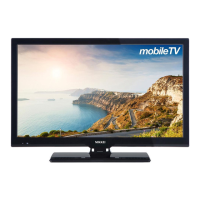

 To Next Page