This document serves as an operating manual for the Nikkei Professional Belt Drive USB Turntable, model NTT01U. It provides comprehensive instructions for setup, operation, maintenance, and software usage, ensuring users can effectively utilize the device for playing and digitizing vinyl records.
Function Description
The Nikkei NTT01U is a professional belt-drive USB turntable designed for playing vinyl records and converting them into digital audio files. Its primary function is to reproduce sound from both 30-cm (12") LP records and 17-cm (7") EP records. A key feature is its USB connectivity, which allows users to connect the turntable to a computer and use specialized software, such as Audacity, to record and digitize their vinyl collection. This enables preservation of analog audio in a digital format, making it accessible for modern playback devices and archiving. The turntable incorporates a belt-drive system, which is known for reducing motor noise and vibration transmitted to the platter, thereby contributing to better sound quality.
Usage Features
The turntable offers several user-friendly features for both record playback and digital conversion:
Record Playback:
- Automatic Playback: The NTT01U supports automatic playback for both 12" LP and 7" EP records. Users simply place the record on the platter, set the appropriate speed (33 or 45 RPM) and size (17 or 30 cm) using dedicated buttons and selectors, close the dust cover, and press the START button. The tonearm will automatically move to the correct position and begin playing.
- EP Adaptor: For playing 7" EP records, an EP adaptor is provided and should be placed over the center spindle.
- Speed Selection: Dedicated SPEED buttons allow users to switch between 33 and 45 RPM, accommodating different types of vinyl records.
- Size Selection: A SIZE selector is available to specify whether a 17 cm or 30 cm record is being played, which helps the automatic tonearm positioning.
- Arm-Elevation Control: An arm-elevation button provides control over raising and lowering the tonearm, offering manual intervention when needed.
- STOP Function: A STOP button allows users to halt playback at any point, and the tonearm will automatically return to its rest position once the record finishes or the STOP button is pressed.
- Dust Cover: The integrated dust cover helps protect records and the turntable components from dust and debris during playback and when not in use.
- Phono/Line Switch: A switch at the rear of the turntable allows users to select between PHONO and LINE output, providing flexibility for connecting to different audio amplifiers or receivers. If connecting to an amplifier's PHONO input, the switch should be set to PHONO. If connecting to a line input, it should be set to LINE.
Digital Conversion (USB Function):
- USB Connectivity: The turntable features a USB socket for connecting to a PC using the provided USB cable.
- Audacity Software: The manual details the use of Audacity, a free, open-source software, for recording audio from the turntable. This software allows users to:
- Set up Recording Preferences: Configure audio input/output devices, channels (stereo), and enable features like "Play other tracks while recording new one" and "Software Playthrough."
- Record Audio: Users can initiate recording by clicking the red Record button in Audacity, then lowering the tonearm onto the record.
- Pause and Stop Recording: Blue Pause and yellow Stop buttons in Audacity provide control over the recording process.
- Save Projects: Audacity allows users to save their recorded audio as projects, which include all changed and recorded audio data.
- Export Audio: Recorded audio can be exported in various formats (e.g., WAV, MP3, Ogg Vorbis) for wider compatibility and use.
- Editing Capabilities: Audacity offers extensive editing capabilities, and the manual highlights the importance of the Undo function, which allows users to revert changes almost without limits while a project is open.
Maintenance Features
Proper maintenance is crucial for ensuring the longevity and optimal performance of the turntable and its components. The manual provides guidelines for:
- Stylus Cleaning: A dirty stylus can significantly degrade sound quality. Users are advised to use a stylus cleaning kit and brush off dirt in the direction of the arrow. It is explicitly warned not to brush in the opposite direction or from side to side, as this can damage the stylus.
- Stylus Replacement: When sound quality diminishes, it's an indication that the stylus needs replacement. The manual describes how to remove the old stylus by pulling it downwards gently and then pushing the new stylus into place.
- External Surface Maintenance: For general cleaning, a polishing cloth or dry cloth can be used to wipe off dust and dirt. For more stubborn dirt, a soft cloth slightly dampened with a diluted neutral cleanser, wrung out well, should be used, followed by wiping with a dry cloth. Users are cautioned against using furniture wax or cleaners.
- Chemical Avoidance: It is strongly advised never to use thinners, benzene, insecticide sprays, or other harsh chemicals on or near the unit, as these can corrode the surfaces.
- Power Cord Handling: Users are instructed to handle the power cord by the plug, avoid pulling the cord itself, and never touch it with wet hands. The cord should not be placed under the unit or furniture, pinched, knotted, or tied with other cords. Proper routing of the power cord is emphasized to prevent it from being stepped on. Regular inspection of the power cord for damage is recommended, with instructions to seek replacement from an authorized service center or dealer if damage is found.
- General Handling Precautions:
- Installation Surface: The turntable should be installed on a solid, flat surface, not on top of a speaker, to prevent vibrations and ensure stability.
- Environmental Factors: It should be kept away from high heat, moisture, direct sunlight, dust, dirt, smoke, and steam.
- Interference: To avoid interference, it should be installed away from TV sets and tuners. If interference occurs, using an outdoor antenna or turning off the TV set and tuner is suggested.
- Condensation: If the turntable is moved from a cold to a warm environment, or if room temperature rises rapidly, moisture may condense inside. In such cases, the turntable should not be used until the moisture has evaporated, which may take about an hour.
- Record Cleaning: For cleaning records, an antistatic spray or cleaning fluid with a soft cloth is recommended. Wiping with a dry cloth or brush can cause static noise.
- Servicing: The manual explicitly states that users should not attempt to service the appliance beyond the described operating instructions. All other servicing should be referred to qualified service personnel. This includes situations where the power supply cord or plug is damaged, objects or liquids have entered the appliance, it has been exposed to rain, it does not operate normally, or if it has been dropped or the enclosure is damaged.
- Component Replacement: In case of critical component replacement, only factory parts or recommended equivalents should be used.
- Non-use Periods: The power cord should be unplugged from the outlet if the appliance is left unused for a long period.
- Power-supply Cord Protection: Power-supply cords should be routed to prevent them from being walked on or pinched, paying particular attention to plugs, convenience receptacles, and the point where they exit the appliance.
These detailed instructions ensure that users can maintain their Nikkei NTT01U turntable in optimal condition, preserving both its functionality and the quality of their vinyl collection.

 Need help?
 Power
Power Turntable Specifications
 Weight and Dimensions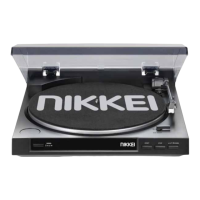

 To Next Page