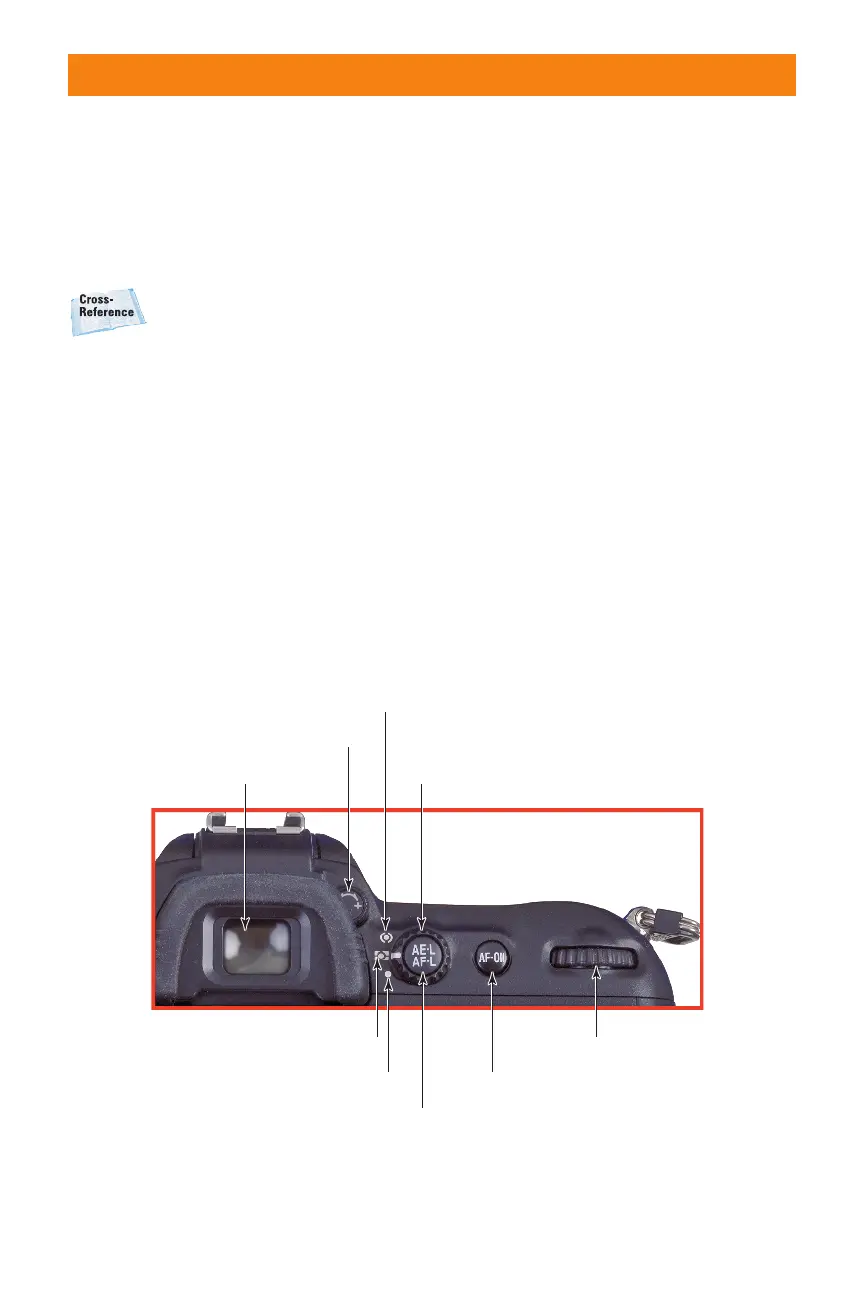
✦ AE/AF (autoexposure/autofocus)
lock. Depending on settings you
make in the Setup menu, pressing
this button will lock exposure,
focus setting, or both, either until
you release the button or press it a
second time.
For more on using the Setup
menu, see Chapter 3.
✦ Activate Autofocus. Press this
button to turn the autofocus sys-
tem on. It serves the same function
as partially depressing the shutter
release, and you can use it to lock
focus.
✦ Main command dial. This dial is
spun to change settings such as
shutter speed, bracketing, or shoot-
ing mode, depending on what
function button you press at the
same time.
Lower left
This is the D200’s hot corner, because it has
a collection of some of the function buttons
you’ll use frequently. They can each have
multiple functions, so you need to keep
your camera’s current mode (playback/
shooting, and so on) in mind when you
attempt to access a specific feature. A more
complete description of each button’s func-
tions appears later in this chapter. The but-
tons include:
✦ Playback. Use this button to enter
the picture review (playback)
mode.
✦ Menu. Use this button to access
the D200’s multilevel menu
system.
22 Part I ✦ Using the Nikon D200
Center-weighted metering
Metering mode dialViewfinder eyepiece
Diopter adjustment control
Autoexposure/Autofocus lock
Activate autofocusSpot metering
Matrix metering Main command dial
1.11 Key components on the upper-right corner of the back panel of
the D200.
06_037482 ch01.qxp 9/18/06 1:38 PM Page 22



 To Next Page