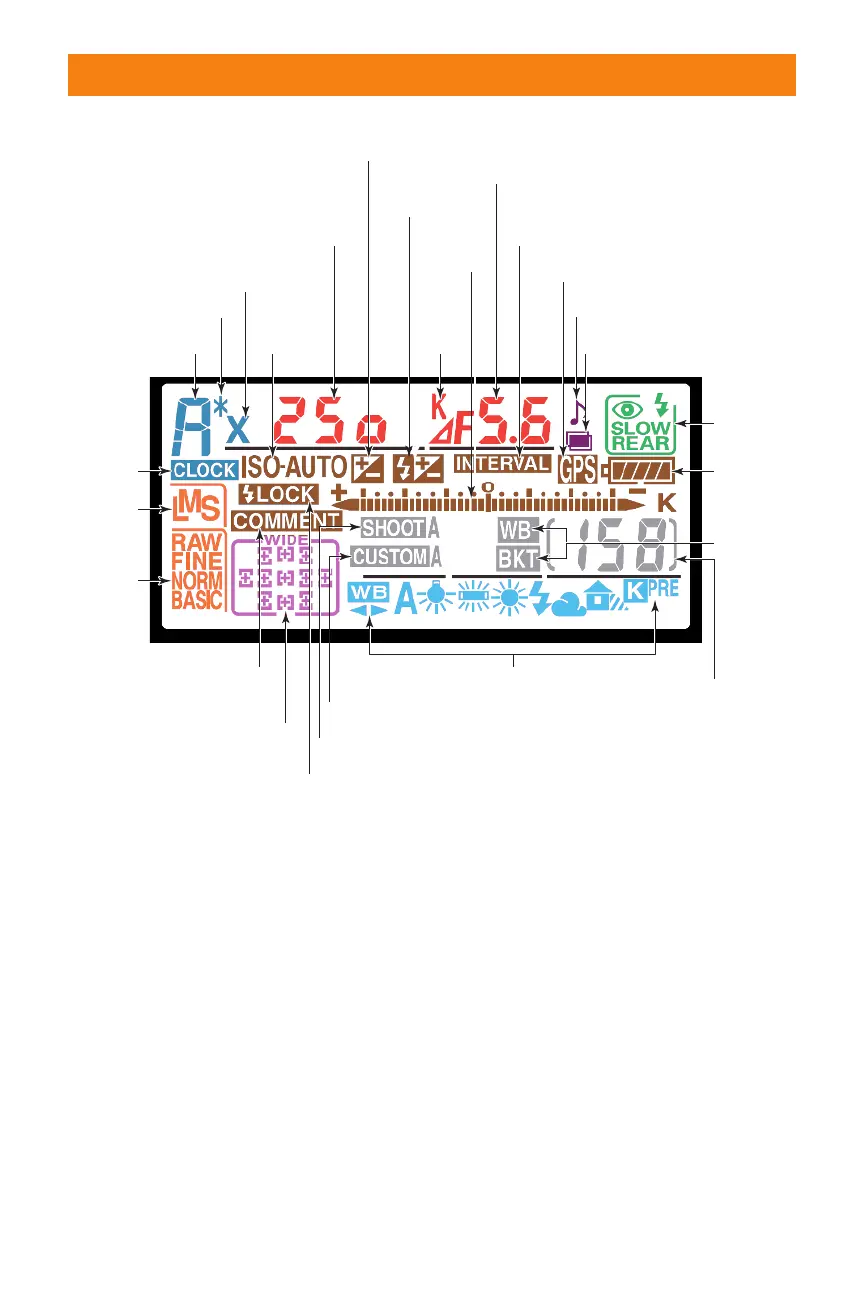
In magenta (bottom left):
✦ Focus area/Autofocus area
mode. Shows the currently selected
focus area and type of autofocus
operation in use. It also indicates
whether Wide Frame or Normal
Frame focus zones are used.
In light blue (bottom):
✦ White balance settings. Shows
whether white balance is being set
automatically, to one of the built-in
settings, or to a manually preset
value.
In gray (lower center):
✦ Shooting bank. Shows whether
shooting bank A, B, C, or D is
being used.
✦ Custom menu bank. Shows
whether custom menu bank A, B,
C, or D is being used.
✦ Bracketing: Shown when bracket-
ing is active.
✦ Exposures remaining/other
functions. Shows the number of
exposures remaining (a K appears
above the display if more than
28 Part I ✦ Using the Nikon D200
Exposure mode
Flexible
program indicator
Flash sync
Clock
not set
indicator
Image
size
Image
quality
Focus area/Autofocus area mode
White balance settings
Flash value lock
Image comment
indicator
ISO
sensitivity
Exposures remaining/Shots
remaining in buffer/PC connection
mode/Preset white balance recording
Custom menu bank
Shooting bank
Bracketing
Exposure
display
Battery
level
Interval timer indicator
Exposure
compensation
Flash
compensation
Flash
sync mode
GPS connection
Multiple exposures
Beep indicator
Aperture/Bracket increment/Shots per
interval/Maximum aperture (non-CPU lens)/
PC connection indicator
Color
temp-
erature
Shutter speed/Exposure
compensation value/Flash
compensation value/ISO sensitivity/
White balance fine tuning/Number
of shots bracketed/Number of
intervals/Focal length (non-CPU lenses)
1.16. Monochrome LCD readouts.
06_037482 ch01.qxp 9/18/06 1:38 PM Page 28



 To Next Page