II R6BHistogrom
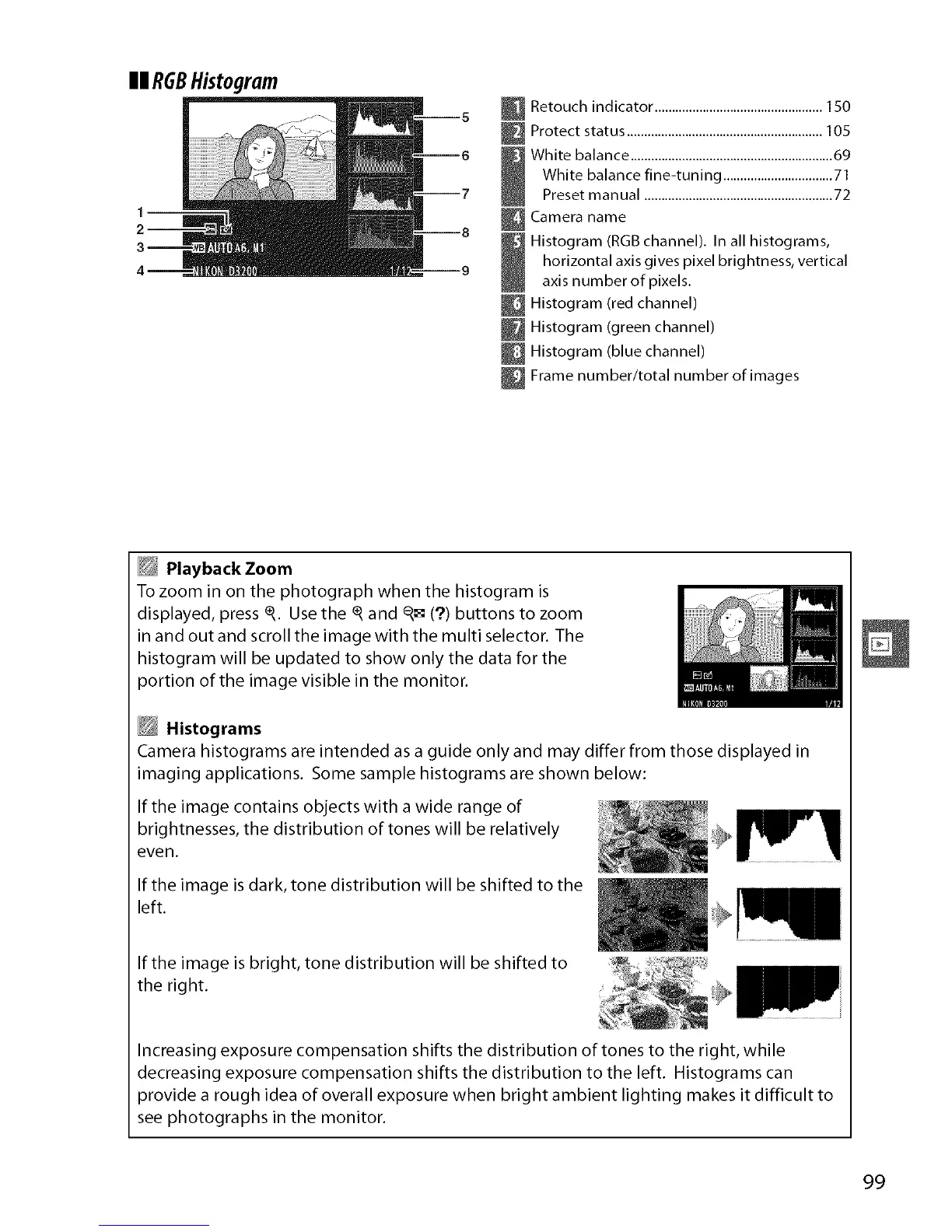
Retouch indicator ................................................. 150
_ Protect status .........................................................105
White balance ...........................................................69
White balance fine-tuning ................................71
Preset manual .......................................................72
Camera name
Histogram (RGB channel). In all histograms,
horizontal axis gives pixel brightness, vertical
axis number of pixels.
Histogram (red channel)
Histogram (green channel)
Histogram (blue channel)
_ Frame number/total number of images
Playback Zoom
To zoom in on the photograph when the histogram is
displayed, press _. Usethe _ and q_=(?) buttons to zoom
in and out and scroll the image with the multi selector. The
histogram will be updated to show only the data for the
3ortion of the image visible in the monitor.
Histograms
Camera histograms are intended as a guide only and may differ from those displayed in
tmagingapplications. Some sample histograms are shown below:
If the image contains objects with a wide range of
brightnesses, the distribution of tones will be relatively
eve n.
If the image isdark, tone distribution will be shifted to the
left.
If the image is bright, tone distribution will be shifted to
the right.
Increasing exposure compensation shifts the distribution of tones to the right, while
decreasing exposure compensation shifts the distribution to the left. Histograms can
3rovide a rough idea of overall exposure when bright ambient lighting makes it difficult to
see photographs in the monitor.
99



 To Next Page