Photo Information
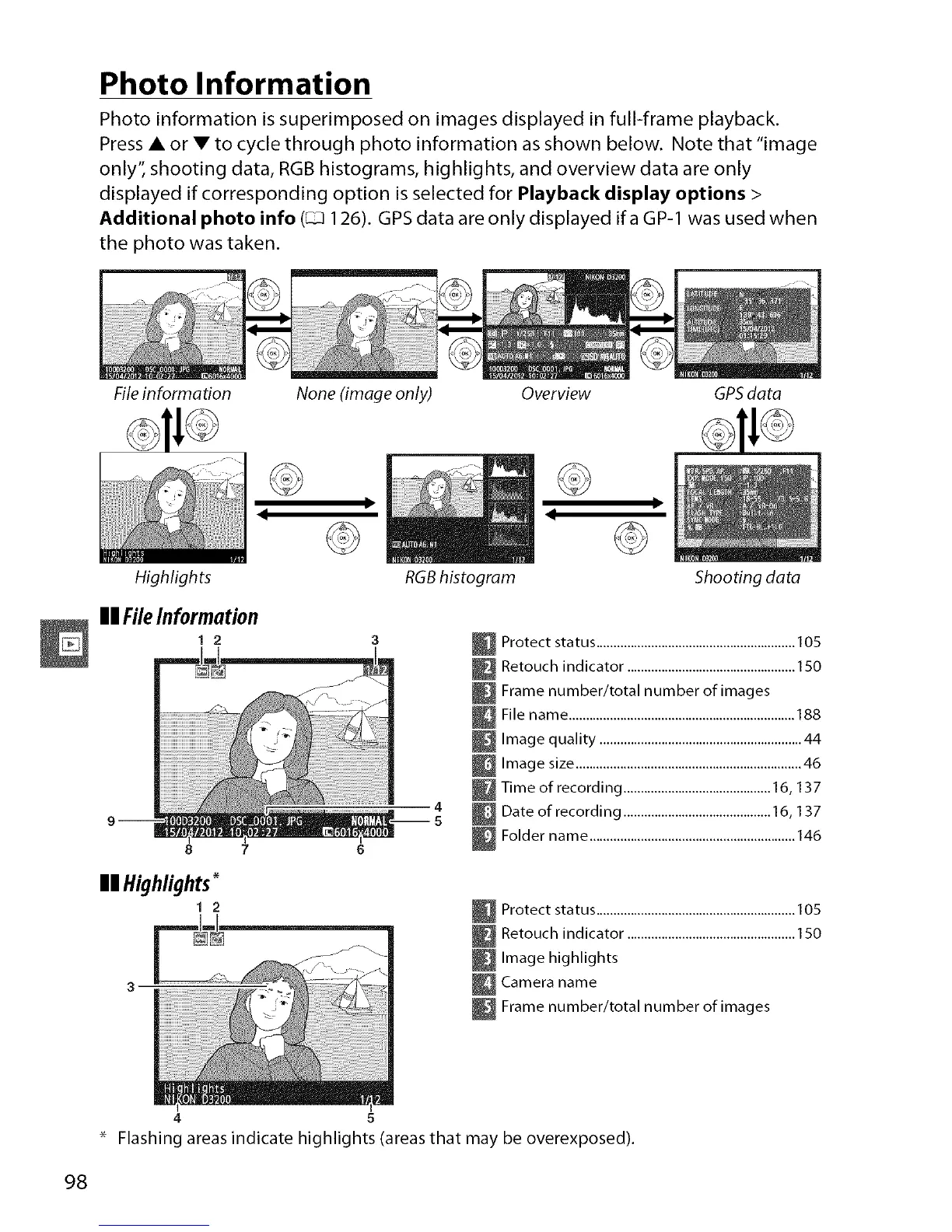
Photo information is superimposed on images displayed in full-frame playback.
Press • or • to cycle through photo information as shown below. Note that "image
only'; shooting data, RGB histograms, highlights, and overview data are only
displayed if corresponding option is selected for Playback display options >
Additional photo info (_ 126). GPSdata are only displayed ifa GP-1 was used when
the photo was taken.
File information None (image only) Overview GPS data
Highlights RGBhistogram Shooting data
II FileInformation
1 2
8 7
mmHighlights
t 2
_ Protect status ..........................................................105
_ Retouch indicator .................................................150
_ Frame number/total number of images
File name ..................................................................188
_ Image quality ...........................................................44
_ Image size ..................................................................46
Time of recording ........................................... 16, 137
Date of recording ........................................... 16, 137
_ Folder name ............................................................146
_ Protect status ..........................................................105
_ Retouch indicator .................................................150
Image highlights
_ Camera name
_ Frame number/total number of images
4 5
Flashing areas indicate highlights (areas that may be overexposed).
98



 To Next Page