EasyManua.ls Logo

Nikon D3300 - Page 63

Nikon D3300
541 pages
Print Icon
To Next Page IconTo Next Page
To Previous Page IconTo Previous Page
Loading...
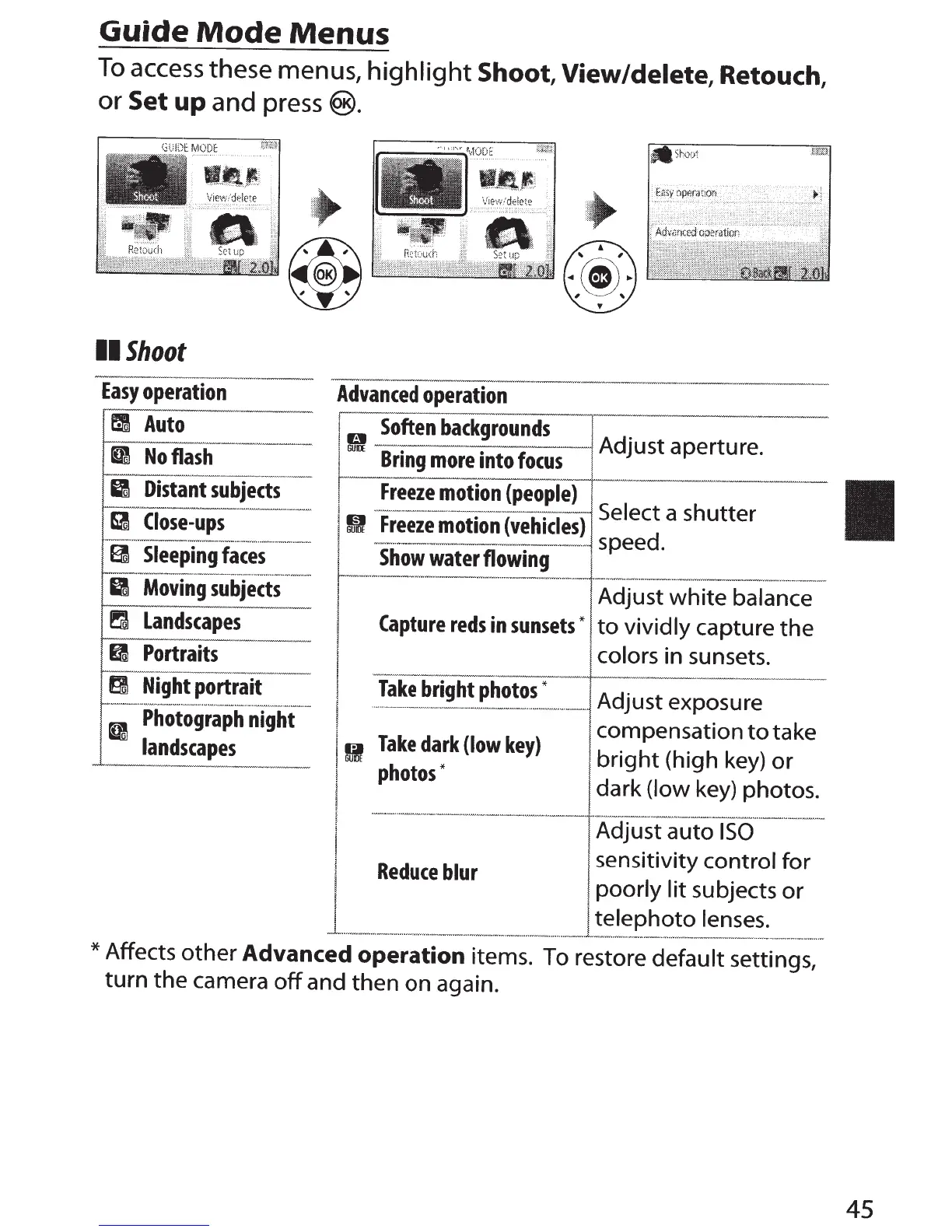
Guide
Mode
Menus
To
access
these
menus,
highlight
Shoot,
View/delete,
Retouch,
or
Set
up
and
press
®
.
..
lllj-~-
~
---d
II
Shoot
Easy
operation
tm
Auto
..
...
.__~
II
No
flash
II
Distant
subjects
I---·
·
·-··
-
~~
-~~
~
B
Close-ups
...
..............
.__
..........
~
...
~
........
...
~
..........
.
~~---~
.....
· ·
~·-·
E!
Sleeping
faces
-
·
---··
·--
~
.......-.
v~.~._..,.
.,.,.._.
,
_
II
Moving
subjects
~
Landscapes
II
Portraits
g
Night
portrait
1---
-··
···-
--
--·
-·-···
···-·
- --·-·····-·-·-·---
II
Photograph
night
landscapes
Advanced
operation
1
0
Soften
backgrounds
Adjust aperture.
I
Freeze
motion
(people)
h
i -
··
·
·•
Select a s
utter
I m
~~ez!
~Otl~n
(vehlcl
_
es)
speed.
i
GUo:
Bring
more
into
focus
L
Show
water
flowing
I
--·---·---·
·
-----
····
--
·
--
·-·
·-
-
AdJ~st
·~
-
h
ite
ba
Ia
nee
j
Capture
reds
in
sunsets
"
to
vividly capture
the
I colors in sunsets.
1
!.
..
!ak_!
br~gh~_Ph~~
-
~
--
-
~---·-
-
Adjust exposure
compensation
to
take
I
!I
Take
dark
(low
key)
bright
(high key)
or
1
photos
"
dark (low key) photos.
!
·
····
-
-·-·-·
·-
·-
·-
- - ·
---
- - ·
-·-
-·····
- -
··
----
·-
-·-
--
-···
·
--·
·-·-
!
Adjust auto
ISO
sensitivity control for
'
Reduce
blur
I
poorly
lit
subjects
or
I
telephoto
lenses.
~----··-····
····
··--·
·····
--
······--
·-
·······
-
·······
···--
·
·-
-
·-··
-
-~···
·
··--·
..
·
-·····-··-------·
-
*Affects
other
Advanced
operation
items. To restore default settings,
turn
the camera
off
and then
on
again.
45

Table of Contents

Other manuals for Nikon D3300

Related product manuals