EasyManua.ls Logo

Nikon D3300 - Page 67

Nikon D3300
541 pages
Print Icon
To Next Page IconTo Next Page
To Previous Page IconTo Previous Page
Loading...
Return
to
previous
display
View
help
~Qi':l
(?)
button
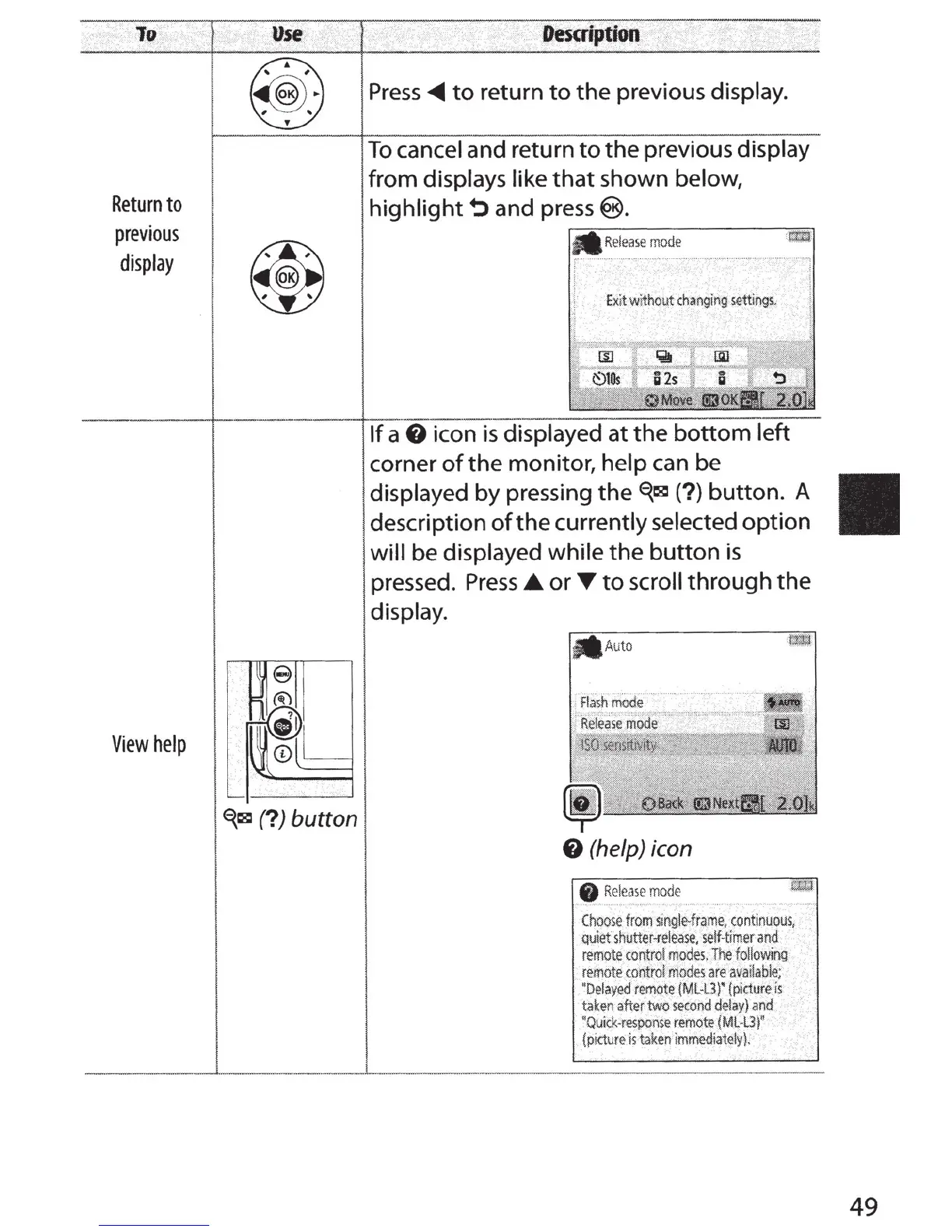
Press
<1111111
to return to the
previous
display
.
To
cancel
and
return
to the
previous
display
from
displays
like
that
shown
below,
highlight~
and
press~
.
Exit
without
changing
~ettings.
If a 8
icon
is
displayed
at the bottom left
corner
of
the monitor, help
can
be
displayed
by
pressing
the
~Qi':l
(?)button. A
description
of
the currently
selected
option
will
be
displayed
while the button
is
pressed.
Press
.A
or~
to
scroll
through the
display
.
8
(help)
icon
Choose
from
si
ngle-frame,
continuous.
quiet
shutter-release,
setf-timer
and
remote
contro
l
modes,
The
following
remote
control
modes
are
available;
"Delayed
remote
{Ml-L3)'
(picture
is
taken
after
two
second
delay}
and
"Quick-response
remote
{Ml·l3}
~
{picture
is
taken
immediately).
·
-------------
49

Table of Contents

Other manuals for Nikon D3300

Related product manuals