CHAPTER 1: THE D5000 TOP TEN LIST 19
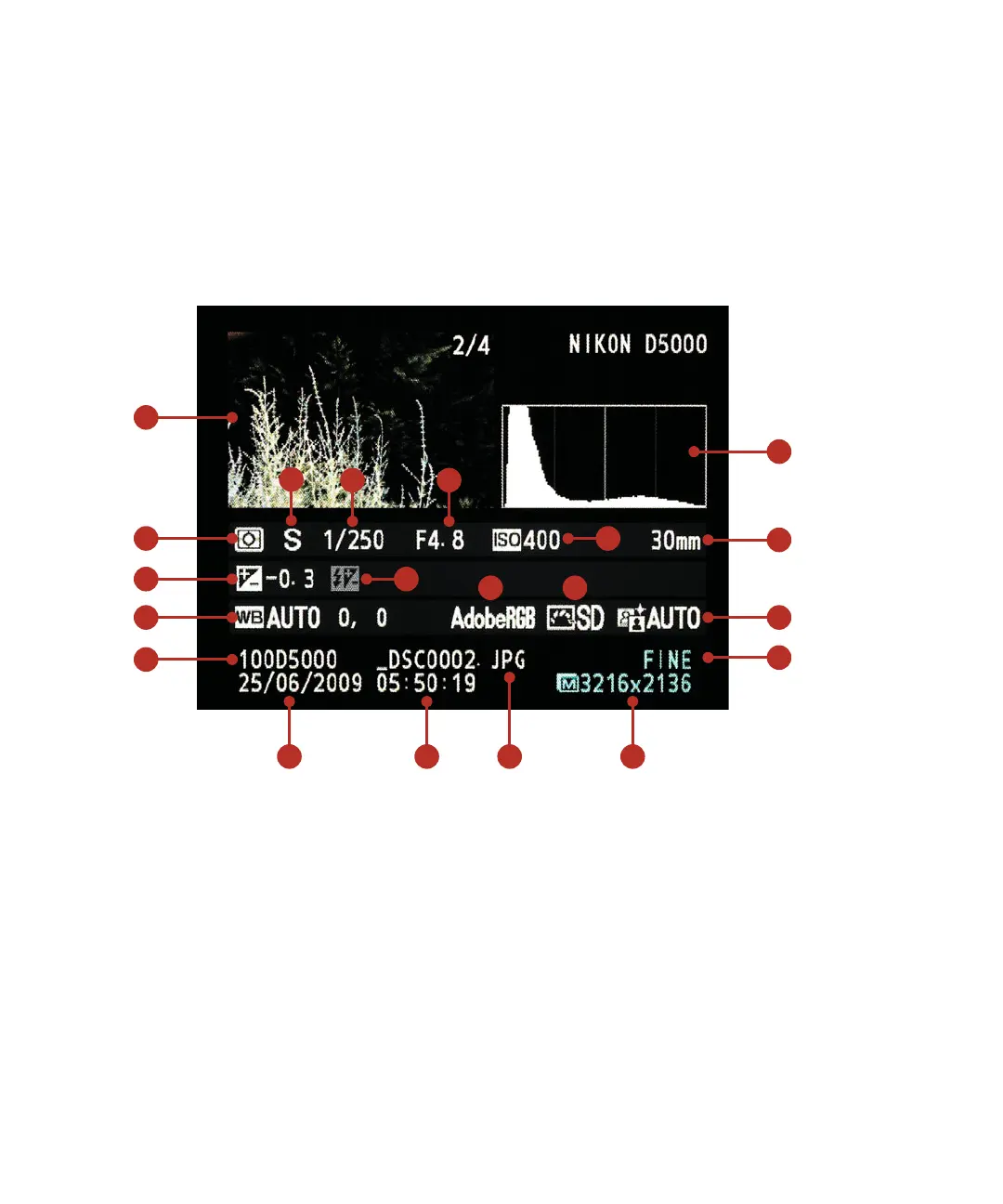
To get more visual feedback, press the Multi-selector up to display the second dis-
play view called Overview (Figure 1.6). This view mode not only displays the same
information as the default view, but also includes camera settings such as aperture,
shutter speed, lens length, white balance, exposure compensation, shooting mode,
ISO, white balance setting, picture control, quality setting, any compensation set-
tings, the active color space, picture control, and the D-lighting setting. The other
noticeable item will be the histogram, which gives you important feedback on the
luminance values in your image.
FIGURE 1.6
This display mode
gives you much
more information.
ML
I
C
J
G
N
T
A
K
O
P
FE
D
H
B
Q R S
A Image Thumbnail
B Histogram
C Meter Setting
D Camera Mode
E Shutter Speed
F Aperture
G ISO
H Lens Length
I Exposure Compensation
J Flash Compensation
K White Balance
L Color Space
M Picture Control
N Auto D-Lighting
O Folder Name
P Date
Q Time
R File Name
S Image Size
T Quality Setting



 To Previous Page