Chapter 1 ✦ Exploring the Nikon D60 25
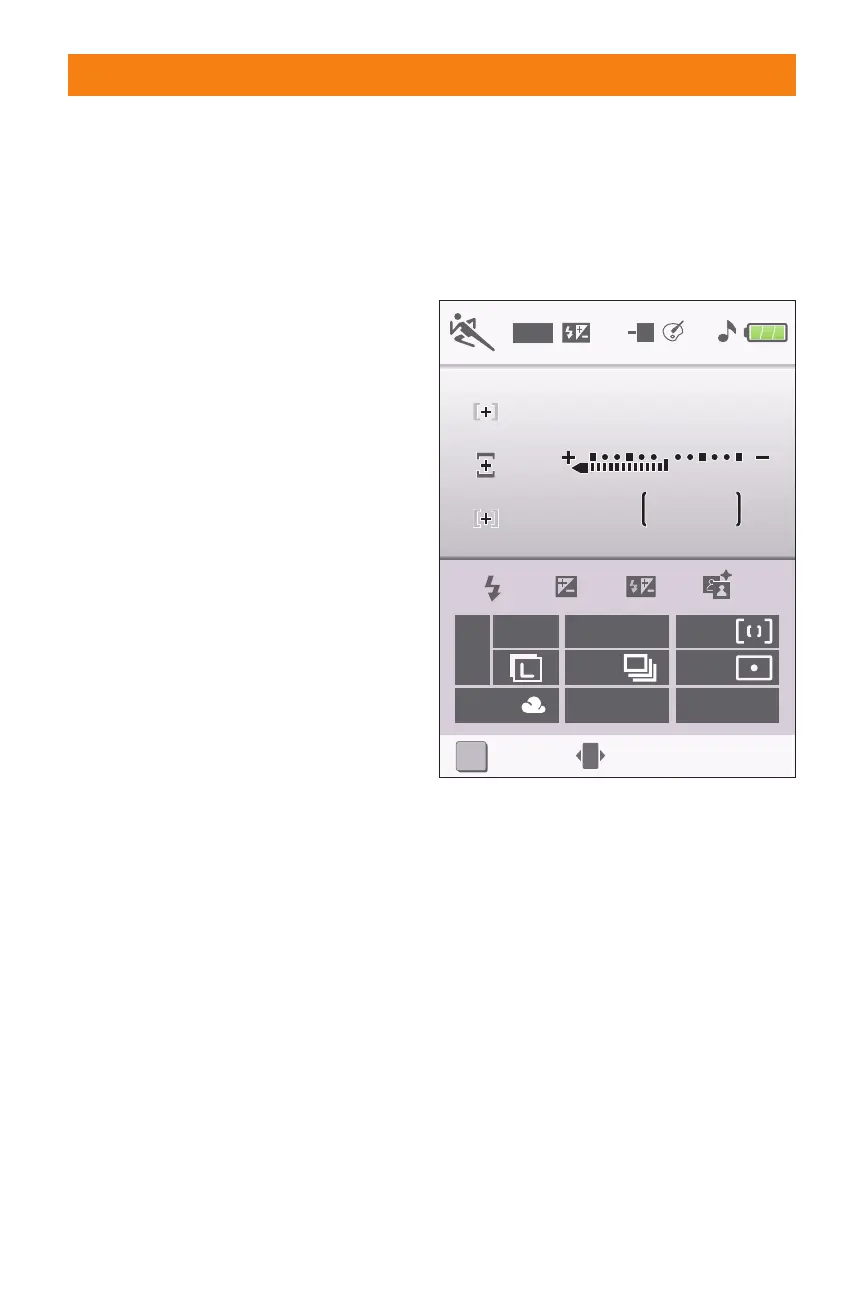
✦ Focus point display/AF-area
mode. This indicates which focus
point is currently active. This also
shows the AF-area mode currently
in use.
✦ Battery indicator. This shows you
the remaining charge on your
battery.
✦ Beep indicator. This icon tells you
whether you have the camera set
to beep when focus is achieved.
✦ Optimize image indicator. This
option lets you know which
Optimize image setting your cam-
era is currently set to. The options
are Normal (N), Softer (SO), Vivid
(VI), More vivid (VI*), Portrait (PO),
Black-and-white (BW), or Custom.
✦ ISO auto indicator. When this
icon is shown the camera is set to
Auto ISO.
✦ Manual flash control indica-
tor/Flash compensation for
optional Speedlight indicator.
When this is displayed the cam-
era’s built-in flash is being set
manually. This icon also appears
when an optional Speedlight is
attached and FEC has been set.
✦ Date imprint indicator. This icon
is shown when the optional date
imprint function is applied. This
function prints the date at the bot-
tom of the image as it’s being
recorded.
OFF
DATE
ISO
-2.0
AUTO
SLOW
-2.0
A
PO
32
K
1
/125
F5.6
?
Set
i
QUAL
FINE
100
AF-A
WB
ISO
0
1.9 LCD display Tall (portrait) orientation
06_383124 ch01.qxp 6/4/08 10:05 AM Page 25



 To Next Page