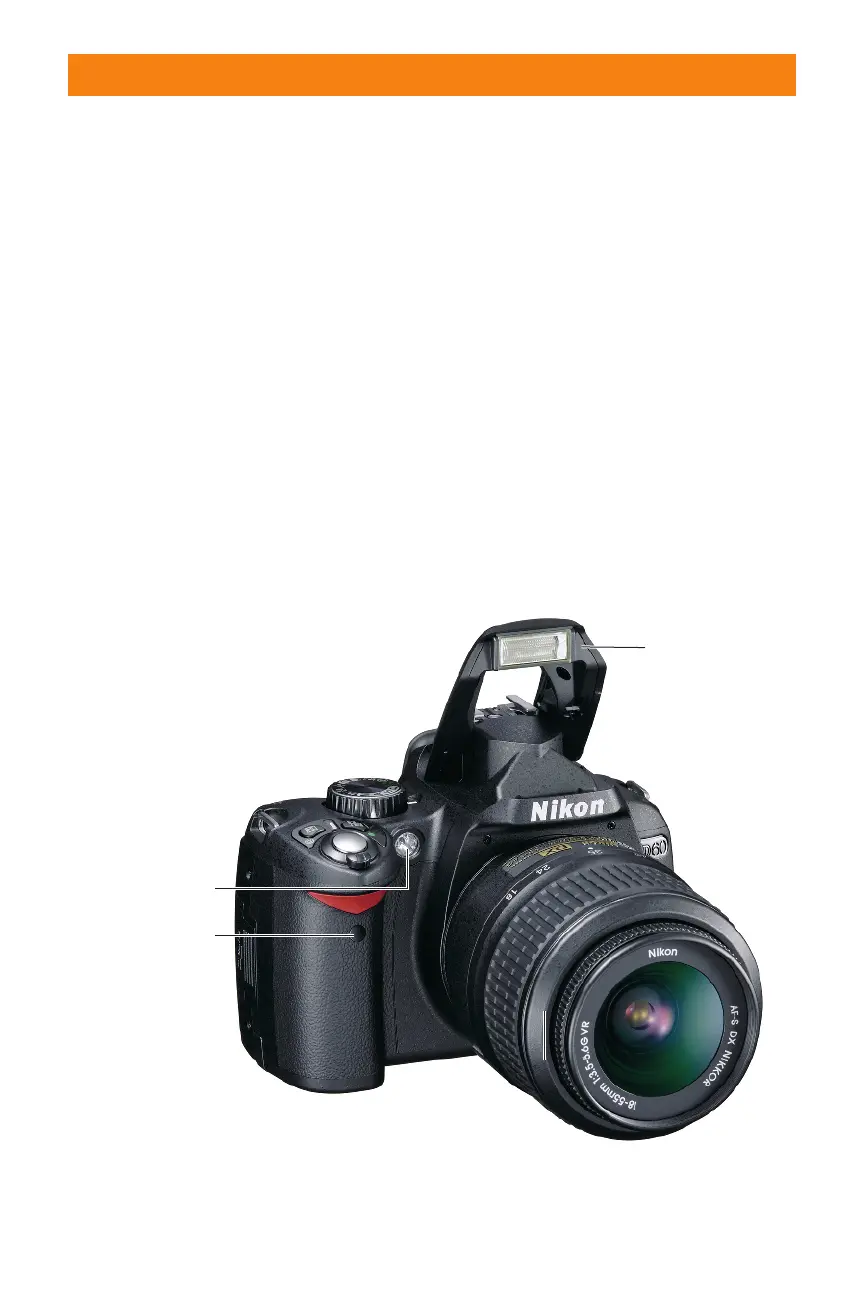
✦ Lens Focus mode selector. This
switch is used to choose between
using the lens in Auto or Manual
focus.
✦ VR switch. If your lens features
Vibration Reduction (VR) technol-
ogy, this switch allows you to turn
the VR on or off. When shooting in
bright light it’s best to turn the VR
off to reduce battery consumption.
✦ Built-in flash. This option is a
handy feature that allows you to
take sharp pictures in low-light sit-
uations. Although not as versatile
as one of the external Nikon
Speedlights such as the SB-800 or
SB-600, the built-in flash can be
used very effectively and is great
for snapshots.
✦ AF-assist illuminator. This is an
LED that shines on the subject to
help the camera focus in dim light-
ing. The AF-assist illuminator only
lights when in Single focus mode
(AF-S) or Automatic focus mode
(AF-A).
✦ Infrared receiver. This allows you
to wirelessly control the camera’s
shutter release using the optional
ML-L3 infrared transmitter.
Sides and bottom of
camera
The sides and bottom of the camera have
places for connecting and inserting things
such as cables, batteries, and memory cards.
18 Part I ✦ Using the Nikon D60
Built-in flash
F-assist illuminator
Infrared receiver
VR switch
Image courtesy of Nikon, Inc.
1.4 Left front camera controls
06_383124 ch01.qxp 6/4/08 10:05 AM Page 18



 To Next Page