287
n
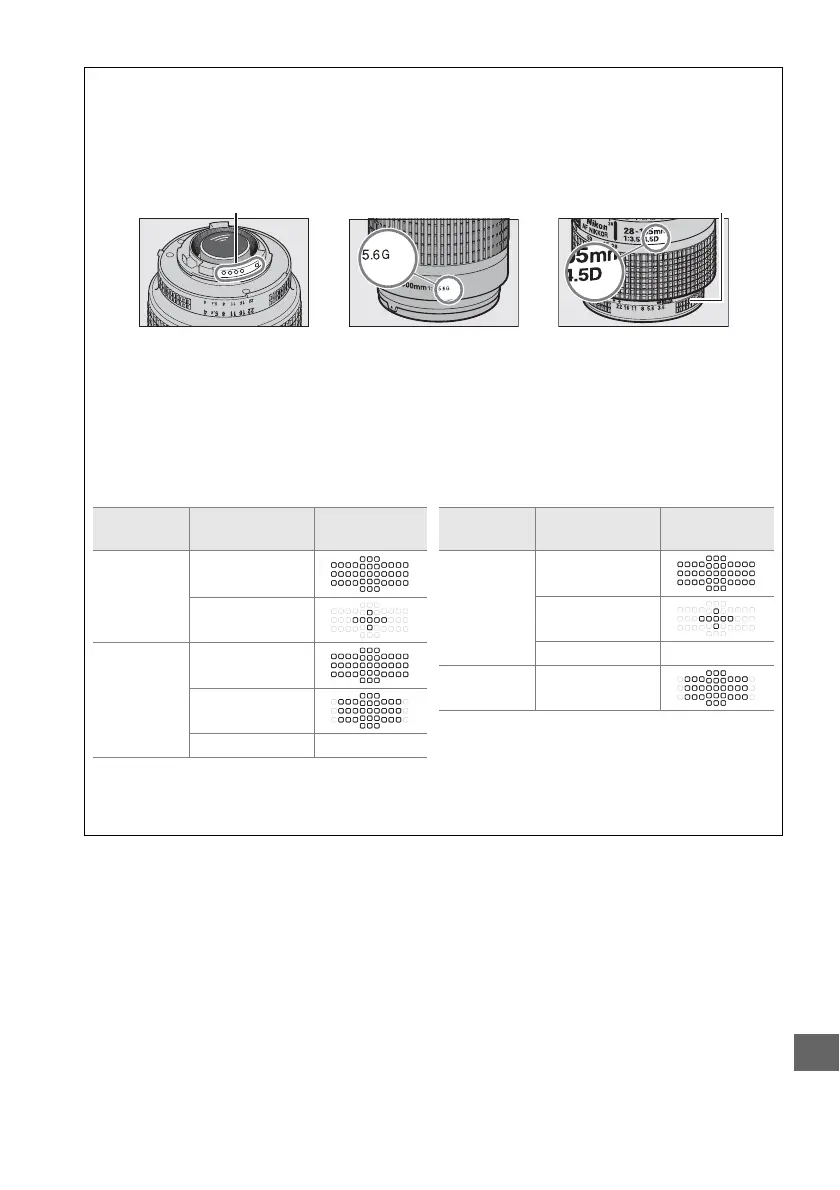
A Recognizing CPU and Type G, E, and D Lenses
CPU lenses (particularly types G, E, and D) are recommended, but note that IX-NIKKOR lenses
can not be used. CPU lenses can be identified by the presence of CPU contacts, type G, E, and
D lenses by a letter on the lens barrel.
Type G and E lenses are not equipped with a lens
aperture ring.
A AF-S/AF-I Teleconverters
The table below shows the focus points available for autofocus and electronic rangefinding
when an AF-S/AF-I teleconverter is attached. Note that the camera may be unable to focus
on dark or low-contrast subjects if the combined aperture is slower than f/5.6. Autofocus is
not available when teleconverters are used with the AF-S VR Micro-Nikkor 105mm f/2.8G
IF-ED.
1 Focus data for focus points other than the center focus point are obtained from line sensors.
2 Single-point AF is used when 3D-tracking or auto-area AF is selected forAF-area mode (0 99).
3 Autofocus not available.
Aperture ring
CPU lens Type G/E lens Type D lens
CPU contacts
Accessory
Maximum aperture
of lens
Focus points
TC-14E,
TC-14E II
f/4 or faster
f/5.6
TC-17E II
f/2.8 or faster
f/4
f/5.6 —
1
2
3
TC-20E,
TC-20E II,
TC-20E III
f/2.8 or faster
f/4
f/5.6 —
TC-800-1.25E
ED
f/5.6
Accessory
Maximum aperture
of lens
Focus points
1
3
2



 To Next Page