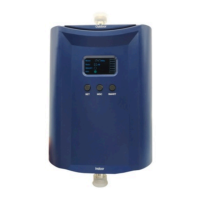
The Nikrans LCD-500GD is a dual-band mobile signal booster designed to enhance weak GSM signals at 900 MHz and 1800 MHz frequencies simultaneously. This model incorporates the latest signal amplification technologies, featuring an informative LCD screen, sleep mode, and automatic gain adjustment. A distinctive characteristic of this dual-band repeater is that it comes with two indoor antennas in a set, which can be connected to the repeater concurrently.
Function Description:
The Nikrans LCD-500GD serves as a solution for improving cellular signal reception in medium-sized areas up to 500 m² (5400 ft²), such as offices, parking lots, supermarkets, and private homes. The 900 MHz frequency is a standard for GSM signal transmission, while 1800 MHz is used by providers across Europe, and in some regions, it is the primary GSM frequency. This makes the LCD-500GD an optimal choice for users with mobile providers operating on different frequencies.
The signal booster operates with two antennas: an Outdoor antenna and an Indoor antenna. The Outdoor antenna receives signals from the base station (BS) and transmits them via cable to the Signal Booster, where they are amplified. The amplified signals are then re-transmitted by the Indoor antenna throughout the coverage area. Conversely, when a cellular device picks up a signal from the Indoor antenna, the Signal Booster amplifies it and transmits it back to the BS via the Outdoor antenna. The booster will only function if there is an adequate signal to amplify.
Usage Features:
The Nikrans LCD-500GD boasts several innovative features for enhanced user experience:
- LCD Screen: Displays indoor and outdoor signal levels, aiding in setup. It also provides error messages with causes and solutions, along with installation tips.
- Sleep Mode: The system conserves energy by entering sleep mode during inactive periods. The LCD display turns off, but the amplification system continues to function. Pressing any button will reactivate the screen.
- Automatic Level Control (ALC) / Automatic Gain Control (AGC): The booster automatically adjusts its gain based on the incoming signal strength, eliminating the need for manual regulation.
- High-Tech Design and Compactness: The device features a smart LCD screen, attractive white casing, and a compact size, making it suitable for any interior.
Important Technical Specifications:
- Indoor coverage: 500 m²
- Up-link frequency: 890-915 & 1710-1785 MHz
- Down-link frequency: 935-960 & 1805-1880 MHz
- Up-link gain: 67 dB
- Down-link gain: 75 dB
- Power-output: Input AC90~264V, output DC5V/2A
- Operating temperature: -25/+55 °C
- Humidity: 5-95%
- Dimensions (mm): 18114233mm
- Booster weight: 1.2 kg
- dBm: 17 dBm
Installation Requirements:
- Location: The repeater should be installed indoors in a cool, dry, and ventilated room free from erosive gas or smoke, or on a cool and ventilated wall to ensure proper heat dissipation.
- Height: Installation height should allow for proper RF cable wiring, heat dissipation, and maintenance.
- Power Supply: An independent and stable AC 100~264V / 50±5Hz power supply is required.
- Antenna Placement:
- Outdoor Antenna: Should be installed on the roof or another location within the mobile coverage zone where the mobile signal is strong (at least three to four bars). It must be fixed straight and its connectors waterproofed. Optimal placement involves testing signal strength at various points (A to E) to find the best signal.
- Indoor Antenna: Should be 10-15 meters away from the outdoor antenna, at least 2 meters above the ground, and fixed vertically. Omni (ceiling or whip) antennas are suitable for central placement, radiating in all directions. Directional panel or Yaggi antennas are better for long, narrow areas (corridors, tunnels, etc.).
- Isolation: Proper isolation between the outdoor and indoor antennas is crucial to prevent self-oscillation. A minimum distance of 15 meters between antennas is recommended. Using building structures (roof, walls) as barriers can enhance isolation.
- Cables: Cables should be kept straight, not wound, and shortened to the acceptable maximum to avoid signal loss. RF cables should be placed separately from power cables. All connections must be tight and waterproofed for outdoor parts.
- Lightning Protection: In thunderstorm-prone areas, a lightning surge protector is highly advisable, installed in-line between the outdoor antenna and the repeater. The protector diverts excess voltage to a grounding wire, protecting the equipment.
Maintenance Features:
The device includes an internal self-test function. If signal reception problems are detected, an arrow will appear on the LCD screen, and pressing the Page Down button will display possible solutions. These solutions may include adjusting the outdoor antenna's position or direction, or avoiding obstacles. If the system detects self-oscillation due to insufficient isolation between antennas, it will automatically adjust the system gain. If the system indicates "Device was damaged," contact customer service for repair.
Troubleshooting and Solutions:
- Weak Input Signal: If the LCD shows "Input signal weak," solutions include directing the outdoor antenna towards the nearest base station, raising the outdoor antenna, or repositioning it to avoid obstacles.
- Insufficient Antenna Separation: If the LCD shows "Receive and Relay antennas distance too close," ensure antennas are at least 15 meters apart and not facing each other directly.
- Bad Isolation: If the LCD shows "The antennas isolation become worse," the device is adjusting automatically; no user action is needed.
- Device Damage: If the LCD shows "Device was damaged," contact customer service.
- Signal Fluctuations/No Connection: Check for loose or incorrect cable connections. If signals from other operators are too strong, adjust the outdoor antenna's direction or use barriers to block unwanted signals.
- Slow/Intermittent Connection: Check indoor antenna position, cable connections, and adjust indoor antenna direction for optimal signal reception.
The Nikrans LCD-500GD is certified with CE and RoHS, confirming its compliance with international quality and safety standards. It also adheres to ISO 9001:2008 standards for product development.

 Need help?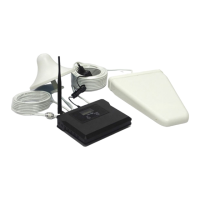

 To Next Page
 General