EasyManua.ls Logo

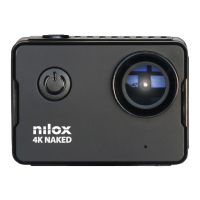
Nilox 4K NAKED - User Manual

Nilox 4K NAKED
32 pages
Print Icon
To Next Page IconTo Next Page
Loading...
nilox.com
Question and Answer IconNeed help?

Do you have a question about the Nilox 4K NAKED and is the answer not in the manual?

Summary

User Manual Overview

Precautions and Safety

Essential guidelines for safe and correct camera usage to prevent damage.

Camera Interface and Buttons

Details physical components, buttons, and their functions for operation.

Video and Picture Modes

Video Recording Modes

Explains normal, interval, loop, and time-lapse recording methods.

Picture Taking

Guide to entering picture mode and capturing photos.

SD Card Recommendations

Specifies 'Class10' SD card for optimal 4K/2.7K performance.

Navigation and Settings

Shortcut Controls

Utilize touch screen shortcuts for quick access to various recording modes.

Playback and File Management

Browse, play, and delete recorded files and media.

Menu System Access

Navigate through menu icons to access Video, Picture, or System settings.

Advanced Settings and Connectivity

Picture and System Menus

Configure image, shooting, system parameters, language, and date/time.

Wi-Fi Setup and Use

Install app, connect to Wi-Fi, and control camera remotely via smartphone.

HDMI Connection

Connect the camera to an HDMI-compatible TV for viewing.

Accessories, Safety, and Support

Remote Control

Operate camera functions using the provided remote control.

Security and Warranty

Safety precautions, warranty terms, and conditions for use.

Recycling and Technical Support

Information on product recycling and how to contact technical assistance.

Summary

User Manual Overview

Precautions and Safety

Essential guidelines for safe and correct camera usage to prevent damage.

Camera Interface and Buttons

Details physical components, buttons, and their functions for operation.

Video and Picture Modes

Video Recording Modes

Explains normal, interval, loop, and time-lapse recording methods.

Picture Taking

Guide to entering picture mode and capturing photos.

SD Card Recommendations

Specifies 'Class10' SD card for optimal 4K/2.7K performance.

Navigation and Settings

Shortcut Controls

Utilize touch screen shortcuts for quick access to various recording modes.

Playback and File Management

Browse, play, and delete recorded files and media.

Menu System Access

Navigate through menu icons to access Video, Picture, or System settings.

Advanced Settings and Connectivity

Picture and System Menus

Configure image, shooting, system parameters, language, and date/time.

Wi-Fi Setup and Use

Install app, connect to Wi-Fi, and control camera remotely via smartphone.

HDMI Connection

Connect the camera to an HDMI-compatible TV for viewing.

Accessories, Safety, and Support

Remote Control

Operate camera functions using the provided remote control.

Security and Warranty

Safety precautions, warranty terms, and conditions for use.

Recycling and Technical Support

Information on product recycling and how to contact technical assistance.

Nilox 4K NAKED Specifications

General IconGeneral
Video Resolution4K
Wi-FiYes
WaterproofUp to 30 meters with case
Battery Life90 minutes
Screen size2 inches
Lens170° wide-angle

Related product manuals