HOW TO USE THE BICYCLE
The Assisted Pedaling
This electric bicycle is equipped with an "assisted pedaling system (PAS)", consisting of a motor, a battery and a
pedaling sensor.
It is important to know that when the system is on, the engine undertakes to supply energy only while you are
pedaling. When you stop pedaling, the motor switches off and the electrical assistance for pedaling is missing.
In all pedal-assisted bicycles, in addition, the engine switches off and the electrical assistance stops when the
maximum speed allowed for electric bicycles of 25 km / h is reached.
When the speed drops below this value, the electrical assistance starts again until you stop pedaling.
Even if the brakes are used, the electrical assistance stops.
Switch on the bicycle
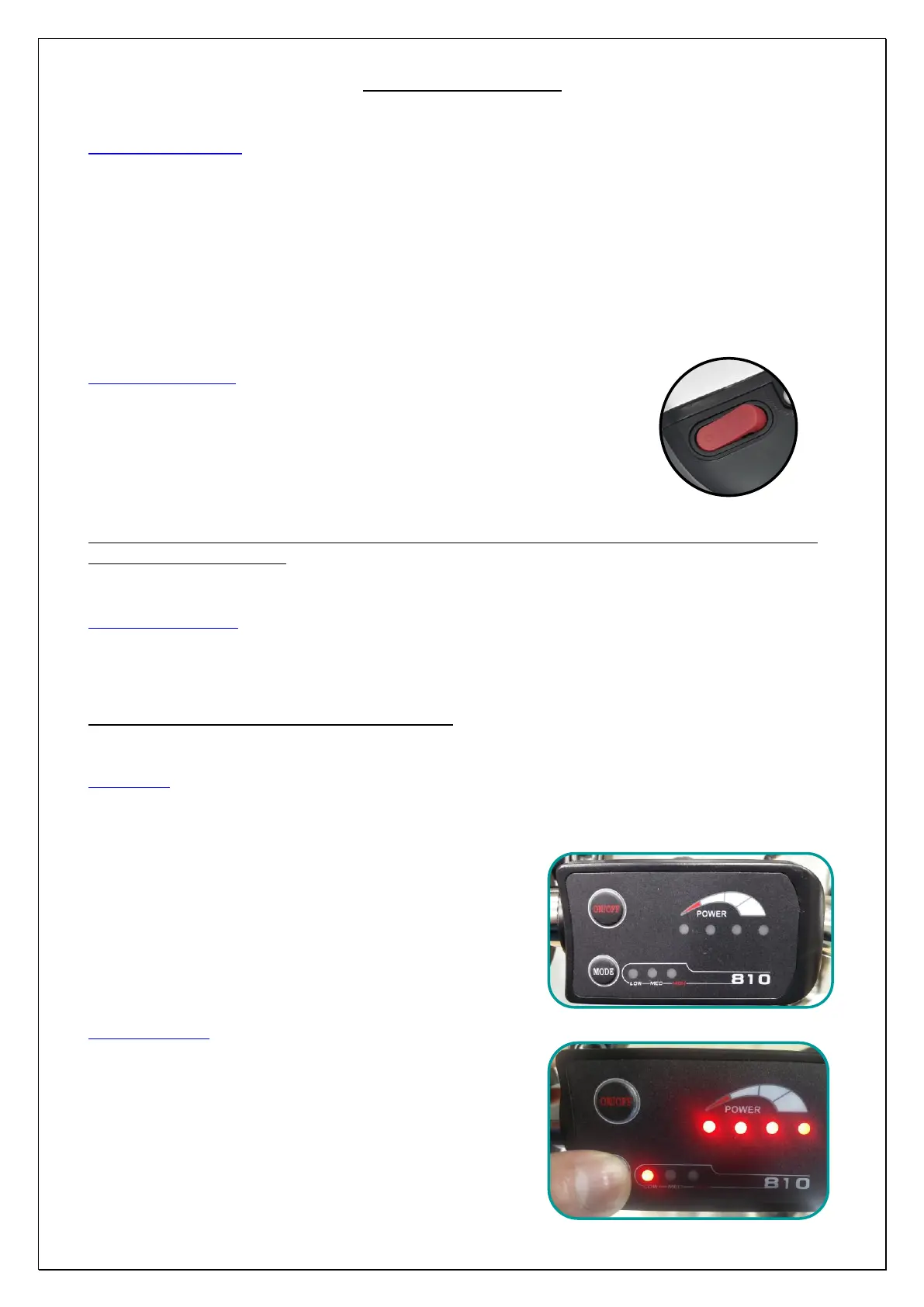
Switch on the bicycle by the button on the battery (Pic. 15) and then press
the ON / OFF button on the display on the handlebar to activate the engine.
Start pedaling to activate pedal assistance.
We recommend that you start slowly and gradually increase your pedaling speed.
YOU ARE USING AN ASSISTED PEDAL BIKE, therefore the engine only starts pedaling. Stopping pedaling
or braking stops the engine.
Switch off the bicycle
Switch off the bicycle the ON / OFF button on the display on the handlebar and then press the button on the battery
(Pic. 15).
Be sure that the bike is off when you are not riding.
The Display
On the display on the handlebar you can turn on the bicycle, check the level of battery charge and choose the pedal
assistance (Pic. 16).
7. Power button "ON / OFF"
8. "MODE" button to choose the assistance level
9. Low pedal assistance at 60%
10. Medium pedal assistance at 80%
11. High pedal assistance at 100%
12. Battery charge status
Display functions
Turning on the engine using the "ON / OFF" button activates the
pedal assistance system. The assistance level is reset to "LOW"
(Pic. 17)
To change it: start pedalling and stabilize your speed; press the
"MODE" button on the display to bring the assistance to the
"MEDIUM" level (Pic. 18). Press the "MODE" button again to get to
the "HIGH" level (Pic. 19). Press the "MODE" button again to return
to the "LOW" level (Pic. 20).


 To Next Page