UK
MAN372 User’s guide
MAN372 is a new product with the patent of code setting which is invented by our engineers. You can input the
numeric keys (0-9) for the code required directly, visual and convenient, quick and efcient. It has clock accurate,
timer on and off, room temperature display, conversions between Celsius and Fahrenheit degree, Sleep function,
code memory and also has unique function of “intelligent cooling” “intelligent heating”. So it is your best choice.
Please read this manual carefully before using, which will be a great help for you to use the remote control.
The remote control can be used after setting. Pull side cover of remote control down, put 2 AAA (VM-4, R03)
batteries as per polar indicated on battery cabin.
Patent code set up
Find out the codes from code table, there are many groups codes of each brand. Please try the rst group, if it
does not operate your equipment, try the second, and do it like this until the codes can operate your equipment
Ex: ALPIN, you can choose 0252, if it does not work, please try the 0253 etc.
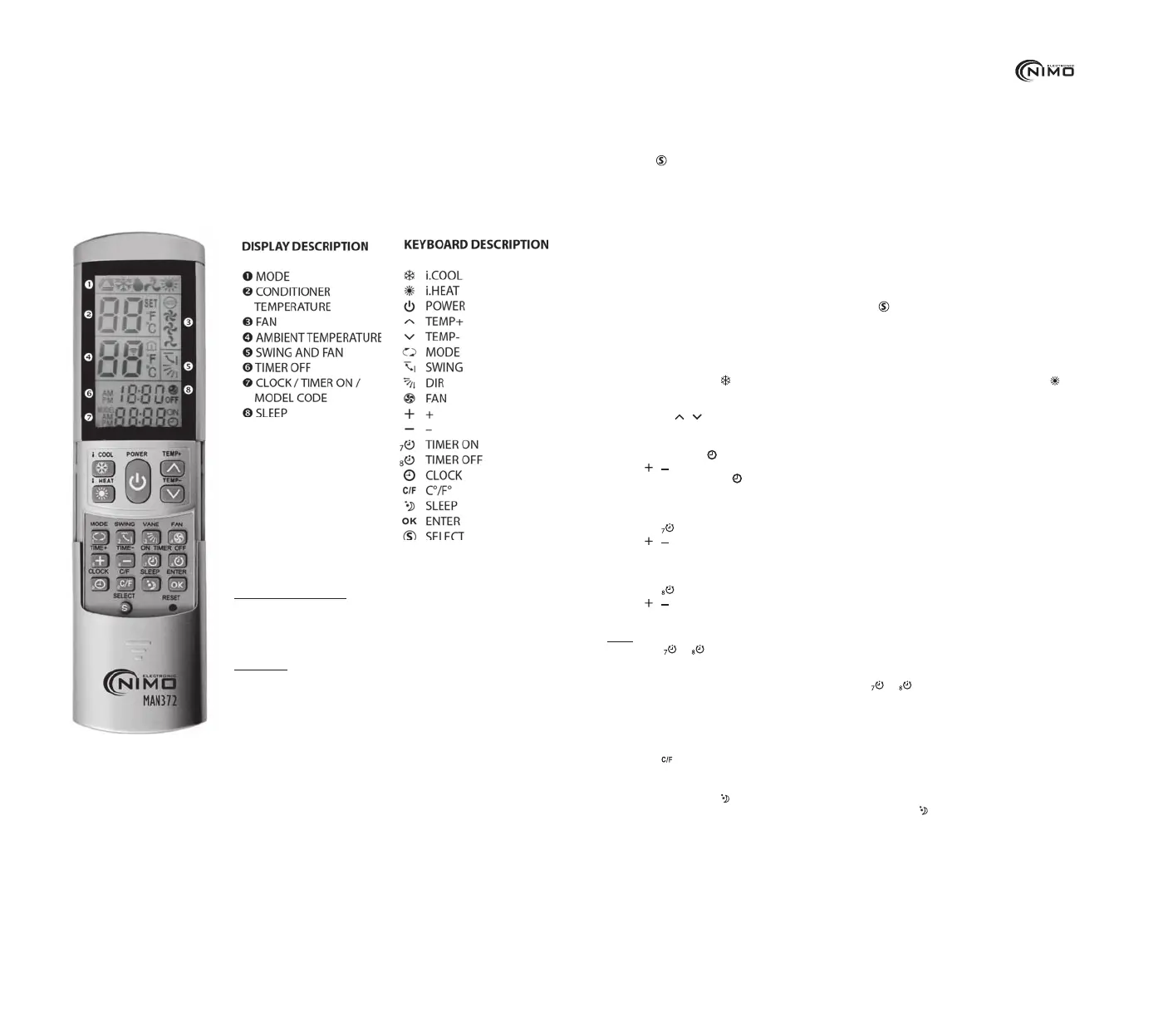
Press the
SELECT key, the code on LCD will ash. Enter the 4 digit code in tum. Ex: “0252”, press the “0” key,
“0” stop ashing, the last three numbers ashing, then press the “2” key, the last two numbers ashing, and press the
“5” key, the last number ashing, nally press the last number “2”, all of the 4 digit code “0252” stop ashing, code
entry is now complete. The remote control conrms the code automatically, and you can use the numeric key
normally. You can operate your air conditioner now.
After the air conditioner on, try other function keys, if they do not work well, please choose the next group of
code until all the functions can work. The remote control is 2000 codes in one, so it is invalid when the code
greater than 1999.
Auto-search code setting
If you do not know the brand of your air conditioner, or if your brand is not listed in the code table, please
operate as per following steps:
1. Put the remote control aim at your air conditioner, press the
“SELECT” key for 5 seconds and then release,
remote control is entering the auto-search status, emit the signal continuously, the code ashes and increases.
While the air conditioner receives the signal, and send one buzzer, press any key to conrm.
2. Try other function keys, if they do not work, repeat above steps until it is correct.
Using of “intelligent Cooling” “intelligent heating”
In the summer, press the only, the air conditioner will be cooled immediately. In the winter, press the key only,
the air conditioner will be heated immediately. In both status, the air conditioner will let the heating and cooling in a
comfortable temperature automatically, and the fan and swing are all automatic. At the same time, it also can adjust the
temperature by
/ keys as your requires. These two intelligent keys are very good for the children and the old.
Clock set up
1. Press the “time” key, signal ashes.
2. Press
/ . 2 key, adjust to the current time.
3. Press the “time” key again,
signal stop ashing, the time setting nishes. (If you do not press the “time” key, it
also nishes automatically after 15 seconds)
Timer on
1. Press the key,the time on LCD ashes
2. Press
/ . key,adjust the time when you want to make the air conditoner turn on automatically
3. Time on LCD will stop ash after 15 seconds.Setting is complete
Timer off
1. Press the key,the time on LCD ashes
2. Press / . key,adjust the time when you want to make the air conditoner turn off automatically
3. Time on LCD will stop ash after 15 seconds.Setting is complete
NOTE
If press the
or
key twice, timer is cancel.
After timer setting is nished, you should make the remote control’s emit directs to your air conditioner’s
receiving location in available distance. If not, it can not work.
If you want to watch the time of timer, you should press the
or key, the LCD will display the time of timer
and after 5 seconds it will display current time.
Room temperature display
1. Press “Room T” key, it shows current room temperature and as a thermometer
2. Conversions between Celsius and Fahrenheit degree
3. Press the
key can convert the display between Fahrenheit and Celsius degree.
Sleep function
In the summer, press the key while it is in cool mode, the temperature will be raised 1 ºC per hour in the rst
2 hours and will be shut off by itself after 8 hours. In the winter, press the
key while it is in heat mode, the
temperature will be fall 1 °C per hour in the rst 2 hours and will be shut off by itself after 8 hours. After setting
sleep function, please let remote aim at the receiver of your air conditioner in the effective distance, otherwise the
function of “SLEEP” is null.
ATTENTION
• If it is not used for a long time, remove the battery to avoid leakage liquid of
the battery to damage the machine. When the LCD looks dim, please change
batteries. (New and old batteries can not be used together) After the batteries
are replaced every time, it is not necessary to set model code again.
• As usual the LCD only display the time when pressing model codes “Enter” key,
you can nd the code and it is showed on LCD. After 5 seconds it returns time.
• Check carefully that there is no remora between remote controller and Air con-
ditioner when the time on/off doesn’t work. Because the operation is effective only
when the air conditioner receives the timer on/off signal from remote controller.
• The manufacturer keeps the right to change the parameter and function of product.
TECHNICAL PARAMETERS
• Controllable distance: Large than 8 meters Power supply voltage: DC 3 V
• Battery model: Battery AAA(UM-4, R03) X 2
• Dimension: L165mm x W55mm X D25mm
• Weight: Approx100g(excl.the batteries)


 To Next Page
 Loading...