13
Operating Instructions - GALAXY VISITOR 3 RTF FTR 2.4 GHz No. NE2529M2
No. NE2529M1
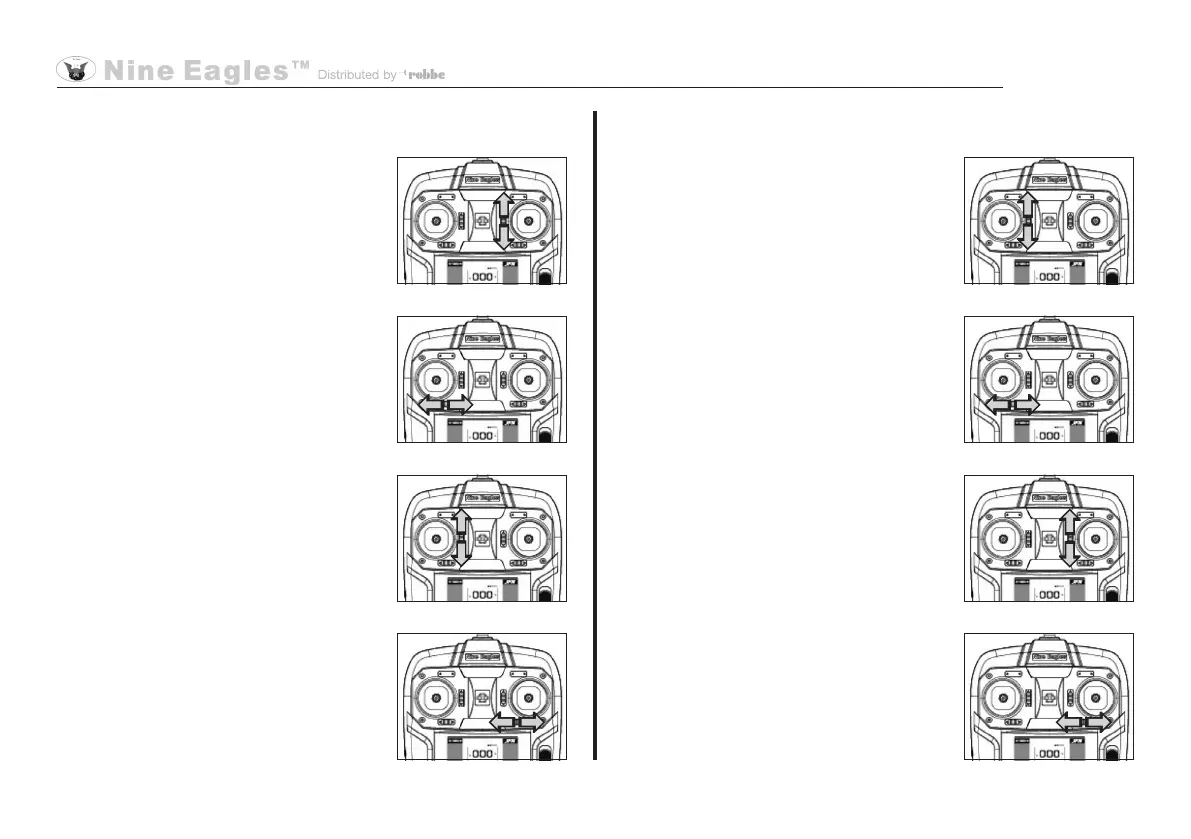
Trim settings, Mode 1
Throttle trim:
If the rotors start to spin without the
throttle stick being touched, or do not
respond to stick movements, you must
adjust the throttle trim until they stop
moving.
Yaw trim:
If the model's nose turns to right or left
when it lifts off, adjust the yaw trim to
correct the rotation until the model
maintains a stable heading.
Pitch-axis trim:
If the model flies forward or back when
it lifts off, adjust the pitch-axis trim until
it hovers over one point.
Roll trim:
If the model moves bodily to left or right
when it lifts off, adjust the roll trim until
the model remains in a stable hover.
Trim settings, Mode 2
Throttle trim:
If the rotors start to spin without the
throttle stick being touched, or do not
respond to stick movements, you must
adjust the throttle trim until they stop
moving.
Yaw trim:
If the model's nose turns to right or left
when it lifts off, adjust the yaw trim to
correct the rotation until the model
maintains a stable heading.
Pitch-axis trim:
If the model flies forward or back when
it lifts off, adjust the pitch-axis trim until
it hovers over one point.
Roll trim:
If the model moves bodily to left or right
when it lifts off, adjust the roll trim until
the model remains in a stable hover.


 To Next Page